
It is very common for applications to have hierarchical data, in other words data with a parent-child relationship among entities. A database designed for such cases involves storing the hierarchy relation between the components in the same table, in other words the record Id and its ParentId, which is nothing but the Id of the parent record that is in the same table . So when we are required to fetch the actual data , let's say, we need to get the data of employees with their names and manager names, then we use various ways to write the query. It could be using a self join, it could be using sub-queries or may involve the use of temporary tables and so on. Apart from these, there is one other easy way to do this, using the Common Table Expressions and we will be explaining this approach.
What a Common Table Expression is
A Common Table Expression (CTE) is just another way of storing temporary data, such as when we have a temporary table or table variables, but the main difference is that their scope of existence is only the immediate query following the CTE. We will not be going into much details about CTEs; our focus will be on explaining recursive queries using CTEs.
So before we explain this further, we will be explaining the structure of a CTE. Then we will create an example to demonstrate its use and explain how it works, as per the structure defined for it.
Structure/Syntax of a Common Table Expression:
WITH cte_name AS
(
query1 or anchor query
UNION ALL
query2 or recursive query
)
So, a CTE starts with the keyword WITH, followed by its name. Then we have two different queries that will be the core for getting the required data. They are divided into 2 parts.
Anchor query: This query is the starting point that acts as a base to enable the process of recursion in the CTE. We have a kind of a condition in this query, that makes it our starting point for the rest of the data fetching query. For example, to fetch hierarchical data, this query may have a where condition to get the first record. So this query basically provides the base data for the rest of the process for fetching the data.
Recursive query: After the anchor query is executed, the result set is generated by the anchor query as an input for the recursive query and is joined with the recursive query to generate new results. A new result set is created and is again joined with the recursive query and further results are generated. So this is added to the result set and is joined with the recursive query; that continues until all the records are processed or you can say until further joins return no data.
How Common Table Expressions work
We have had an overview of its structure, we will now be explaining how the CTE actually works. We will be explaining the process in 3 steps. When a SELECT statement is executed on a CTE, the first query executed is the anchor query. Since this is the starting point for getting the required data, we need to take care of how the base condition is to be applied so that we get the starting point for the rest of the recursion process. We will be using an example to get all the managers and employees workering under them. Then after those steps, we will explain the process in detail, using the same example.
Step 1:
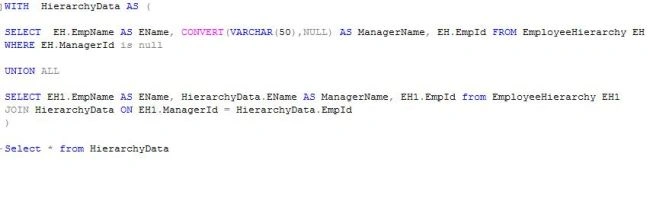
We will write the anchor query as the first step. To get the list of all the employees under a manager, our anchor query should begin with the record where the ManagerId for the employee is null. This means, we are starting from the top of the hierarchy or management level to get the further data.
Step 2:
Now that we have the starting point, we will join it with the rest of the data using the Union condition.
Step 3:
We will write the recursive query, which means, we use the input of Step 1 for this step to apply a JOIN between the result set of Step 1 and the rest of the data in the table. So for the first time this recursive query is joined with an anchor query result set, we get the immediate workers under the manager at the top of the hierarchy, and this process proceeds with the results being added to the result set and joined with the main table.
Now to explain the process using an example. We will be using hierarchical data with an Employee-Manager relationship and try to get the names of the managers and employees working under them, using the CTE. For this we create a simple table with the 3 columns, EmpId, EmpName and ManagerId. Here, ManagerId is nothing but the EmpId of the same table.
After this we will add some dummy data like the following. Based on these entries we will try to get the name of the managers and the workers under them.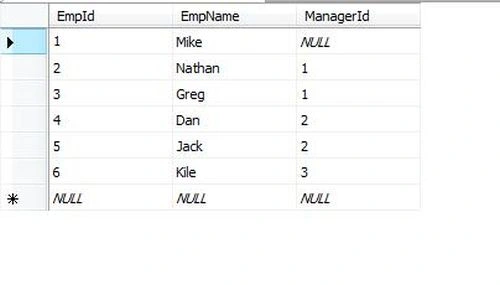
So as per the preceding data, we should have the following data:

Recursive Query Using Common Table Expression
Join the conversation! Your thoughts help the community grow.
Sign in to leave a comment
It is the same account you read, post and publish with — and you will come straight back to this page.

Ramzanali MominPosted Aug 27, 2018, 2:11 AM
Good article for fresher
Ravi KiranPosted Oct 30, 2015, 9:14 AM
Super explanation boss. I can find anywhere but you explanation with examples seems good for me