

You Want to Learn Redux
Good.
And the best way to learn Redux is to build something with it. Something with moving parts - products, a cart, quantities.
So we're going to build a store for car parts.
This four-part series provides an in-depth look at state management. By the end, you won't just have a functional shopping cart, you'll truly understand the mechanics behind it.
Check out the sneak peek below. It looks simple on the surface, but behind the scenes, every component is dancing in sequence.
Check out the full implementation and give the repo a star on redux-simplified

You have a header. It shows a cart icon with a count.
You have a product grid. Each product has an "Add to Cart" button.
You have a cart panel. It shows items, quantities, totals.
Three different components but somehow, they seem to be in sync with data.
Now, the question is, who owns that data?
If the header holds it, how does the product grid update it? If the product grid holds it, how does the cart panel read it?
It starts simply: you centralize the logic, pass props down, and send callbacks back up. But then, you add just one more component and the entire house of cards collapse.
This is where Redux comes in.
What Redux Is
Redux is a state management library, but that definition is a bit dry. Think of it as the Centralized Store for your entire application.
In a typical app, components are constantly gossiping: the Header asks the Cart for a count, or the Cart asks the Product Grid what was added. With Redux, that "whisper game" ends. Every component that needs data reads from the Store, and every component that changes data writes to the Store. Everything flows through one place.
To keep this flow predictable, Redux relies on three main players:
Actions: Objects that describe events, such as saving, removing, or updating data.
Reducers: Pure functions that take the current state and an action to calculate the new state.
Selectors: Functions that extract and format specific pieces of state for your components.
This structure ensures that as your app grows, your state remains predictable. Since our shopping cart data needs to be accessed from multiple screens, it’s the perfect use case to see this architecture in action.
Redux data flow architecture
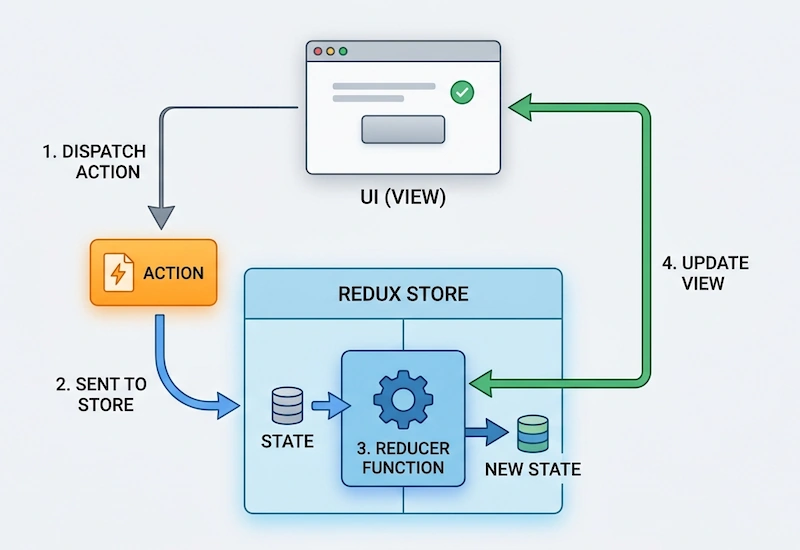
UI: If I had to explain what a UI is, we’d be back in nursery learning our colors and shapes.
Action: The UI "dispatches" an Action, a simple object that describes what happened (e.g.,
TYPE: 'ADD_ITEM').Reducer: The Store receives the Action and passes it to the Reducer. The Reducer is a function that looks at the current application State and the incoming Action, and calculates the new State.
Store: The Store holds the entire application State. It updates itself with the new State returned by the Reducer.
UI Update: Because the State in the Store has changed, the UI (which is "subscribed" to the Store) is notified, receives the new data, and re-renders to reflect the change.
What We're Building
A car parts e-commerce store. Here's the folder structure we'll end up with:
src/
├── App.tsx
├── dummy-products.ts
├── components/
│   ├── Header.tsx
│   ├── Product.tsx
│   ├── Cart.tsx
│   ├── CartItems.tsx
│   └── Shop.tsx
└── store/
    ├── store.ts
    ├── cart-slice.ts
    └── hooks.ts
Notice the split.
components/ is pure UI: it displays things and fires actions. It doesn't care how state is managed.
store/ is pure logic: it manages state. No JSX. No styling. Just state.
This separation is what makes the app maintainable. Components are displays. The store is the brain.
We're Using Redux Toolkit
Classic Redux had a reputation. Verbose. Too much boilerplate. People spent more time setting up than building.
Redux Toolkit — RTK — fixed that.
It ships with createSlice, which lets you write your actions and reducers together in one place. It handles immutability for you. It sets up the store with sensible defaults.
Less ceremony. Same power. Hence, we're using RTK throughout this series.
Why TypeScript makes Redux much better
Redux plus TypeScript gives practical safety where beginners usually struggle:
state shape safety
payload safety
dispatch and selector safety
You get clearer autocomplete, safer refactors, and fewer runtime surprises.
Redux Simplified: The Complete Series
This series walks you through Redux from scratch by building a real car parts e-commerce store in React + TypeScript.
If you want to see the 'moving parts' in action, the code is waiting for you on redux-simplified
Join the conversation! Your thoughts help the community grow.