

We can change the display name of the entity fields easily by editing field display name property. But we can’t change fields label used in address composite controls. In this post we are demonstrating how to relabel composite control fields.
Requirement: Relabel city field in address composite control in account entity.
Note: You can’t change field logical name once it is created.
Solution
We can implement this requirement using Java Script. We have option to access composite control using JavaScript. It can be refered using the following ways:
<composite control name>_compositionLinkControl_<constituent attribute name>
If we want to refer any field which is used in the composite control, it can be done like the following. Here we are accessing the city field:
<composite control name>_compositionLinkControl_address1_city
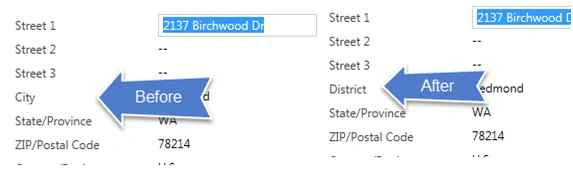
To relabel the normal fields, we can use setLabel method, so we can use the same method to relabel city as well. Let’s say we want to rename city field to “Distric”. We can use the following code for that:
- Xrm.Page.getControl('address1_composite_compositionLinkControl_address1_city').setLabel("District");
Using Code
To use this code we need to create JavaScript web resource, where we can have the following method. We need to call this method on Onload of the account entity form.
- function RelableAddressControl()
- {
- Xrm.Page.getControl('address1_composite_compositionLinkControl_address1_city').setLabel("District");
- }

Now after publishing the changes, the following changes will be visible after opening any account record:
Karthikeyan KPosted Sep 5, 2015, 11:16 PM
Good one sir...Thanks for sharing
Rajeesh MenothPosted Sep 5, 2015, 11:19 AM
Nice Share Sir..
Pankaj Kumar ChoudharyPosted Sep 5, 2015, 11:15 AM
Nice Explain Sir.........
Mohammed IbrahimPosted Sep 5, 2015, 10:33 AM
nice share
RakeshPosted Sep 5, 2015, 10:12 AM
Good sharing sir