

Introduction
In this article, I’ll describe how to remote bind the kendo grid in Partial View using ASP.NET.MVC and Entity Framework. The application is developed basically using Entity Framework database first approach and MVC
Prerequisites
Basic knowledge in ASP.NET MVC, Entity Framework and kendo UI framework
Set up the Database
Open SSMS with new query window, create a new database, and a table for the demo purpose. Here, the script to create a database and table is given below:
- CREATE DATABASE Employee
- CREATE TABLE Employee
- (
- EmployeeID INT IDENTITY(1,1) CONSTRAINT Pk_Emp_Id PRIMARY KEY,
- FirstName VARCHAR(20),
- LastName VARCHAR(20)
- )
Insert some sample records, as given below:
- INSERT INTO Employee VALUES('Bob','Ross')
- INSERT INTO Employee VALUES('Pradeep','Raj')
- INSERT INTO Employee VALUES('Arun','Kumar')
- INSERT INTO Employee VALUES('Vasanth','Kumar')
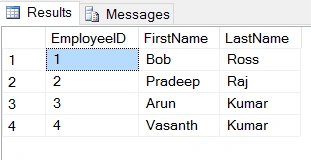
The table design is given below:
Create New MVC Project
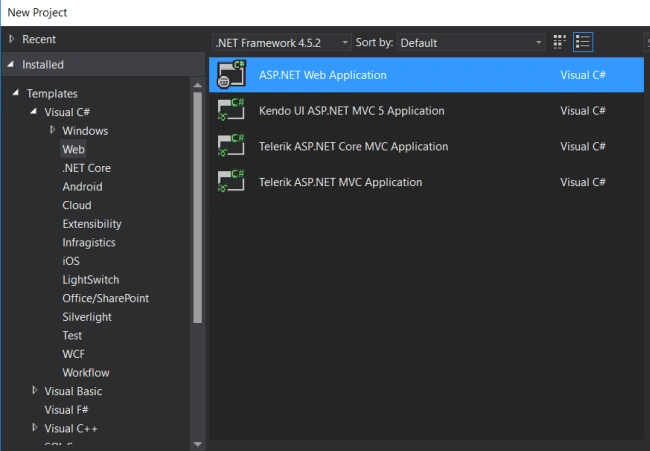
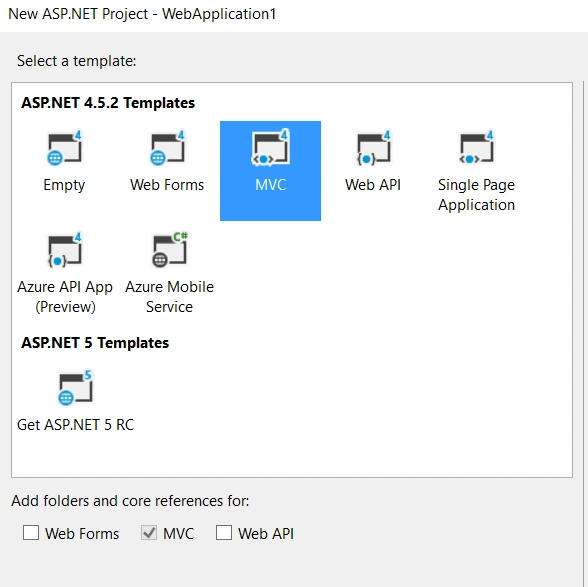
Create a new empty ASP.NET MVC application as per the following figures:
Open Visual Studio ->File ->New project ->ASP.NET Web Application.
Select MVC and click OK.
Please refer to my previous article to check out how to configure Kendo UI in ASP.NET MVC Application.
Vignesh ManiPosted Aug 30, 2016, 8:43 AM
Good one
Prasanna MuraliPosted Aug 28, 2016, 9:23 PM
Nice one...