

In this article we will be seeing how to remove AD mapping from a user property in
SharePoint 2010 using PowerShell.
AD mapping in SharePoint 2010
We can map an AD property to user property so that the value for the user property
will be imported from AD in SharePoint 2010 from Central Administration.
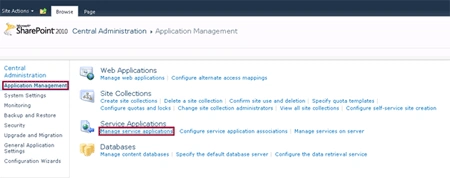
Go to Central Administration => Application Management => Manage Service
Applications => User Profile Service Application.
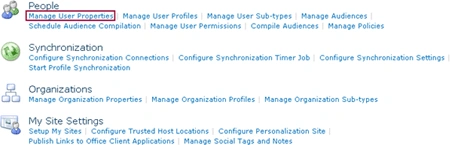
Click on Manage User Properties
Click on the User property and then click on Edit in the ECB menu. You could see
the user property is mapped to one of the AD property.

Automation: Remove AD mapping from a user property in SharePoint 2010 using
PowerShell
Here we will be seeing how to remove AD mapping from user property in SharePoint
2010 using PowerShell.
Steps Involved:
- Create the input xml file which contains the inputs for removing AD mapping from user property.
- Create ps1 file which contains the script for removing AD mapping from user property.
RemoveADMapping.xml
<?xml
version="1.0"
encoding="utf-8"
?>
<RemoveADMapping>
<SiteURL>http://serverName:8080/</SiteURL>
<ADProperty
Name="manager"
ConnectionName="Domain
Users" ></ADProperty>
</RemoveADMapping
>
RemoveADMapping.ps1
#----------------Get
the xml file---------------------------------------------------------------
Gowtham RajamanickamPosted Apr 11, 2016, 1:53 AM
very good article