
In SharePoint 2013 we have a good option in SharePoint List, i.e. bulk edit. In SharePoint 2010 it is not available, and also we can remove this option from the list.
Here I’ve explained a simple way to remove this option,

Steps
Here are the steps to remove the Quick Edit Option,
Step 1: Open the List in SharePoint Site,
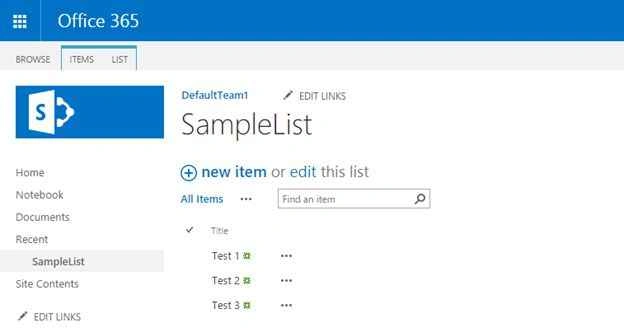
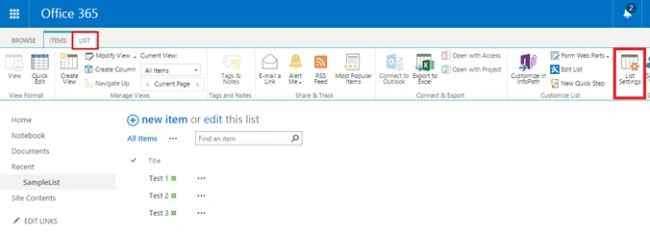
Step 2: Select List option from the ribbon bar to go to the list settings as in the following screenshot:

Step 3: Then click on the List Settings on the ribbon bar,
Step 4: On the List settings page select the Advanced settings option

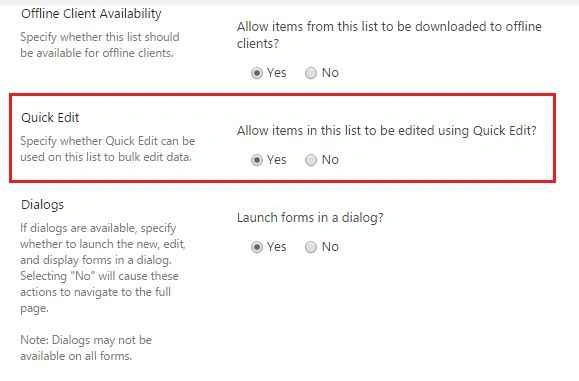
Step 5: Then scroll down the advanced settings page, you will get the following option,
Step 6: Check the “No” on advanced settings page to open the form on dialog,
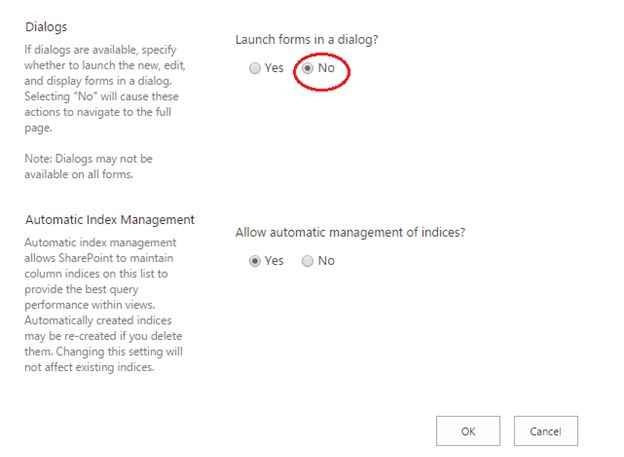
Step 7: Click “Ok” to save the settings.
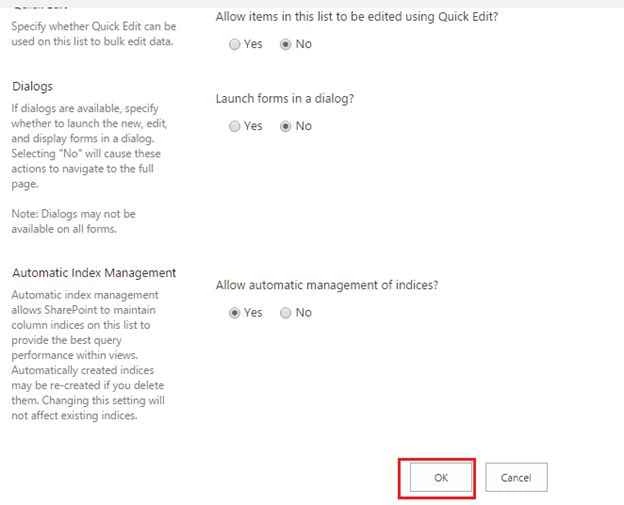
Finally Quick “Edit” option will be removed from your site.

Summary
In this article we explored how to remove the Quick Edit option in SharePoint 2013 List.

Remove Quick Edit Option From SharePoint 2013 List
Join the conversation! Your thoughts help the community grow.
Sign in to leave a comment
It is the same account you read, post and publish with — and you will come straight back to this page.
Kaviya BalasubramanianPosted Sep 28, 2015, 4:59 AM
Thank u vinodh
Vinodh NarayananPosted Sep 27, 2015, 8:42 AM
nice share
Kaviya BalasubramanianPosted Sep 27, 2015, 2:47 AM
Thank u
Saineshwar BageriPosted Sep 25, 2015, 8:36 AM
Nice one
Saineshwar BageriPosted Sep 25, 2015, 8:35 AM
Nice one
Kaviya BalasubramanianPosted Sep 23, 2015, 9:25 AM
Thank you all :)
Harshad PansuriyaPosted Sep 23, 2015, 3:18 AM
Nice Share
Sibeesh VenuPosted Sep 23, 2015, 3:05 AM
Nice Share
Ankit BansalPosted Sep 23, 2015, 1:51 AM
thanks for sharing..
Kaviya BalasubramanianPosted Sep 23, 2015, 12:22 AM
Thank you all :)
Karthikeyan KPosted Sep 22, 2015, 11:17 PM
Thanks for sharing...
Santhakumar MunuswamyPosted Sep 22, 2015, 2:59 PM
Thanks for nice share
Pankaj Kumar ChoudharyPosted Sep 22, 2015, 1:38 PM
Nice Explain Sir.........
Sujeet SumanPosted Sep 22, 2015, 11:49 AM
Nice Article....................
Rajeesh MenothPosted Sep 22, 2015, 11:18 AM
Thanks for sharing...
Vinodh NarayananPosted Sep 22, 2015, 7:57 AM
nice share