

Introduction
SharePoint Online is like a digital headquarters for many organizations. It's where teams collaborate, store documents, and build their virtual workplaces. Just like how a physical office might need a makeover or reorganization, SharePoint Online sometimes needs a change too. And one significant change you can make is replacing the "root site"
But what is the root site? Think of it as the front door to your SharePoint Online home. It's the first thing you see when you log in, and it sets the tone for the rest of your SharePoint experience. Let's dive into why and how you might want to replace this front door.
Why Replace the Root Site?
There are several compelling reasons for organizations to consider replacing the root site:
- New Beginnings: Sometimes, you need a fresh start. Maybe your organization is growing, and the old root site doesn't fit your needs anymore. It's like moving to a bigger and better office space.
- Branding and Design: A fresh look and feel may be required to modernize the user interface and align it with the organization's brand.
- Information Architecture: Over time, changes in content, teams, and projects can lead to an outdated information architecture. Replacing the root site provides an opportunity to reorganize and optimize.
- Performance Optimization: Older root sites may accumulate unused or outdated components that can impact performance. A new site can be a performance boost.
- Compliance and Governance: Evolving compliance and governance requirements may necessitate updates to the site structure and permissions.
Considerations Before Replacing the Root Site
Before embarking on the journey to replace the root site, consider the following critical factors:
- Communication site: The site you select as the new root site must be a communication site or a modern team site that isn't connected to a Microsoft 365 group and where the publishing feature has never been activated.
- Hub Site: When you replace the root site, both the current site and the new site can't be hub sites or associated with a hub. If either site is a hub site, unregister it as a hub site, replace the root site, and then re-register the site as a hub site. If either site is associated with a hub, disassociate the site, replace the root site, and then reassociate the site.
- Archived Subsite: Replacing the root site with another site replaces the entire site collection with the new site collection. If your current root site has subsites, they'll be archived.
- Same Domain: The site you select as the new root site must be within the same domain as the current root site.
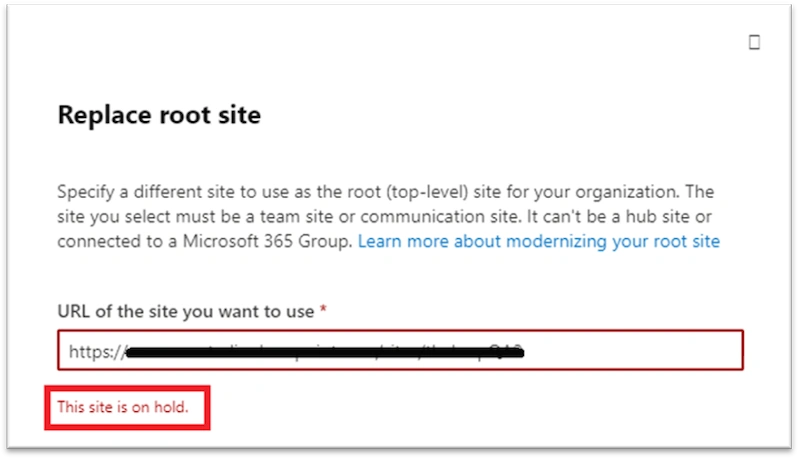
- On Hold Site: If the site is on hold, you'll receive an informative error, and you can't replace the site.
- Navigation: The navigation structure, including the top navigation bar and global navigation links, will be affected. You will need to update and reconfigure navigation elements to reflect the new root site.
- URL Structure: Changing the root site will modify the URL structure (old root site) for your SharePoint Online environment. It will affect how user’s access and reference sites and content within the organization.
- Links and Bookmarks: Any links or bookmarks that point to the old root site will need to be updated to reflect the new URL.
- Search Configuration: Search settings and results may be impacted. The result of old may take time to reconfigure with latest URL.
Steps to Replace Root Site
- Go to Active sites in the SharePoint admin center, and sign in with an account that has admin permissions for your organization.
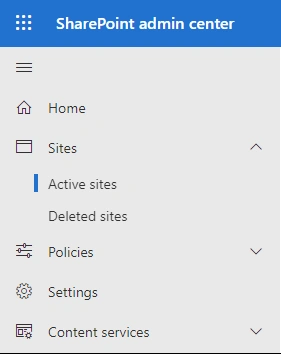
- Select the existing root site from the list of Active Root site.
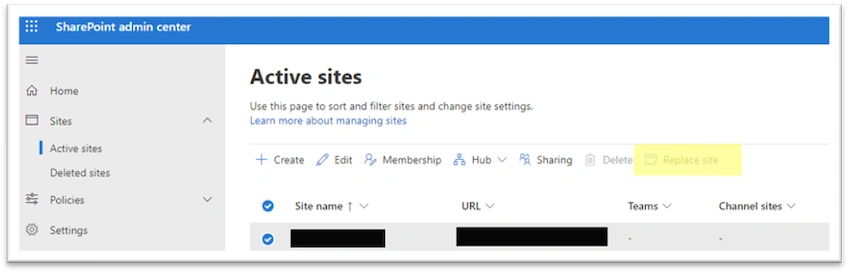
- Select Replace site on the command bar.
- Enter new site URL which need to be replaced:
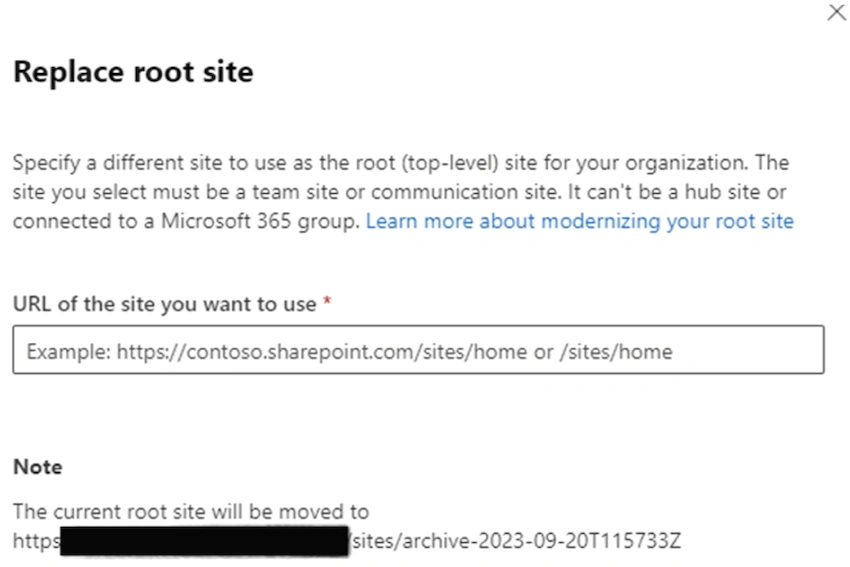
- Select Save.
Conclusion
Updating your SharePoint Online hub is a smart move to keep up with your organization's changing needs. With careful planning and testing, it can be a smooth process. This update refreshes your hub, makes it work better, and helps it match your goals in the digital world.
Note: While the root site is being replaced, it might return a "not found" (HTTP 404) error for a few minutes. After you replace the root site, content must be recrawled to update the search index. This might take some time depending on factors such as the amount of content on these sites. Anything dependent on the search index might return incomplete results until the sites have been recrawled.
Join the conversation! Your thoughts help the community grow.