

To load your website faster you must do the resource optimization. There are a lot of reasons we need resource optimization. I mean to say the optimization of number of requests sent from your browser and data served by the server. We can do the resource optimizations in many ways and it is not limited to Bundling, Minification & Sprite Images, we can do a lot of other optimization too.
These are the 3 popular concepts of resource optimization:
- Bundling (Bundling of .js,.css, .resx, .html…)
- Minification (Minification of .js, .css,.html…)
- Sprite (Image Sprite)
Why we need resource optimization
The number of requests a browser can made is limited. Each browser does not have same requests limits but it is always limited. There are some newer browsers like Microsoft Edge which have higher request limit.
- Internet Explorer
- Internet Explorer 7: 2
- Internet Explorer 8: 6
- Internet Explorer 9: 6
- Internet Explorer 10: 8
- Google Chrome: 6
- Opera 12: 6
- Safari 6: 6
- Mozilla Firefox 3+: 6
Bundling
Bundling is a technique which is used to improve performance and decrease the request loading time as it reduces the number of http requests.
Bundling Java Script Files
File1.js
- function myFunction()
- {
- var mytext = "";
- var i = 0;
- while (i < 10)
- {
- mytext += "<br>The number is " + i;
- i++;
- }
- document.getElementById("htmlelement").innerHTML = mytext;
- }
File2.js
- var lstcolors = ["Red", "Green", "Blue", "Orange"];
- var mytext = "";
- var i;
- for (i = 0; i < lstcolors.length; i++)
- {
- mytext += lstcolors[i] + "<br>";
- }
- document.getElementById("Colors").innerHTML = mytext;
MyBundle.js (File1.js + File2.js)
- function myFunction()
- {
- var mytext = "";
- var i = 0;
- while (i < 10)
- {
- mytext += "<br>The number is " + i;
- i++;
- }
- document.getElementById("htmlelement").innerHTML = mytext;
- }
- var lstcolors = ["Red", "Green", "Blue", "Orange"];
- var mytext = "";
- var i;
- for (i = 0; i < lstcolors.length; i++)
- {
- mytext += lstcolors[i] + "<br>";
- }
- document.getElementById("Colors").innerHTML = mytext;
You can use it in your MVC or ASP.NET project as in the following:
Let's take a real JavaScript file rather than file1.js & file2.js
Add a new class, I have renamed it MyBundleConfig.cs
For which here's the complete code:
- using System;
- using System.Collections.Generic;
- using System.Linq;
- using System.Web;
- using System.Web.Optimization;
- /// <summary>
- /// Summary description for MyBundleConfig
- /// </summary>
- public class MyBundleConfig
- {
- public MyBundleConfig()
- {
- //
- // TODO: Add constructor logic here
- //
- }
- public static void RegisterBundles(BundleCollection bundles)
- {
- bundles.Add(new StyleBundle("~/Style/myStyle").Include(
- "~/css/bootstrap.min.css",
- "~/css/main.css",
- "~/css/responsive.css",
- "~/styles/shCoreDefault.css",
- "~/Content/Auto/Global.css"
- ));
- bundles.Add(new ScriptBundle("~/Scripts/myJsFiles").Include(
- "~/en-gb.res.axd",
- "~/Scripts/Auto/01-jquery-1.9.1.min.js",
- "~/Scripts/Auto/02-jquery.cookie.js",
- "~/Scripts/Auto/04-jquery-jtemplates.js",
- "~/Scripts/Auto/05-json2.min.js",
- "~/Scripts/Auto/blog.js",
- "~/scripts/mycss.js",
- ));
- BundleTable.EnableOptimizations = true;
- }
- public static void AddDefaultIgnorePatterns(IgnoreList ignoreList)
- {
- if (ignoreList == null)
- throw new ArgumentNullException("ignoreList");
- ignoreList.Ignore("*.intellisense.js");
- ignoreList.Ignore("*-vsdoc.js");
- //ignoreList.Ignore("*.debug.js", OptimizationMode.WhenEnabled);
- //ignoreList.Ignore("*.min.js", OptimizationMode.WhenDisabled);
- //ignoreList.Ignore("*.min.css", OptimizationMode.WhenDisabled);
- }
- }
Now register this class in Global.asax file.
Global.asax
- //you can register multiple classes here
- //BundleConfig.RegisterBundles(BundleTable.Bundles);
- MyBundleConfig.RegisterBundles(BundleTable.Bundles);
In your ASPX Page
- <%# System.Web.Optimization.Styles.Render("~/Style/myStyle")%>
- <%# System.Web.Optimization.Scripts.Render( "~/Scripts/myJsFiles")%>
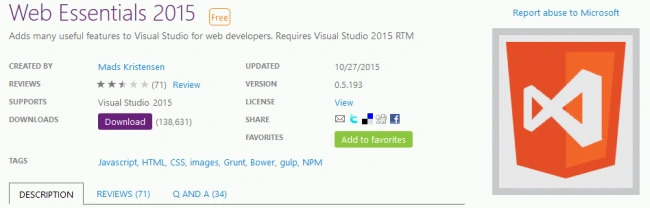
We can also do bundling using Web Essential.
Bundling Using Web Essentials.
Select the JavaScript files, Web Essentials, then create JavaScript bundle file.
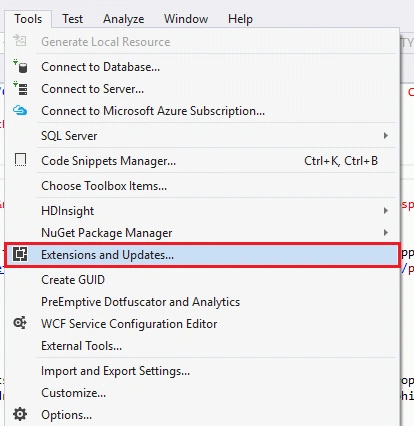
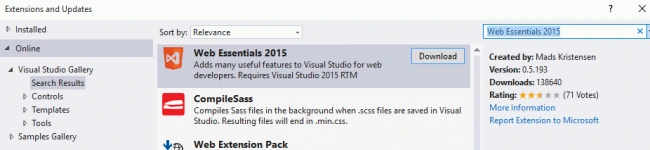
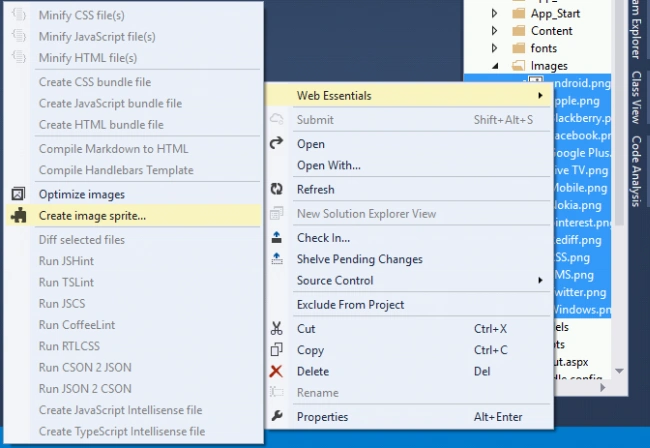
To know how to install Web Essentials please go to Sprite Image section of this blog.
It will create a file like “MyBundle.js.bundle” which have MyBundle.js, “MyBundle.min.js” & “MyBundle.min.js.map”.

You can see it has automatically bundled file and .min file also. So it is doing bundling and Minification both.
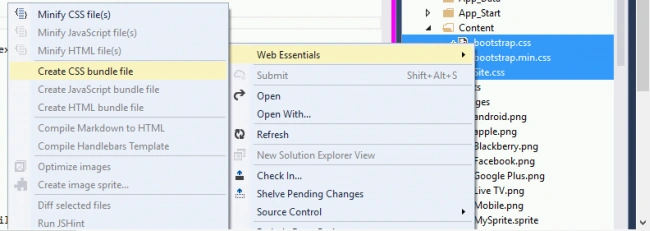
In the same way we can do the bundling of css and HTML files.
Bundling of CSS Files
Minification
Minification improve loading time of the web page. It also decreases the size of a file and it can be used for any interpreted language. Ordering matters in case of Bundling, but it does not matter in case of Minification.
Minification can be performed on Bundled files or it can be used on a single unbundled files too. It means Minification can be used with Bundled files or without bundling feature.
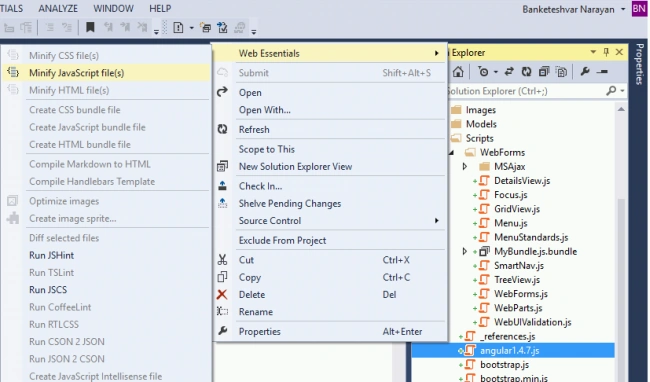
For Minification of a javascript file we do the following things:
- Remove the white spaces from file(s).
- Remove line breaks to shorten file size.
- Remove final semicolon.
- Renaming local variable name and provide it a short name e.g. a variable like “isProcessExecutedSucessfully” can be renamed to “ipes” or simply a single character variable like ‘s’ indication of success or failure.
Original JavaScript File
- function myFunction()
- {
- var mytext = "";
- var i = 0;
- while (i < 10)
- {
- mytext += "<br>The number is " + i;
- i++;
- }
- document.getElementById("htmlelement").innerHTML = mytext;
- }
- var lstcolors = ["Red", "Green", "Blue", "Orange"];
- var mytext = "";
- var i;
- for (i = 0; i < lstcolors.length; i++)
- {
- mytext += lstcolors[i] + "<br>";
- }
- document.getElementById("Colors").innerHTML = mytext;
Minified JavaScript File
- function myFunction()
- {
- for (var e = "", t = 0; 10 > t;) e += "<br>The number is +t,t++;document.getElementById("
- htmlelement ").innerHTML=e}var lstcolors=["
- Red ","
- Green ","
- Blue ","
- Orange "],mytext="
- ",i;for(i=0;i<lstcolors.length;i++)mytext+=lstcolors[i]+" < br > ";document.getElementById("
- Colors ").innerHTML=mytext;
Minification Level
First Level:
- Removing comments
- Removing white spaces







Banketeshvar NarayanPosted Nov 18, 2015, 10:52 AM
Thanks Yaduveer for giving your precious time
Yaduveer SainiPosted Nov 18, 2015, 9:29 AM
Nice Article for web performance improvements...
Banketeshvar NarayanPosted Nov 16, 2015, 10:11 AM
Thanks Aishwarya
Aishwarya DPosted Nov 16, 2015, 7:11 AM
Nice.. Thank you
Banketeshvar NarayanPosted Nov 13, 2015, 3:15 AM
Thanks Suman for giving your precious time to read the article.
Suman VermaPosted Nov 13, 2015, 2:37 AM
Thanks for sharing
Banketeshvar NarayanPosted Nov 11, 2015, 8:20 AM
Thanks Santhakumar
Santhakumar MunuswamyPosted Nov 11, 2015, 7:10 AM
Good one
Banketeshvar NarayanPosted Nov 9, 2015, 3:58 AM
Tnnx Amandeep
Amandeep singhPosted Nov 9, 2015, 1:54 AM
good job
Banketeshvar NarayanPosted Nov 9, 2015, 12:45 AM
Thanks Humayun
Humayun Kabir MamunPosted Nov 9, 2015, 12:25 AM
Nice...
Banketeshvar NarayanPosted Nov 8, 2015, 11:44 PM
Thanks Manoj
Manoj KulkarniPosted Nov 8, 2015, 11:25 PM
Nice article. Thank you for sharing
Banketeshvar NarayanPosted Nov 8, 2015, 11:11 PM
thnx Harshad
Harshad PansuriyaPosted Nov 8, 2015, 11:06 PM
Nice one
Banketeshvar NarayanPosted Nov 8, 2015, 8:49 AM
Thnx Gowtham
Gowtham KPosted Nov 8, 2015, 7:11 AM
Good One
Banketeshvar NarayanPosted Nov 8, 2015, 4:32 AM
Thnx
Mukesh KumarPosted Nov 8, 2015, 3:34 AM
Good One