

The Response.Redirect object transfers the page permanently to the next page and ends the processing of the first page and the new page processing continues on the redirected page but also it sends a command back to the browser; because of this one extra unnecessary round trip happens.
The suitable uses are:
- To redirect the page from the same as well as a different web server.
- don't care about causing additional round trips to the server on each request.
- do not need to preserve the Query String and Form Variables from the original request.
- want our users to be able to see the new redirected URL, where the page is redirected.
- want to bookmark the page.
Server.Transfer
Server.Transfer navigates the pages within the same application or within the same server, the page is still in memory that can read the values directly from page2 on page1, in other words by using server.Transfer the page is not redirected permanently.
Suitable Uses
The suitable uses are:
- to transfer the current page request to another .aspx page on the same server.
- to preserve server resources and avoid the unnecessary round trips to the server.
- to preserve the Query String and Form Variables.
- don't need to show the real URL of where we redirected the request in the user's Web Browser.
- don’t want to bookmark the pages.
- "Start" - "All Programs" - "Microsoft Visual Studio 2010".
- "File" - "New WebSite" - "C#" - "Empty Web Site" (to avoid adding a master page).
- Provide the Project name such as "ResponseVsServer" or another as you wish and specify the location.
- Then right-click on Solution Explorer then seelct "Add New Item" - "Default.aspx" page (two web pages).
The UI will be look like as:
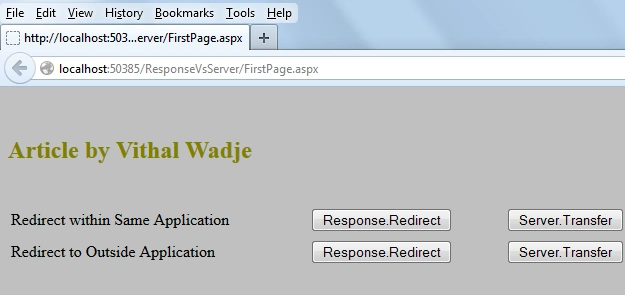
Now write the some code to redirect the pages as:
- using System;
- public partial class _Default : System.Web.UI.Page
- {
- protected void Page_Load(object sender, EventArgs e)
- {
- }
- protected void Button1_Click(object sender, EventArgs e)
- {
- Response.Redirect("SecondPage.aspx");
- }
- protected void Button2_Click(object sender, EventArgs e)
- {
- Server.Transfer("SecondPage.aspx");
- }
- protected void Button3_Click(object sender, EventArgs e)
- {
- Response.Redirect("http://www.mcnsolutions.net");
- }
- protected void Button4_Click(object sender, EventArgs e)
- {
- Server.Transfer("http://www.mcnsolutions.net");
- }
- }
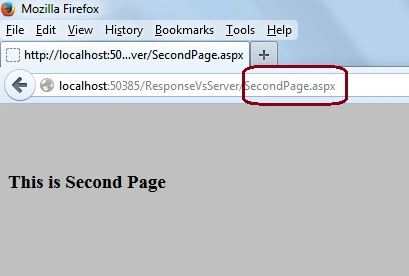
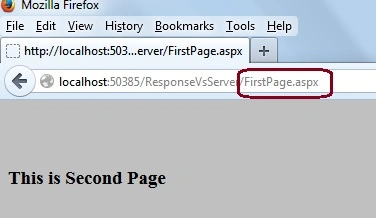


Response.Redirect
- The page is redirected permanently.
- Used to navigate within the same application as well as navigating from one application to another application.
- The URL is changed because the processing of the second page is done on the second page, not on the first page from where we redirected.
- We can bookmark the page because the full address is shown in a browser URL.
- An extra round trip happens to the server.
- It is used in HTML, ASP and ASP.Net pages to navigate from one page to another.
Server.Transfer
- The Page is not redirected permanently.
- Used to navigate within the same application, not outside of an application.
- The URL is changed because the processing of the second page is done on the same page, without navigating on the second page.
- We cannot bookmark the page because the full address is not shown in a browser URL.
- An extra round trip does not happen to the server; because of this it saves server resources.
- It is only used to navigate within an ASP or ASP.Net page, not within HTML pages.
Note
- Download the Zip file from the attachment for the full source code of an application.
Summary
I hope this article is useful for all readers, if you have any suggestion then please contact me including beginners also.
Dinesh BeniwalPosted Nov 20, 2013, 6:35 AM
Good Start Maroof, Welcome to the C# Corner.