

Introduction:
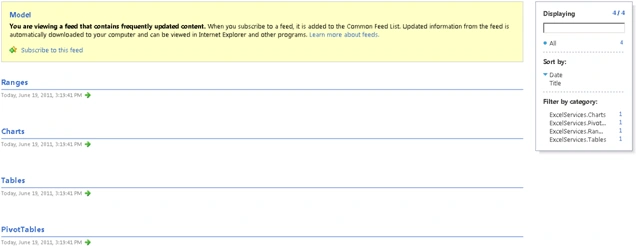
The REST API in Excel Services is new in Microsoft SharePoint Server 2010. REST
API is used to access workbook parts or elements directly through a URL. This
will also enable developers and users to explore the content of the workbook
manually or programmatically by supplying an Atom feed that contains information
about the elements that reside in a specific workbook. Atom is an XML-based
document format that describes lists of related information known as "feeds".
Feeds are composed of a number of items, known as "entries", each with an
extensible set of attached metadata. For more information on Atom refer http://tools.ietf.org/html/rfc4287.
A REST API for Excel Services enables operations against Excel workbooks by
using operations specified in the HTTP standard. This allows for a flexible,
secure, and simpler mechanism to access and manipulate Excel Services content.
Excel Workbook:
I have an excel workbook "ExcelChart" which contains the following
Sample ("Sheet1" is renamed as Sample) Sheet:
Named Range (Names):
- Drag select the cell or range of cells to be named, such as A1 to B8
- Click in the Name box, to the left of the formula bar.
- Type a name for the list, e.g. Names.
- Press the Enter key on the keyboard.
- The name appears in the Name box.

Chart:
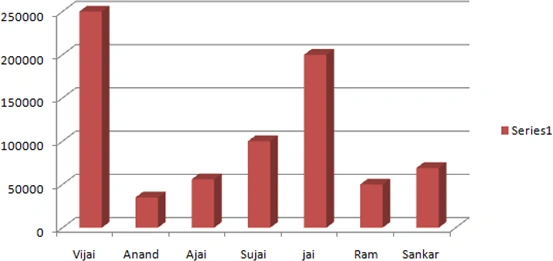
Table:

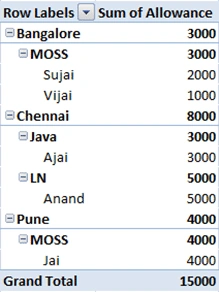
Pivot Table:
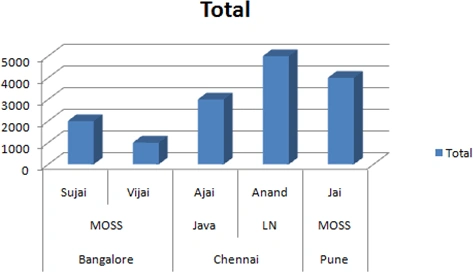
Pivot Chart:
Discovering Items in a workbook:
I have uploaded the excel workbook to the "Shared Documents".

Now using REST API I am going to access the excel workbook.
URL Structure:
We can access resources like charts, PivotTables, tables, and named ranges in a
workbook directly through a URL using REST API. Each REST URL in Excel Services
is built of three parts.




MoorthyPosted Oct 4, 2017, 5:24 AM
Hi, I have extracted specific data from a sheet to SharePoint page but when I export to excel again all data's stored to single cell. Kindly help me.