

Introduction
If you are having problems with themes in
Windows 8, it is entirely possible that you have to restart your Windows 8
themes service. Windows 8, Microsoft's brand new operating system, provides options to choose among many themes available for its appearance, to suit users' tastes and moods. If you are a user of the Windows 8 operating system
then there are certain steps you have to follow and these steps are:
Step 1
Open the Search.
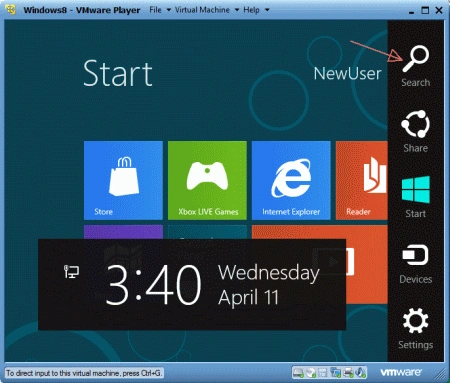
Step 2
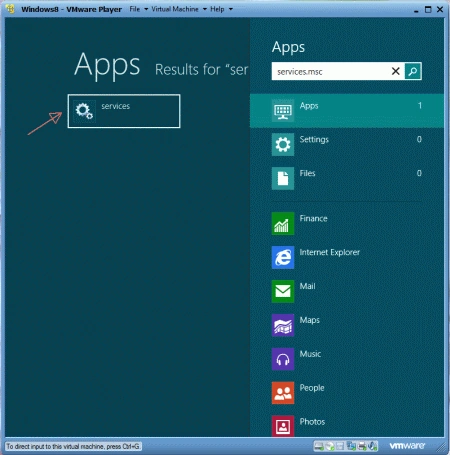
Now
type service.msc into the Metro search bar and press enter. Now click on the Services option.
Step 3
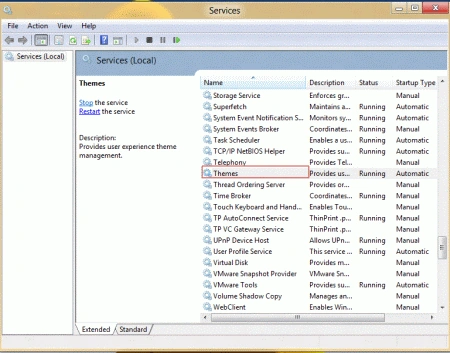
The list of Windows 8 services appears. Now you can scroll
down, hit T on the keyboard to jump to Themes.
Step 4
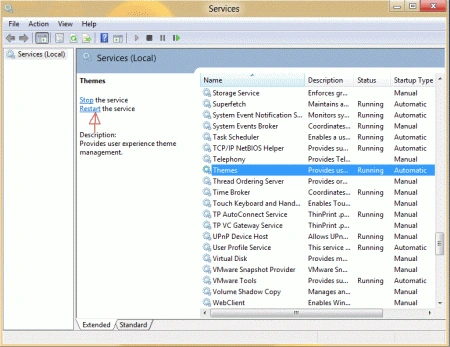
Select THEMES and
then Click on Restart link
to restart the service
Note
The service will automatically as you click on it. If you have the problem of it not restarting then check your graphic drivers.
Summary
In this article, we learned about Restarting Windows 8 Themes Service.
Join the conversation! Your thoughts help the community grow.