

The AppInfo class is available at Xamarin.Essentials API. It provides information about the application. Android, iOS, and UWP offer unique operating systems and platform APIs that developers have access to in C# leveraging Xamarin. Xamarin.Essentials provides a single cross-platform API that works with any Xamarin.Forms, Android, iOS, or UWP application that can be accessed from shared code no matter how the user interface is created.
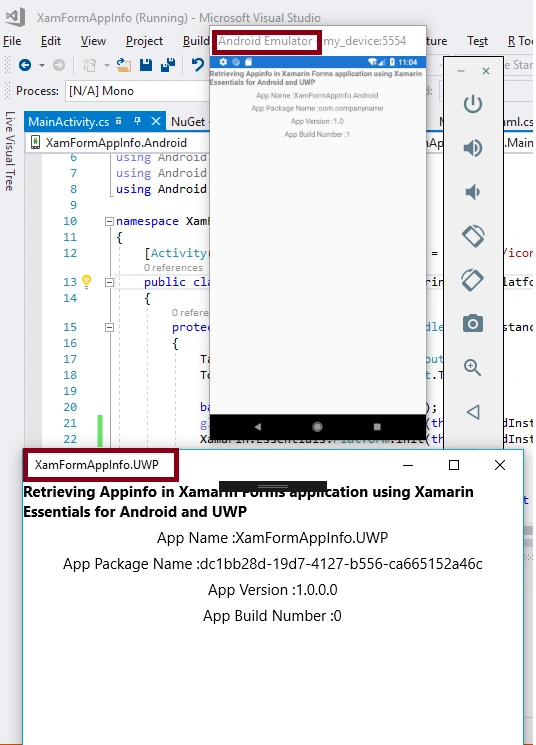
Reading this article, you will learn about retrieving Appinfo in Xamarin.Forms applications using Xamarin Essentials for Android and Universal Windows Platform with XAML and Visual C# in a cross-platform application development process.
The following important tools are required for developing a Xamarin.Forms App.
- Windows 10 (Recommended)
- Visual Studio 2017
- Android API 19 or higher and UWP 10.0.16299.0 or higher.
Now, we can discuss step by step app development.
Step 1
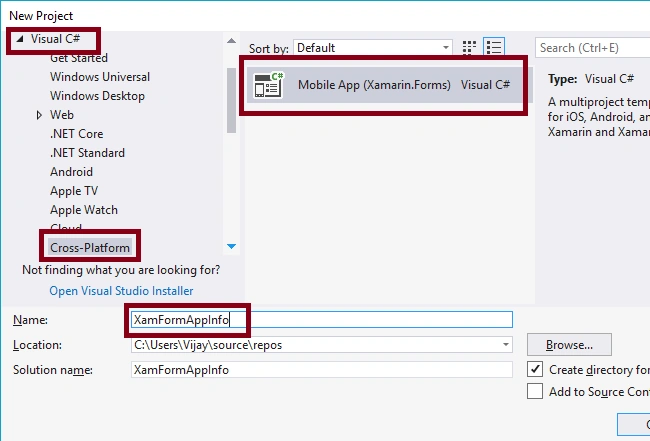
Open Visual Studio 2017 and go to Start -> New Project. Select Cross-Platform (under Visual C#-> Mobile App (Xamarin.Forms). Give a suitable name to your app (XamFormAppInfo) and click OK.
Step 2
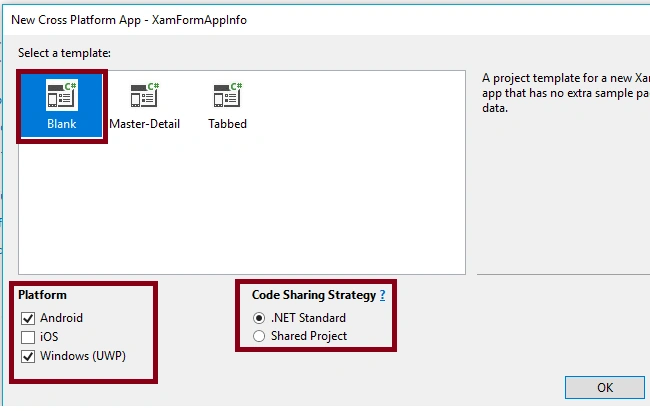
Select the cross-platform template as a blank app, set the platform to Android and UWP, and code sharing strategy as .NET Standard. Afterward, Visual Studio creates 3 projects (Portable, Droid, and UWP).
Step 3
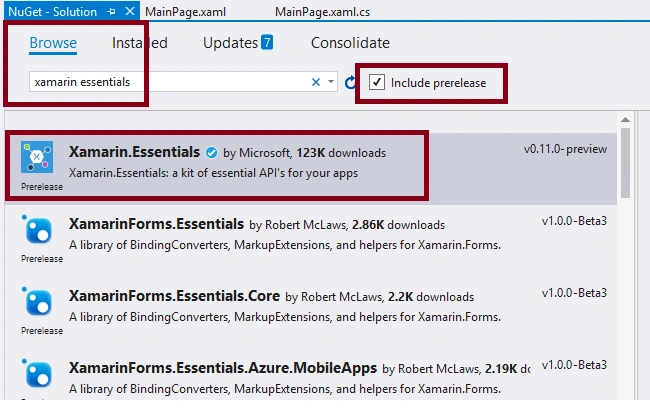
For adding Xamarin.Essentials Reference, right-click your solution (XamFormAppInfo) and select "Manage NuGet Packages". Choose Browse and search for Xamarin.Essentials. Select the package and select all the projects (portable, Android, UWP) and install it.
Step 4
Add the label controls to Mainpage.Xaml for displaying the title and app info like Appname, Packagename, Version, and Buildnumber.
- <Label Text="Retrieving Appinfo in Xamarin Forms application using Xamarin Essentials for Android and UWP" VerticalOptions="Center" HorizontalOptions="Center"/>
- <Label HorizontalOptions="Center" x:Name="lblAppName"></Label>
- <Label HorizontalOptions="Center" x:Name="lblPName"></Label>
- <Label HorizontalOptions="Center" x:Name="lblVer"></Label>
- <Label HorizontalOptions="Center" x:Name="lblBNumber"></Label>
Step 5
Add the following code to the MainActivity.cs in XamFormAppInfo.Android project.
Join the conversation! Your thoughts help the community grow.