
Requirement
Save more than one record (multiple records) to a SharePoint 2013 list in an App using the REST API in a single request (Batch Processing).
Solution
This can be done in one of the following ways:
- Traditional Approach: SharePoint REST API ($batch)
- Simplified Approach: SharePoint REST API + BreezeJs
Note: To explain both these approaches, I am using a SharePoint CustomList named "Employees" with the 3 columns "First Name", "Last Name" and "Email".
For both of these approaches SharePoint should receive the data as shown below.
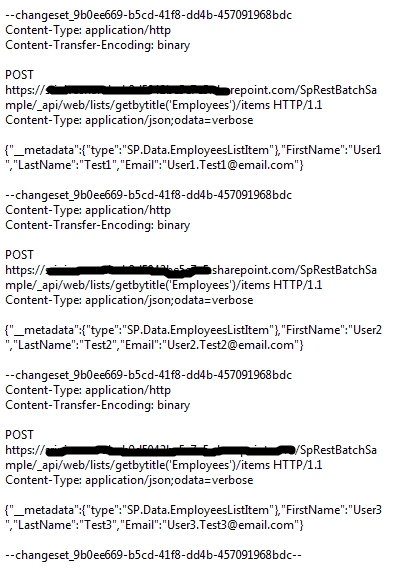
Traditional Approach
SharePoint provides $batch processing that requires the following code snippet to generate the data shown in the preceding format. The following code is attached with this article as RESTAPI_Batch.js.
- var EmployeesAsJson = [
- {
- __metadata: {
- type: 'SP.Data.EmployeesListItem'
- },
- FirstName: 'User1',
- LastName: 'Test1',
- Email: '[email protected]'
- },
- {
- __metadata: {
- type: 'SP.Data.EmployeesListItem'
- },
- FirstName: 'User2',
- LastName: 'Test2',
- Email: '[email protected]'
- },
- {
- __metadata: {
- type: 'SP.Data.EmployeesListItem'
- },
- FirstName: 'User3',
- LastName: 'Test3',
- Email: '[email protected]'
- }
- ];
- var batchGuid = generateUUID();
- // creating the body
- var batchContents = new Array();
- var changeSetId = generateUUID();
- // get current host
- var temp = document.createElement('a');
- temp.href = _spPageContextInfo.webAbsoluteUrl;
- var host = temp.hostname;
- // for each employee...
- for (var employeeIndex = 0; employeeIndex < employeesAsJson.length; employeeIndex++) {
- var employee = employeesAsJson[employeeIndex];
- // create the request endpoint
- var endpoint = _spPageContextInfo.webAbsoluteUrl
- + '/_api/web/lists/getbytitle(\'Employees\')'
- + '/items';
- // create the changeset
- batchContents.push('--changeset_' + changeSetId);
- batchContents.push('Content-Type: application/http');
- batchContents.push('Content-Transfer-Encoding: binary');
- batchContents.push('');
- batchContents.push('POST ' + endpoint + ' HTTP/1.1');
- batchContents.push('Content-Type: application/json;odata=verbose');
- batchContents.push('');
- batchContents.push(JSON.stringify(employee));
- batchContents.push('');
- }
- // END changeset to create data
- batchContents.push('--changeset_' + changeSetId + '--');
- // generate the body of the batch
- var batchBody = batchContents.join('\r\n');
- // create the request endpoint
- var endpoint = _spPageContextInfo.webAbsoluteUrl
- + '/_api/$batch';
- // batches need a specific header
- var batchRequestHeader = {
- 'X-RequestDigest': jQuery("#__REQUESTDIGEST").val(),
- 'Content-Type': 'multipart/mixed; boundary="batch_' + batchGuid + '"'
- };
- // create request
- jQuery.ajax({
- url: endpoint,
- type: 'POST',
- headers: batchRequestHeader,
- data: batchBody,
- success: function (response) {
- alert("Successfully saved a batch request");
- },
- fail: function (error) {
- alert('.. create employee FAIL ', error);
- }
- });
Simplified Approach
The code of the preceding content needs a lot amount of time and patience. As an alternate, Breezejs can be used to simplify the formatting and submission of data. We need to reference Breeze libraries in the SharePoint App Page. The following is the reference for that.

Here is the code format when using Breeze libraries. The following code is available with this article as RESTAPI_Breeze.js
- // create a new Employees
- function createItem() {
- var Employee1 = entityManager.createEntity(EmployeeType);
- Employee1.FirstName = 'User1';
- Employee1.Title = 'Test1';
- Employee1.Email = '[email protected]';
- var Employee2 = entityManager.createEntity(EmployeeType);
- Employee2.FirstName = 'User2';
- Employee2.Title = 'Test2';
- Employee2.Email = '[email protected]';
- var Employee3 = entityManager.createEntity(EmployeeType);
- Employee3.FirstName = 'User3';
- Employee3.Title = 'Test3';
- Employee3.Email = '[email protected]';
- // save entity
- entityManager.saveChanges()
- .then(function () {
- alert("Successfully saved a batch request");
- });
- }
Future Articles
I will write new article(s) for the following content:
- Configuring Breeze to SharePoint 2013 App
- Example of Breeze along with code for create, update and delete operations.
Deepika TomarPosted Mar 16, 2020, 6:48 AM
How to batch update items in list using breeze
Pedro BramaoPosted Feb 12, 2019, 2:04 AM
Hello, I'm doing the batch request to SP 365 and getting a 200 statuscode and a batch code response. All seems ok, but actually nothing happens, i don't see the request on the Job queue and i don't see anything getting create. Any help on how this actually works? TIA
DibakarPosted Jun 12, 2018, 1:50 AM
Traditional approach code is missing some lines and it is not creating items. Below url has complete details---https://github.com/andrewconnell/sp-o365-rest/blob/master/SpRestBatchSample/Scripts/App.js
Metin ErmanPosted Jan 25, 2018, 3:54 PM
Traditional approach does NOT work in SP 2013...from the documents it only works in SP 2016 or O365...I've followed your code exactly and get the following error message in 2013: "<?xml version=\"1.0\" encoding=\"utf-8\"?><m:error xmlns:m=\"http://schemas.microsoft.com/ado/2007/08/dataservices/metadata\"><m:code>-1, Microsoft.SharePoint.Client.ResourceNotFoundException</m:code><m:message xml:lang=\"en-US\">Cannot find resource for the request $batch.</m:message></m:error>"
Anand KumarPosted Sep 4, 2015, 7:51 AM
And i am using the traditional approach
Anand KumarPosted Sep 4, 2015, 7:50 AM
Can you please help me out in this
Anand KumarPosted Sep 4, 2015, 7:49 AM
I am trying to replicate the code in SharePoint online. My response from ajax is success but item is not getting added into the list. :(
Rahul Kumar SaxenaPosted Feb 25, 2015, 12:19 PM
Good Work Bro...
Sibeesh VenuPosted Feb 21, 2015, 1:09 AM
Good One .
Manish TewatiaPosted Feb 20, 2015, 11:42 AM
Welcome to C# Corner