

Today we will learn how to store and retreive user details from local application data storage.
Sometimes we want to save user-related data in some application storage during his/her session. It is necessary to save user session data during navigation though various pages in an application. Anytime and for any page we need this user session data to do some processing taks. Normally we want to store user login information for his/her session, so that we can check whether he/she is authorized or not.
In Windows 8 Store apps, the developer has the ability to save user data so it can be retrieved any time during running the application or even again in running mode after being closed by the user. The data stored in Application local storage is saved even when an application is not in running mode and you can also fetch data from it when running the app again. The data in Application local storage is never lost untill the application is removed or uninstalled from the computer system.
In this article we are trying to save user data to Local Application data storage and also retrieve from it. So, now we proceed to create a Windows 8 Store blank application and save user details to Local Application data storage.
First create a Blank Application using C# and XAML.
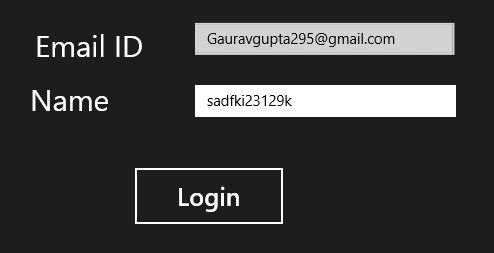
I've created a simple blank XAML page:
<Page
x:Class="savinguserdataonsuspended.MainPage"
IsTabStop="false"
xmlns="http://schemas.microsoft.com/winfx/2006/xaml/presentation"
xmlns:x="http://schemas.microsoft.com/winfx/2006/xaml"
xmlns:local="using:savinguserdataonsuspended"
xmlns:d="http://schemas.microsoft.com/expression/blend/2008"
xmlns:mc="http://schemas.openxmlformats.org/markup-compatibility/2006"
mc:Ignorable="d">
<Grid Background="{StaticResource ApplicationPageBackgroundThemeBrush}">
<Canvas>
<TextBox Canvas.Left="249.977" TextWrapping="Wrap" Canvas.Top="67.89" x:Name="IdTextBox" RenderTransformOrigin="0.5,0.5" UseLayoutRounding="False" Width="259.477" d:LayoutRounding="Auto"/>
<TextBlock Canvas.Left="90" FontSize="30" TextWrapping="Wrap" Text="Email ID" Canvas.Top="75"/>
<TextBox Canvas.Left="250" TextWrapping="Wrap" Canvas.Top="130" x:Name="NameTextBox" Width="261"/>
<TextBlock Canvas.Left="85" TextWrapping="Wrap" Text="Name" FontSize="30" Canvas.Top="129"/>
<Button x:Name="save" Content="Login" Click="save_Click_1" FontSize="25" Canvas.Top="210" Canvas.Left="187" Height="62" Width="154"></Button>
</Canvas>
</Grid>
</Page>
Now, I need an entity for the values of these controls and then save the entire bucket to Local Application Storage. So, I'm going to create a UserDetails class.
Mario MendocaPosted Apr 6, 2018, 4:23 AM
It would be more helpfull if you had all the code here. For example what kind of return does the SaveAssync has?
Gowtham RajamanickamPosted Apr 20, 2016, 8:40 AM
good article..
SeanPosted Feb 21, 2014, 11:04 PM
It would be helpful if all the assembly references needed were listed. I've reduced my errors with this code significantly by adding the following:using System.IO; using Windows.Storage; using System.Threading.Tasks; using Windows.Storage.Streams; using System.Runtime.Serialization;
Giancarlo MarinPosted Mar 28, 2013, 4:18 AM
:) good!
surya syamalaPosted Feb 6, 2013, 1:14 AM
can u pls tell me where the whole code can be downloaded
naren dranPosted Feb 1, 2013, 5:09 AM
Please update your article, praveen vr is right!
berhan cemPosted Jan 23, 2013, 5:00 AM
Hey thx for the code but I'm trying to compile project like an hour but it doesn't work :( There are some missing arguments like UserProfileId what is that and why it doesn't work? So if you could just upload your full project here and we can analyze that it would be great..
tak vPosted Jan 3, 2013, 4:42 AM
I created a public async void SaveAsync() and put it right after public MainPage(), but I get an error: 'savinguserdataonsuspended.MainPage.SaveAsync()' does not return a Task and cannot be awaited. Consider changing it to return Task. Also it says that UserName and UserProfileId do not exist in current context but I guess they have to be created on the next page. Could you please post a fully working project solution, like you have on your other articles, so that we could fully understand it? Thank you for your work
Gaurav GuptaPosted Jan 3, 2013, 3:39 AM
I had updated it.. If more updation required plz suggests...
tak vPosted Jan 1, 2013, 4:34 PM
Please update your article, praveen vr is right!
Praveen VRPosted Oct 8, 2012, 7:07 AM
Hi Gourav, I seen some irrelevant coding lines in your article. You specified "UserDetails" class but never used and instantiated.Instead you specified an "Account" class for DataContractSerializer parameter.You also used undefined App.Stats for accessing Name and Id. To retrieve information from local storage you parsed Account object to "var name" that is fine. But to display result, you given Stats.Name and Stats.Id instead of name.Name and name.Id. The XAML does'nt have any field for Id and HasField for inputs.