Introduction
This article provides the basic concepts of Scope and Events in JavaScript.
Before reading this article, I highly recommend reading the following previous parts:
Scope in JavaScript
The scope defines the accessibility of a variable, objects, and function. It is nothing but the boundary line. There are only two types of scope present in JavaScript as follows:
- Local Scope in JavaScript
- Global Scope in Script
Local Scope in JavaScript
It defines that something is only accessible on a limited scope. When you declare a variable within the function, it becomes local to that function. It's not accessible to other functions or outside the function.
Example
- <!DOCTYPE html>
- <html>
- <title>Scope in JavaScript</title>
- <head></head>
- <body>
- <script language='javascript'>
- AuthorName();
- document.write("</br>Outside the function</br>");
-
- document.write("</br>Author is " + typeof author);
- document.write();
-
- function AuthorName() {
-
- var author = "Jeetendra";
- document.write("</br>Inside the function </br>Author is " + author + "</br>");
- }
- </script>
- </body>
- </html>
Output
Inside the function Author is undefined
Author is Jeetendra
Outside the function
In the preceding, you observe that I used one keyword typeof. It returns the type of JavaScript variable. The following example clarifies the concept of typeof in JavaScript.
Example
- <!DOCTYPE html>
- <html>
- <title>typeof in JavaScript</title>
- <head></head>
- <body>
- <script language='javascript'>
- document.write("</br><b>typeof</b> in JavaScript</br>");
- document.write("</br>" + typeof "Jeetendra" + "<br>" +
- typeof 3.14 + "<br>" +
- typeof true + "<br>" +
- typeof [5,1,3,4] + "<br>");
- </script>
- </body>
- </html>
Output
typeof in JavaScript
string
number
boolean
object
Global Scope in JavaScript
It can be accessible to other functions, it becomes global to all. You can access it within the function. It is defined anywhere in your JavaScript code.
Example
- <!DOCTYPE html>
- <html>
- <title>Scope in JavaScript</title>
- <head></head>
- <body>
- <script language='javascript'>
- document.write("Global Scope in JavaScript</br>");
-
- var name = "krishna";
- Name();
- function Name()
- {
-
-
- document.write("My Name is " + name);
- }
- </script>
- </body>
- </html>
Output
Global Scope in JavaScript
My Name is krishna
Automatically Global in Scope
When you assign a value to a variable that is not declared, it automatically becomes global in scope. The following example clarifies the concept.
Example
- <!DOCTYPE html>
- <html>
- <title>Automatically Global in Scope</title>
- <head></head>
- <body>
- <script language='javascript'>
- Name();
-
- document.write("</br>Automatically Global in Scope " + name);
-
- function Name()
- {
-
- name = "Jeetendra";
- }
- </script>
- </body>
- </html>
Output
Automatically Global in Scope Jeetendra
Events in JavaScript
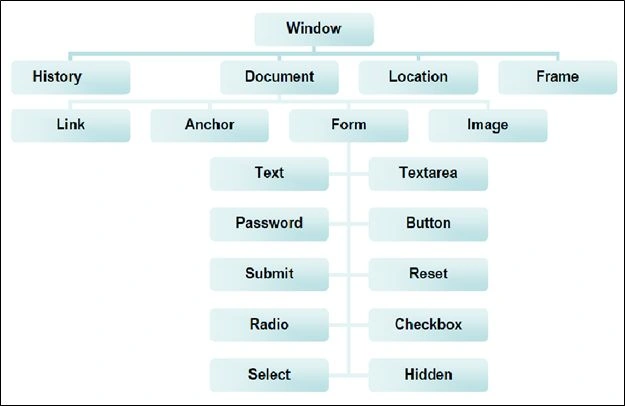
The following figure shows the object hierarchy in JavaScript. All objects have properties and methods, some objects also have "events". Every element on a web page has certain events that can trigger the invocation of event handlers. The "event handler" is a command that is used to specify actions in response to an event. Attributes are inserted into HTML tags to define events and event handlers
.
The following are examples of events:
- A mouse click.
- A web page or an image loading.
- Moussing over a hot spot on the web page.
- Selecting an input box in an HTML form.
- Submitting an HTML form.
- A keystroke.
The following are some of the most common events:
- onLoad – It occurs when a page loads in a browser.
- onUnload – It occurs just before the user exits a page.
- onMouseOver – It occurs when you point to an object.
- onMouseOut – It occurs when you point away from an object.
- onSubmit – It occurs when you submit a form.
- onClick – It occurs when an object is clicked.
- onAbort – An image failed to load.
- onBeforeUnload – The user is navigating away from a page.
- onBlur – A form field lost the focus (User moved to another field)
- onChange –The contents of a field has changed.
- onClick –User clicked on this item.
- onDblClick –User double-clicked on this item.
- onError –An error occurred while loading an image.
- onFocus –User just moved into this form element.
- onKeyDown –A key was pressed.
- onKeyPress –A key was pressed OR released.
- onKeyUp –A key was released.
- onMouseDown –A mouse button was pressed.
- onMouseMove –The mouse moved.
- onMouseUp –The mouse button was released.
- onReset –A form reset button was pressed.
- onResize –The window or frame was resized.
- onSelect –Text has been selected.
- onSubmit –A form's Submit button has been pressed.
- onUnload –The user is navigating away from a page.
The following is the object hierarchy in JavaScript:
Example: OnClick event example.
- <!DOCTYPE html>
- <html>
- <head>Event Example</head>
- <body>
- <button onclick="clickme()">Click me</button>
- <script language='javascript'>
- function clickme() {
- alert("OnClick Event of Button");
- }
- </script>
- </body>
- </html>
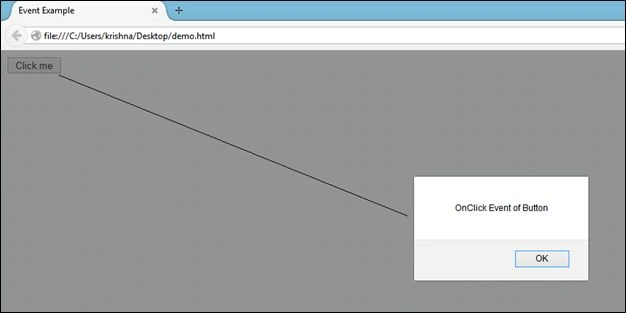
Run the preceding code, it will show you a button. When you click on that button it will pop up a message box as shown in the following output.
Output
Summary
I hope you understand the basic concepts of JavaScript. If you have any suggestions regarding this article then please contact me.


Join the conversation! Your thoughts help the community grow.