Introduction
The Scope Communication object consists of a session object, application object, and pageContext object.
The Session Object
The first time a user makes a request, the session object is assigned to the user, and it is used to store, share, and retrieve information related to the user session. The session object uses HTTP protocol, which is a stateless protocol. This means that the connection between the browser and the server is lost once the transaction ends. Session tracking is a mechanism that the servlet uses to maintain the state of a series of requests from the same user in another way the same browser across some period of time.
The session object stores information for a particular session. It can track sessions using URL rewriting of hiding form fields or a custom method. The cookies contain an identification number, known as the session ID, which matches a request to the session object on the server side. When you use URL rewriting or hidden form fields, the session ID is passed not as a value of a cookie but as extra path information or a form field.
The variables stored in the session object are not discarded when the user navigates between pages in the application. Instead, these variables stay for the entire user session. As long as the client keeps sending the session ID with the request, the servlet engine is able to access user-specific session data for that client. The Web server destroys the session object when the session expires or is abandoned.
Common methods of the session object
- getAttributes(String name): This method returns the object with the specified name. If no object is found, it returns null.
- getAttributeName(): This method returns the name of each object in this session.
- getCreationTime(): This method returns the time when the session was created in milliseconds.
- getId(): This method returns the unique identifier for the session.
- getMaxInactiveInterval(): This method returns the maximum amount of time in seconds.
- setAttribute(String name, Object value): This method writes an attribute and value to the session.
- getLastAccessedTime(): This method returns the time of the last client request associated with this session. The time is returned as the number of milliseconds.
Write an example to demonstrate how to use the session object to manage session data, like storing user information and tracking the number of visits.
<%@ page import="java.util.*" %>
<%@ page language="java" contentType="text/html; charset=UTF-8"
    pageEncoding="UTF-8"%>
<html>
<head>
    <title>Session Example in JSP</title>
</head>
<body>
    <h2>Session Example in JSP</h2>
    <%
        HttpSession session = request.getSession(true);
        if (session.isNew()) {
            out.println("<h3>New Session Created</h3>");
            session.setAttribute("username", "GuestUser");
            session.setAttribute("visitCount", 1);
        } else {
            out.println("<h3>Welcome Back!</h3>");
            String username = (String) session.getAttribute("username");
            Integer visitCount = (Integer) session.getAttribute("visitCount");
            visitCount++;
            session.setAttribute("visitCount", visitCount);
            out.println("<p>Username: " + username + "</p>");
            out.println("<p>Visit Count: " + visitCount + "</p>");
        }
        out.println("<p>Session ID: " + session.getId() + "</p>");
        out.println("<p>Session Creation Time: " + new Date(session.getCreationTime()) + "</p>");
    %>
</body>
</html>
Output
- Start the Apache server from the XAMPP control panel.
- Start the Tomcat server by running the startup.bat file located in the Tomcat bin folder.
- Deploy Your JSP Project
- Place your JSP files or web project inside the webapps folder of your Tomcat directory. Create a new folder for your project, e.g., c:\tomcat\webapps\myproject.
- Inside this folder, create your JSP files (e.g., index.jsp).
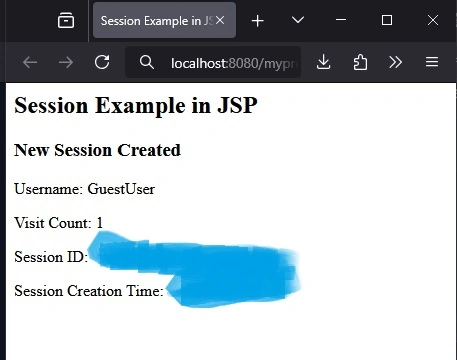
The simple JSP-based session example allows you to track user activity across requests using the session object.
The application Object
The application object is used to share information among all users of a given application. Any JSP in the application can access the application object. J2EE defines a JSP-based application as all the. JSP files are in a virtual directory and its subdirectories.
Common Methods of Application Object
- getAttribute(string name): This method returns the attribute with the specified name. It returns null if an attribute by that name does not exist.
- getAttributeNames(): This method returns the name of each attribute within the application object.
- getInitParameter(String name): This method returns the value of an initialization parameter. It returns null if the parameter does not exist.
- getInitParameterNames(): This method returns the name of all initialization parameters as an enumerated value.
- getServerInfo(): This method returns the name and version number of the servlet engine.
<%@ page language="java" contentType="text/html; charset=UTF-8"
    pageEncoding="UTF-8"%>
<%@ page import="java.util.*" %>
<html>
<head>
    <meta charset="UTF-8">
    <title>Application Object Example</title>
</head>
<body>
    <h2>Application Object Example in JSP</h2>

    <%
        Integer totalVisitors = (Integer) application.getAttribute("totalVisitors");
        if (totalVisitors == null) {
            totalVisitors = 0;
        }
        totalVisitors++;
        application.setAttribute("totalVisitors", totalVisitors);
        out.println("<h3>Total Visitors: " + totalVisitors + "</h3>");
   %>
    <p>This counter shows the total number of visitors across all sessions.</p>
</body>
</html>
Output
Total Visitors: 1
This counter shows the total number of visitors across all sessions.
This example demonstrates how to use the application object in JSP to maintain global data that is accessible to all users and shared across multiple sessions.
The pageContext Object
The pageContext object stores information that is local to the JSP. Each JSP has its own pageContext object, which is created when the user enters the page, and the object is destroyed when the user leaves the page. Methods of the pageContext object give you access to information about the JSP and perform other actions.
Methods used in pageContext Object
- findAttribute(String name): This method returns the value of an attribute in the page, request, session, if valid, and the application scope. It returns null if the attribute is not found.
- getAttribute(String name): This method returns the object associated with the name in the page scope. It returns null if no object is found.
- setAttribute(String name, Object attribute): This method writes the object with the associated name into the pageContext object.
Here is a JSP example demonstrating how to use the pageContext object to store, retrieve, and find attributes within the page scope.
<%@ page language="java" contentType="text/html; charset=UTF-8"
    pageEncoding="UTF-8"%>
<%@ page import="java.util.*" %>
<!DOCTYPE html>
<html>
<head>
    <meta charset="UTF-8">
    <title>PageContext Object Example</title>
</head>
<body>
    <h2>Using PageContext Object in JSP</h2>
    <%
        String userName = "John Doe";
        pageContext.setAttribute("user", userName);
        String retrievedUser = (String) pageContext.getAttribute("user");
        out.println("<p>Stored User Name in Page Scope: " + userName + "</p>");
        out.println("<p>Retrieved User Name from Page Scope: " + retrievedUser + "</p>");
        String foundUser = (String) pageContext.findAttribute("user");
        if (foundUser != null) {
            out.println("<p>Found User using findAttribute(): " + foundUser + "</p>");
        } else {
            out.println("<p>User not found in any scope.</p>");
        }
    %>
    <p>This example shows how the `pageContext` object is used to manage attributes in the page scope.</p>
</body>
</html>
Output
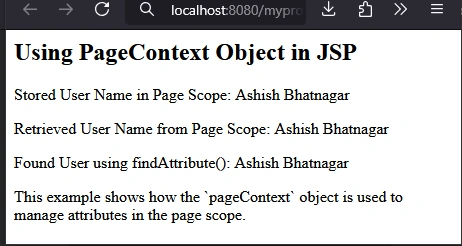
This example demonstrates how to use the pageContext object to manage data at the page level in JSP. It shows the use of setAttribute(), getAttribute(), and findAttribute() methods for working with page-scoped data.
The Config Object
The config object passes configuration information to a servlet when the servlet is initialized. The configuration information that this servlet can access is a set of name/value pairs that describe initialization parameters and the servletContext object, which describes the context within which the servlet is running.
Methods used with the config object
- getServletName(): This method returns the name of the servlet.
- getInitParameterNames(): This method returns the name of each servlet initialization parameter.
The config object in JSP (also called ServletConfig) is used to pass configuration information to a servlet or JSP. This object is created by the servlet container and provides initialization parameters to the servlet, which are typically defined in the web.xml file.
Here’s an example demonstrating how to use the config object in a JSP page to retrieve servlet initialization parameters and the servlet name.
Steps
- Define the servlet initialization parameters in the web.xml file.
- Use the config object in JSP to access these parameters.
web.xml Configuration
First, we define initialization parameters for the JSP page in the web.xml file.
<web-app>
    <servlet>
        <servlet-name>ConfigExample</servlet-name>
        <jsp-file>/config_example.jsp</jsp-file>
        <init-param>
            <param-name>adminEmail</param-name>
            <param-value>[email protected]</param-value>
        </init-param>
        <init-param>
            <param-name>siteName</param-name>
            <param-value>My Website</param-value>
        </init-param>
    </servlet>
    <servlet-mapping>
        <servlet-name>ConfigExample</servlet-name>
        <url-pattern>/configExample</url-pattern>
    </servlet-mapping>
</web-app>
- We define a servlet with the name ConfigExample and map it to the JSP file config_example.jsp.
- We define two initialization parameters: adminEmail and siteName, which will be accessible in the JSP page via the config object.
config_example.jsp
Now, we access the config object in the JSP file to retrieve and display the servlet name and the initialization parameters.
<%@ page language="java" contentType="text/html; charset=UTF-8"
    pageEncoding="UTF-8"%>
<!DOCTYPE html>
<html>
<head>
    <meta charset="UTF-8">
    <title>Config Object Example in JSP</title>
</head>
<body>
    <h2>Config Object Example in JSP</h2>

    <%
        String servletName = config.getServletName();
        out.println("<p>Servlet Name: " + servletName + "</p>");
        String adminEmail = config.getInitParameter("adminEmail");
        String siteName = config.getInitParameter("siteName");
        out.println("<p>Admin Email: " + adminEmail + "</p>");
        out.println("<p>Site Name: " + siteName + "</p>");
        Enumeration<String> initParameterNames = config.getInitParameterNames();
        out.println("<h3>All Initialization Parameters:</h3>");
        out.println("<ul>");
        while (initParameterNames.hasMoreElements()) {
            String paramName = initParameterNames.nextElement();
            String paramValue = config.getInitParameter(paramName);
            out.println("<li>" + paramName + ": " + paramValue + "</li>");
        }
        out.println("</ul>");
    %>

    <p>This example demonstrates how to use the config object to access servlet initialization parameters.</p>
</body>
</html>
Output
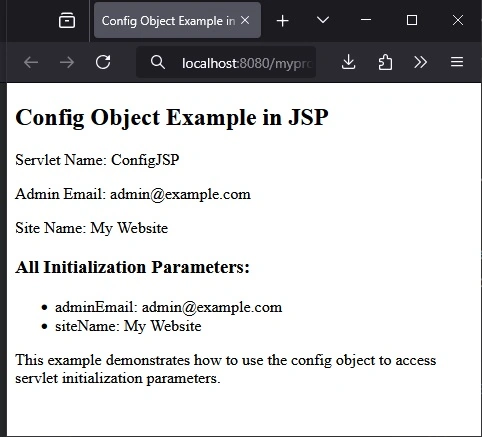
This example shows how to use the config object in JSP to access initialization parameters and the servlet's name. The parameters are typically configured in the web.xml file, and the config object allows you to retrieve these values in the JSP page.
The Exception Object
The Exception object represents all errors and exceptions. You can access the exception object on a page that you declare to be an error page using the isErrorPage attribute of the page directive.
Methods used in the exception object
- getMessage() returns a string containing the error message.
- toString() method returns a string describing the exception object.
- printStackTrace() method writes the exception object and its backtrace to standard error.
Here is an example of a JSP program demonstrating the use of the Exception object in an error handling page. This example includes two JSP pages: the main page (main.jsp) that deliberately throws an exception, and the error page (error.jsp) that handles the exception and displays information using the methods of the Exception object.
<%@ page language="java" contentType="text/html; charset=UTF-8" pageEncoding="UTF-8"%>
<%@ page errorPage="error.jsp" %>
<!DOCTYPE html>
<html>
<head>
    <meta charset="UTF-8">
    <title>Main JSP Page</title>
</head>
<body>
    <h1>Welcome to the Main JSP Page</h1>
    <%
        int number = 10;
        int result = number / 0;
    %>
</body>
</html>
error.jsp (Error Page)
<%@ page language="java" contentType="text/html; charset=UTF-8" pageEncoding="UTF-8" isErrorPage="true" %>
<!DOCTYPE html>
<html>
<head>
    <meta charset="UTF-8">
    <title>Error Page</title>
</head>
<body>
    <h1>An error has occurred</h1>
    <p><strong>Error Message:</strong> <%= exception.getMessage() %></p>
    <p><strong>Exception Description:</strong> <%= exception.toString() %></p>
    <p><strong>Stack Trace:</strong></p>
    <pre>
        <%= exception.printStackTrace(new java.io.PrintWriter(out)) %>
    </pre>
</body>
</html>
Output
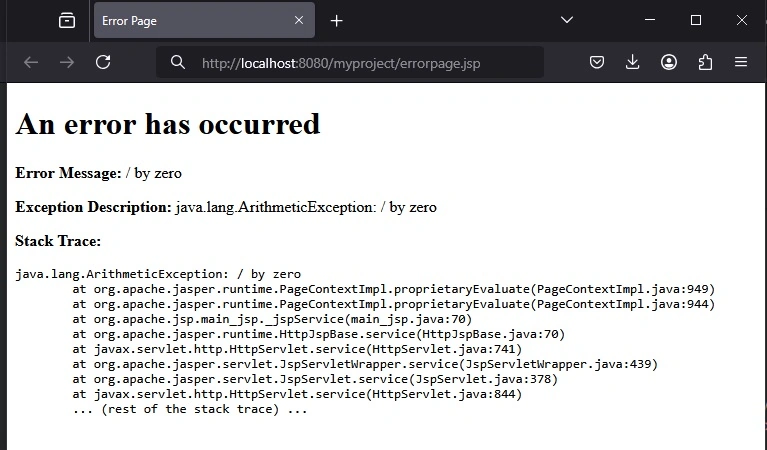
When you run main.jsp, it will trigger the exception and the error.jsp page will handle and display the error details.
Summary
The document titled "Scope Communication Object in JSP" explains various JSP communication objects like Session, Application, PageContext, Config, and Exception objects, which are used to manage data and communication within a JSP application. The Session object helps track user sessions, storing and sharing information across multiple requests from the same user. The Application object allows the sharing of global information accessible by all users of the application. The PageContext object manages data specific to a single page, enabling attribute storage and retrieval within the page's scope.
The Config object passes initialization parameters to a servlet or JSP page, allowing configuration information to be retrieved from the web.xml file. Lastly, the Exception object is used to handle errors and exceptions in JSP error pages. Each object is explained with relevant methods and practical code examples that demonstrate their functionality in maintaining sessions, tracking visitors, managing page-specific data, configuring parameters, and handling exceptions.


Join the conversation! Your thoughts help the community grow.