

In this article we will learn about how to use Scrollspy in our applications.
Sometimes bases on business need while designing the website, management/ client want to include some attractive features from UI point of view which makes website better look and feel.
So here it One of the most important features in Bootstrap4 scrollspy is available which target the navigation bar contents highlight automatically on the time scrolling the area. so here we will cover the following things,
- Definition
- Create Horizentol Scrollspy
- Create Vertical Scrollspy
- Summary
Definition
Scrollspy is the concept of automatically scrolling Bootstrap navigation menu or list group of items based on scroll position so that it will use to indicate which link is currently in active state.
There are two type of scrollspy we can apply: (1-Horizentol Scrollspy, 2-Vertical Scrollspy)
For the real implementation Scrollspy uses three attribute,
- data-spy
- data-target
- data-offset
data-spy = "scroll": attribute, This attribute can be used for scrollable area
data-target: which we can use with the ID or class of the element of any Bootstrap .navbar component so that it will use to indicate navbar is connected with scrollable area and this currently slected nav links will be highlighted.
data-offset: attribute this is use to defines number of pixels which calculates the position of scroll from top.
Create Horizentol Scrollspy
In this following example I am creating horizontal scrollspy to show how the nav bar is highlighted at the time of scroll,
- <!DOCTYPE html>
- <html lang="en">
- <head>
- <title>Bootstrap Example</title>
- <meta charset="utf-8">
- <meta name="viewport" content="width=device-width, initial-scale=1">
- <link rel="stylesheet" href="https://maxcdn.bootstrapcdn.com/bootstrap/4.5.2/css/bootstrap.min.css">
- <script src="https://ajax.googleapis.com/ajax/libs/jquery/3.5.1/jquery.min.js"></script>
- <script src="https://cdnjs.cloudflare.com/ajax/libs/popper.js/1.16.0/umd/popper.min.js"></script>
- <script src="https://maxcdn.bootstrapcdn.com/bootstrap/4.5.2/js/bootstrap.min.js"></script>
- <style>
- body {
- position: relative;
- }
- </style>
- </head>
- <body data-spy="scroll" data-target=".navbar" data-offset="50">
- <nav class="navbar navbar-expand-sm bg-primary navbar-dark fixed-top">
- <ul class="navbar-nav">
- <li class="nav-item">
- <a class="nav-link" href="#section1">Home</a>
- </li>
- <li class="nav-item">
- <a class="nav-link" href="#section2">About</a>
- </li>
- <li class="nav-item">
- <a class="nav-link" href="#section3">Contact </a>
- </li>
- <li class="nav-item dropdown">
- <a class="nav-link dropdown-toggle" href="#" id="navbardrop" data-toggle="dropdown">
- Services
- </a>
- <div class="dropdown-menu">
- <a class="dropdown-item" href="#section41">Training</a>
- <a class="dropdown-item" href="#section42">Development</a>
- </div>
- </li>
- </ul>
- </nav>
- <div id="section1" class="container-fluid bg-success" style="padding-top:70px;padding-bottom:70px">
- <h1>Home</h1>
- <p>Home Home Home Home Home Home Home Home Home Home Home Home </p>
- <p>Home Home Home Home Home Home Home Home Home Home Home Home </p>
- <p>Home Home Home Home Home Home Home Home Home Home Home Home </p>
- </div>
- <div id="section2" class="container-fluid bg-warning" style="padding-top:70px;padding-bottom:70px">
- <h1>About</h1>
- <p>About About About About About About About About About</p>
- <p>About About About About About About About About About</p>
- <p>About About About About About About About About About</p>
- <p>About About About About About About About About About</p>
- </div>
- <div id="section3" class="container-fluid bg-secondary" style="padding-top:70px;padding-bottom:70px">
- <h1>Contact</h1>
- <p>Contact Contact Contact</p>
- <p>Contact Contact Contact</p>
- <p>Contact Contact Contact</p>
- <p>Contact Contact Contact</p>
- <p>Contact Contact Contact</p>
- <p>Contact Contact Contact</p>
- <p>Contact Contact Contact</p>
- </div>
- <div id="section41" class="container-fluid bg-danger" style="padding-top:70px;padding-bottom:70px">
- <h1>Training</h1>
- <p>HTML, CSS, BootStrap, JavaScript, JQuery C#</p>
- <p>HTML, CSS, BootStrap, JavaScript, JQuery C#</p>
- <p>HTML, CSS, BootStrap, JavaScript, JQuery C#</p>
- </div>
- <div id="section42" class="container-fluid bg-info" style="padding-top:70px;padding-bottom:70px">
- <h1>Development</h1>
- <p>Software Development</p>
- <p>Website Development</p>
- <p>Consultant & Placement</p>
- <p>Software Development</p>
- <p>Website Development</p>
- <p>Consultant & Placement</p>
- </div>
- </body>
- </html>
It will show the result as in the following image,
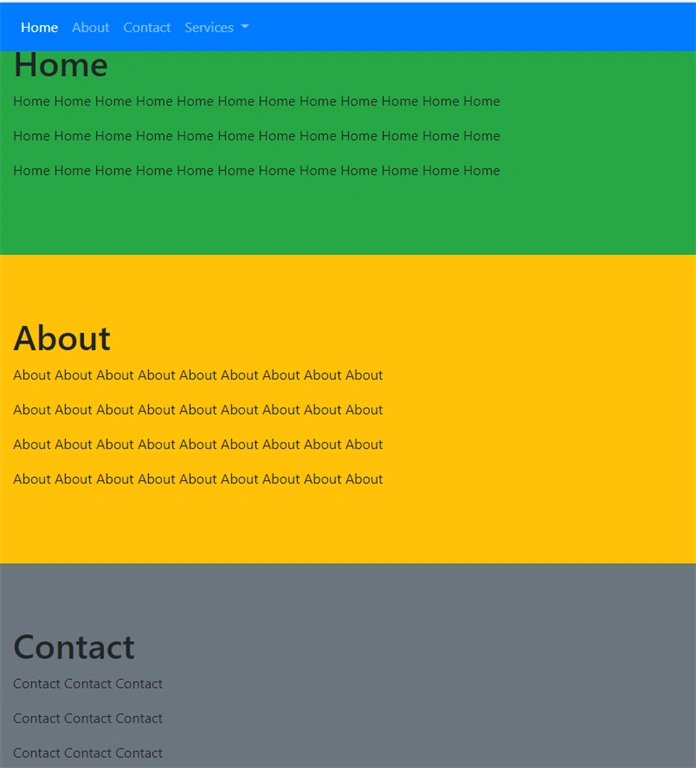
Code Explanation
As above we have seen that mainly three attributes are required for scrollspy. The data-spy="scroll" attribute is used to show the element as the scrollable area. In general this is used for <body element>. But we can use at any tag element. data-target=".navbar": this attribute is used with the value of nav bar element id or the class name of the navigation bar (.navbar).
Join the conversation! Your thoughts help the community grow.