

Scrum is an iterative software development process. In an iterative process, a product undergoes many releases and each release adds value to the product. In Scrum, each release is divided into sprints. Sprints are fixed durations, two to eight weeks, in which all development activities take place.
Each sprint produces a potentially shippable product that contains features, called Product Backlog, which meet customer expectations. In this article, we will see details of Product Backlog with respect to Scrum in Team Foundation Server 2010.
Roles
Scrum has a very simple team structure that involves just three roles. This structure generally doesn't translate to an organization or a reporting structure within a company, but it clearly defines who does what on the Scrum team. These are the three roles:
Product Owner can be a leader in the user community, such as someone from marketing, a business analyst within the IT arena or any other individual who can effectively communicate business needs. They determine what features go into the product, is the voice of the customer, is responsible for ensuring that product features meet customer expectations and is always available to meet directly with the development team to discuss and review features.
Scrum Master is responsible for tracking project status and coordination through release.
Team productivity. Removal of impediments to progress. Defines the sprint duration (generally two to four weeks).
Runs the daily stand up meeting. Helps to keep all team members working productively.
Team Members are responsible for building and testing high quality software. Has skills in software engineering, software architecture, business analysis, software testing, database tuning, IT operations, user experience, and user interface design.
Scrum Artifacts
An artifact is an object created for a practical purpose. Scrum has four artifacts:
- Product backlog: A prioritized list of requirements for the product being developed.
- Sprint backlog: A list of tasks created by the team to turn a set of items from the product backlog into an increment of potentially shippable product.
- Sprint burndown: A graph that measures the remaining sprint backlog items over the duration of a sprint.
- Release burndown : A graph that measures the remaining product backlog over time
What is Product Backlog
In this article we are going to see Product Backlog in details.
The product backlog is the list of features that the product owner believes will make a great product.
Product Backlog defines the full product; the Product Backlog Items (PBIs) define the individual features. Before the project begins, and before the team is assembled, the product owner meets with customers to develop a deep understanding of their needs.
The product backlog: is the sole input queue for the team. Has one set of items before the first sprint, and it has a Very different set with every sprint afterward. Is never static and is never complete. Grows as customers see the product and have more suggestions.
Releases and Sprints:
Release planning meeting:
- Once the product owner has started to create PBIs, the product owner needs to group the PBIs into releases. Releases are a core part of Scrum.
- A release typically consists of multiple sprints.
- The release planning meeting is a meeting in which a Scrum team sets goals and expectations for the next release and also identifies risks for the release.
- All the artifacts produced during the release planning meeting are subject to refinement during the sprints that occur during the release period.
- Most teams do not assign a PBI to an individual on the technical team. Typically, the entire Scrum team takes responsibility for completing a user story, and only tasks are assigned to individuals. The PBI can be assigned to the product owner.
- At the end of the release planning meeting, the technical team has a high - level understanding of what end user visible features it will be delivering over the next few sprints. In addition, the product owner has a sense of when these features will be ready.
Sprint planning meeting:
- Preparing the sprint backlog
Prior to the planning meeting, the product owner prepares the proposed sprint backlog. The proposed sprint backlog typically consists of several more PBIs than the team usually accepts into a sprint. The next section describes how Scrum teams use velocity to decide how many stories to accept into a sprint.
- Discussing user stories
During a sprint, the product owner discusses user stories with the team. A team should spend approximately 10% of its time working with the product owner to elaborate PBIs.
- Estimating PBIs
At the beginning of the sprint planning meeting, the product owner presents the proposed sprint backlog. The team asks questions about each user story and then estimates PBIs by using Planning Poker.
- Creating tasks for the user stories
During the second part of the meeting, the team creates tasks for each PBI. Examples of tasks include "Create database table", "Modify user interface" and "Write unit tests".
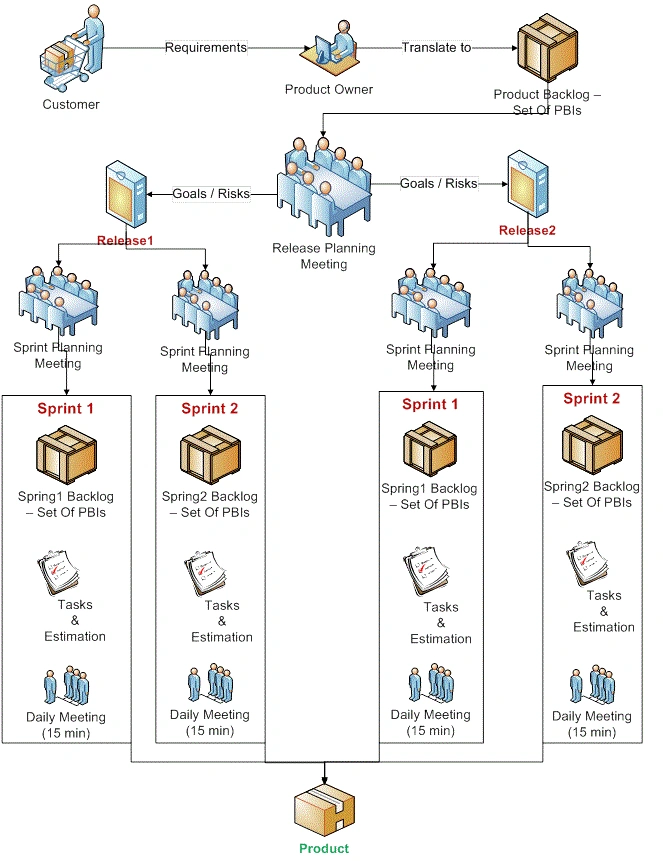
Please refer diagram below:
It shows the flow of new features into a product. It begins with the product manager translating customer requirements and desires into a list of product features that can be built by the team. This list is called the product backlog.
A Scrum team is organized to efficiently build a product in small sprints of activity. The product owner prioritizes the product backlog and identifies a subset of related features that can be implemented in a sprint. Each sprint has its own list, called a sprint backlog.
Each sprint begins with a list of features to build. Each sprint ends with most, but not all, of the features complete. The incomplete items are added back to the product backlog for inclusion in another sprint. After a few sprints (typically between 3 and 10) the team is ready to release a version of the product. It releases the bits, distributes the product to customers, gets feedback, and begins building the next version.
Microsoft Visual Studio Scrum 1.0 process template
- Download process template from http://visualstudiogallery.msdn.microsoft.com/59ac03e3-df99-4776-be39-1917cbfc5d8e/
- For installation instruction Refer to http://blogs.msdn.com/b/cdndevs/archive/2010/07/19/microsoft-visual-studio-scrum-1-0.aspx
Work Items in TFS 2010
Project data in TFS is stored in artifacts known as work items. Work items are database records that track the definition, assignment, priority, and state of work for your team. The Microsoft Visual Studio Scrum 1.0 process template includes seven work item types:
- Product backlog items
- Tasks
- Sprints
- Impediments
- Bugs
- Test cases
- Shared steps
Creating Product Backlog Item (PBI) in Visual Studio
The product backlog consists of product backlog items (PBIs). Each PBI is an individual requirement that is small enough to build and test within a sprint. PBIs are generally user centric requirements, such as "manage the online shopping basket" but they can also be IT - centric, as in "verify that credit card data is not persisted in the database".
The product owner is responsible for the PBIs, from defining them in enough detail that the team can build them to including acceptance criteria so the team knows when the PBIs are done.
To document a PBI in Visual Studio, you select Team >> New Item >> Backlog Item.
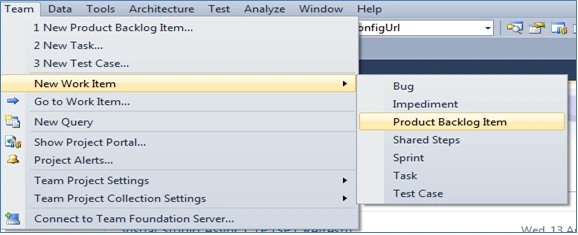
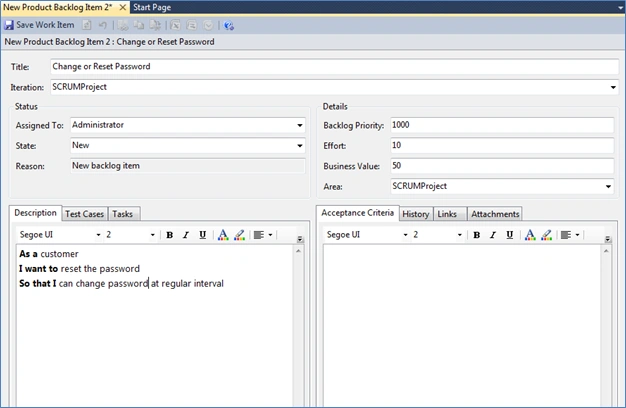
Following are the fields:
Title: Brief description of the PBI. The title of a PBI should represent the intent of the PBI.
Iteration: Indicate the sprint in which a PBI is implemented. When you first enter a PBI into TFS, iteration defaults to the current project, meaning that it's not yet scheduled for a sprint. During the sprint planning meeting, when the team commits to implementing a PBI, you set this field to the iteration representing the sprint.
Assigned To: Indicates the owner of a PBI. The product owner who's assigned to the PBI is responsible for answering questions and providing details about the PBI. This person is also responsible for verifying that the PBI meets acceptance criteria before the team finishes the sprint. When a PBI is first created, the Assigned To field defaults to the user entering the PBI, so it's best to set it to the product owner at that point.
State: Use the State field to track the current state of a PBI.
- New: The PBI is entered into TFS. It may be just the initial text of a user story, or it may be fully defined with test cases and acceptance criteria.
- Approved: The PBI has been approved by the product owner and is a candidate to be assigned to a sprint at the sprint planning meeting.
- Committed: The PBI has been assigned to a sprint, and the team has committed to completing it.
- Removed: The PBI is no longer needed. This is useful when you're pruning the backlog to remove duplicates, to consolidate similar PBIs, or to simply remove the PBIs that are such low priority that they will never be built.
- Done: The PBI is complete, and the product owner has tested and verified it.
Reason: Reason is a read - only field that is predefined based on the state and transition of the PBI.
- New
New Backlog Item : The PBI was just entered but not yet prioritized or estimated.
Reconsidering Backlog Item : The item had been removed but was reconsidered and is now back in the backlog.
- Approved
Approved by the Product Owner : The PBI was approved by the product owner and is now ready to be included in a sprint.
- Work Stopped : The PBI had been committed to a sprint, but the team decided to stop work on it and put it back in the backlog for future sprint.
- Committed : Commitment Made by the Team : The team has committed to implement the PBI in a sprint.
Additional Work Found: The PBI was previously considered done, but more work was found, so it's back in the backlog.
- Removed: The PBI was removed from the backlog.
- Done: The work on the PBI is finished.
Backlog Priority: Used to determine the position of the PBI on the product backlog. New PBIs default to a backlog priority of 1,000. This field represents an item's location in the backlog, not its business value. It indicates when the PBI should be scheduled, relative to other items on the list.
Effort: Used to track the estimated effort required to implement a PBI, relative to other PBIs in the release. Relative is the operative word here, as the effort is not in terms of hours or days. Rather, it's a just a number used to compare the relative effort required for PBIs.
Business Value: Used to track the amount of business value delivered by a PBI. You should choose a number between 1 and 100 to represent the amount of business value that implementing the PBI will deliver to your customers. Higher numbers imply greater business value. A PBI with a low business value and a high effort estimate probably won't get scheduled into a sprint and will remain on the product backlog.
Description: Used to provide a detailed description of a PBI. This is where the product owner describes what the feature does and who needs it. If you're defining PBIs via user stories, then this is the written record of the feature.
Acceptance Criteria: Used to provide a bulleted list of criteria a PBI must meet before it will be accepted as done. The product owner defines the acceptance criteria either when initially creating the PBI or when the PBI is added to a sprint. It's critical to have sufficient information in this field for a PBI because these are the criteria against which the team will build the feature during the sprint.
Conclusion
In this article, we have seen that the product backlog is the list of requirements for the system. It is the central focus of a Scrum team, representing the features that the team will build into the product. The product owner defines and prioritizes the PBIs. Each PBI stores the details of one product feature. It describes its business benefit, test cases, and acceptance criteria.
Sanket TerdalPosted May 4, 2011, 4:50 AM
Thanks for the feedback.
Sam HobbsPosted May 3, 2011, 4:06 PM
Thank you; this is an interesting alternative to software development. I wonder though what people think of the word "scrum"; it just sounds like something negative. Perhaps that would be an issue only for people whose native language is English. Or maybe it is just me. Even if the word does not sound good, it is still possible to do everything the same except just call it something different. Also, I wonder if it is ever necessary to write conversion software to convert data from one phase (sprint?) to another one.
Karthikeyan AnbarasanPosted May 3, 2011, 10:23 AM
Nice article and well explained...
Mahesh ChandPosted May 3, 2011, 8:39 AM
Welcome back Sanket and good to see, experience guys like you sharing your experience with PM. I do not see too many articles on this kind of topics. This also shows how powerful Visual Studio is. Thanks for sharing!
Dinesh BeniwalPosted May 3, 2011, 5:50 AM
Good article, Seeing your article after a long time.
Former memberPosted May 3, 2011, 2:12 AM
Thanks for sharing such a nice article :)