

Introduction
I am sure you have seen many websites like Google search that displays data from Wikipedia in their search results. The Wikipedia API allows developers to access its content via an API. For this article, you should have a good knowledge of jQuery and JavaScript.
In this article, I would like to share how to search and get data using the Wikipedia API and jQuery.
Procedure to search data through API from Wikipedia
Using this API provided by Wikipedia, we can search for data from Wikipedia from the titles in the Wikipedia data store.
http://en.wikipedia.org/w/api.php?action=opensearch&search=" + searchstring + callback=?
Through this code we can search data from the Wikipedia site.
Procedure to search data through API from Wikipedia
Using this API provided by Wikipedia, we can search for data from Wikipedia from the titles in the Wikipedia data store.
http://en.wikipedia.org/w/api.php?action=opensearch&search=" + searchstring + callback=?
Through this code we can search data from the Wikipedia site.
- <script type="text/javascript">
- function WikiSearchdata(search) {
- $j.ajax({
- type: "GET",
- url: "http://en.wikipedia.org/w/api.php?action=opensearch&search=" + search + "&callback=?",
- contentType: "application/json; charset=utf-8",
- async: false,
- dataType: "json",
- success: function(data, textStatus, jqXHR) {
- $j.each(data, function(i, item) {
- if (i == 1) {
- var searchdata = item[0];
- searchwiki(searchdata);
- }
- });
- },
- error: function(errorMessage) {
- }
- });
- }
- function searchwiki(search) {
- $j.ajax({
- type: "GET",
- url: "http://en.wikipedia.org/w/api.php?action=parse&format=json&prop=text§ion=0&page=" + search + "&callback=?",
- contentType: "application/json; charset=utf-8",
- async: false,
- dataType: "json",
- success: function(data, textStatus, jqXHR) {
- var markup = data.parse.text["*"];
- var blurb = $j('<div></div>').html(markup);
- blurb.find('a').each(function() { $j(this).replaceWith($j(this).html()); });
- blurb.find('sup').remove();
- blurb.find('.mw-ext-cite-error').remove();
- $j('#results').html(blurb);
- },
- error: function(errorMessage) {
- }
- });
- }
- </script>
The Search results will be such as:
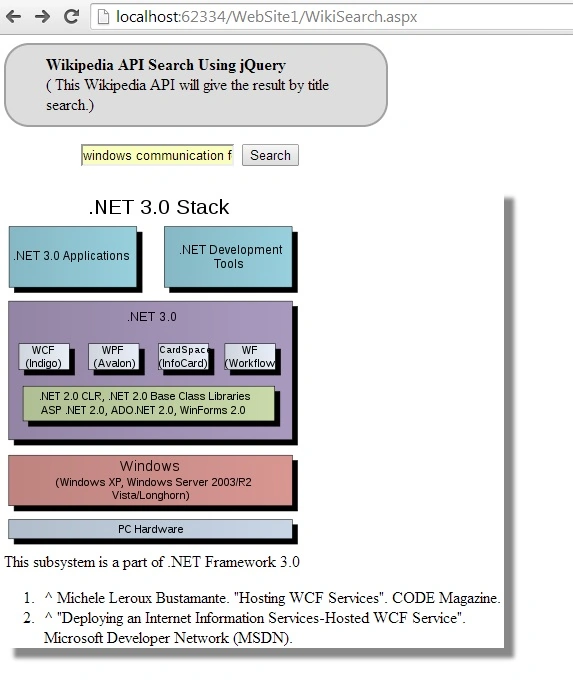
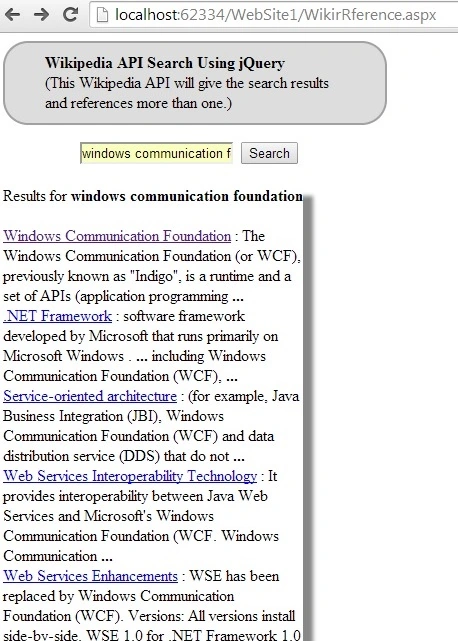
This search API will provide links to results and related references link of the search keyword. Using these links the user will navigate to the Wikipedia site .
- $.getJSON("http://en.wikipedia.org/w/api.php?callback=?", {
- srsearch: q,
- action: "query",
- list: "search",
- format: "json"
- },
- <%@ Page Language="VB" AutoEventWireup="false" CodeFile="WikirRference.aspx.vb" Inherits="Default2" %>
- <!DOCTYPE html PUBLIC "-//W3C//DTD XHTML 1.0 Transitional//EN" "http://www.w3.org/TR/xhtml1/DTD/xhtml1-transitional.dtd">
- <html xmlns="http://www.w3.org/1999/xhtml">
- <head runat="server">
- <script src="Scripts/jquery-1.10.2.intellisense.js" type="text/javascript"></script>
- <script src="Scripts/jquery-1.10.2.js" type="text/javascript"></script>
- <script src="Scripts/jquery-1.10.2.min.js" type="text/javascript"></script>
- <title></title>
- <script type="text/javascript">
- function searchdata() {
- var q = $("#searchterm").val();
- $.getJSON("http://en.wikipedia.org/w/api.php?callback=?",
- {
- srsearch: q,
- action: "query",
- list: "search",
- format: "json"
- },
- function(data) {
- $("#results").empty();
- $("#results").append("Results for <b>" + q + "</b> </br>");
- $("#results").append("<div> </div>");
- $.each(data.query.search, function(i, item) {
- $("#results").append("<div><a href='http://en.wikipedia.org/wiki/" + encodeURIComponent(item.title) + "'>" + item.title + "</a> : " + item.snippet + "</div>");
- });
- });
- }
- </script>
- </head>
- <body>
- <form id="form1" runat="server">
- <div style="border: 2px solid #a1a1a1;padding: 10px 40px; background: #dddddd; width: 300px; border- radius: 25px; height:60px; te xt-align:left;"><b>Wikipedia API Search Using jQuery</b>
<br /> (This Wikipedia API will give the search results and references more than one.)</div> - <div style="padding-left:75px; padding-top:15px;">
<input id="searchterm" type="text" /> <input id="search" type="button" value="Search" onclick="searchdata();"/></div> - <div> </div>
- <div id="results" style="width:300px; box-shadow: 10px 10px 5px #888888;">
- </div>
- </form>
- </body>
- </html>
lisa rossPosted Feb 27, 2020, 3:30 PM
Hello i am trying to make the search page and results page RWD responsive on all devices but i use .results and .form1 and .search in my media quireis but it dfoesnt change..do you kno which ID TAG I MUST USE PLZ THXZ lISA
lisa rossPosted Feb 27, 2020, 2:50 PM
Ok i changed searchj and refernce files to .html files Lisa
lisa rossPosted Feb 27, 2020, 2:35 PM
I went to this URL http://localhost/SearchWiki/WebSite1/WikiSearch.aspx and all i get in browser is the code....Lisa
lisa rossPosted Feb 27, 2020, 2:29 PM
I dont understand at all how to run the code in this lesson or the code i download..Lisa
Parth DavePosted Apr 15, 2017, 4:55 AM
Krishana, I need your help in getting Language Specific data from Wikipedia. Would you please share your contact details? So that I can connect you and can send my code.
Ritha BPosted Mar 2, 2016, 7:43 AM
Nice thanks...and also i need to bind using angularjs
Gowtham RajamanickamPosted Apr 25, 2015, 6:14 AM
good
Vithal WadjePosted Sep 24, 2014, 11:20 AM
great one
M SKPosted Sep 9, 2014, 5:43 AM
Helped me...Thanks :)
Guest UserPosted Sep 7, 2014, 11:54 PM
this is good to add search capability in your site
Ismail Hakki SenPosted Sep 7, 2014, 7:00 AM
Useful tricks. Thanks.
Mahesh ChandPosted Sep 6, 2014, 11:27 AM
Good job Krishna. I like it.