

Hi Friends.
SharePoint 2013 search has huge potential with the integration of FAST and SharePoint search it becomes a very powerful search solution. There are a couple of new search web parts added, like the Content Search web part that is an excellent search web part. A new search result rendering mechanism called display templates is provided that is similar to JSON to HTML templates.
We will explain a scenario about the Search result web part and the solution related to the problem using display templates.
Scenario: If we add a search result web part to the page and above that a search box web part to enter a search term and depending on that the search term we want to search for, the result web part will display the results. When we add both of these web parts to the page and before entering the search term also the results web part shows “Nothing here matches your search” (as shown in the following image), that we don't want to display unless we enter something into the search box.
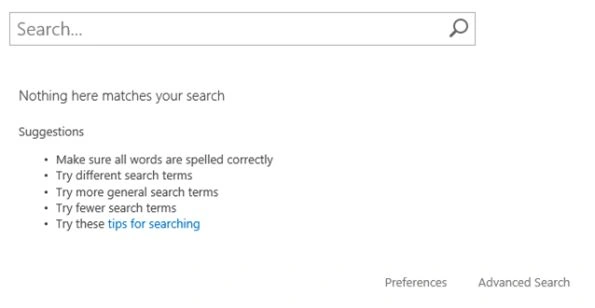
Figure 1 Search Box
Obviously we may think that there will be some web part property available that will help us to resolve this issue, but the web part does not have any property like this. The display templates can help here, we will see how to use display templates to do this.
Search Results web part of SP 2013 uses the "Control_SearchResults.html" display template that is available under the Master Page Library –> Display Templates –> Search.
Solution
- Rename the "Control_SearchResults.html" file to some other name, for example "Control_Test_SearchResults.html".
- Open this file in any text editor like Notepad.
- Change the Title in this HTML file(I used Test Default Result for this demo), this title will be available for selection in web part properties.
- Now we want to get the search text entered into the search box web part, for that we will use a ctx object as in the following ctx.DataProvider.get_currentQueryState().k.
- Search if(ctx.ClientControl.get_shouldShowNoResultMessage()){ line in HTML file (as shown in the following image).

Figure 2 ShouldShowNoResultMessage
- Replace this line with:
var currentQueryTerm = ctx.DataProvider.get_currentQueryState().k; if(ctx.ClientControl.get_shouldShowNoResultMessage() && currentQueryTerm!=””){
(As shown in the following image.)
Figure 3
- Save the modified HTML file.
- Go to Master Page Library –> Display Templates –> Search and upload new control template.
- You will see that respective "Control_Test_SearchResults.js" will be created by SharePoint.
- Now go to your page where the Search Result web part was added, edit the Search results web part. Under the Display Templates section select the newly uploaded display template. ( S shown in the following image/)
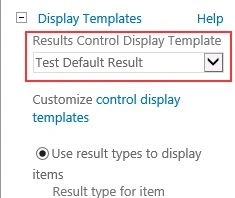
Figure 4 Display Template
Save the changes and that's it, you will see the expected result.
SriramPosted Jul 3, 2015, 3:24 AM
Good..........
Prasham SabadraPosted May 23, 2015, 11:04 PM
Thanks Prasad for sharing.
Santhakumar MunuswamyPosted May 23, 2015, 3:26 PM
Thanks for sharing
Prasad PathakPosted May 23, 2015, 1:25 PM
welcome Nitin
NitinPosted May 23, 2015, 8:49 AM
thanks for sharing