

This article shows how to search text inside a div using jQuery.
The following is the aspx:
- <%@ Page Language="C#" AutoEventWireup="true" CodeBehind="Default2.aspx.cs" Inherits="Contains_In_jQuery.Default2" %>
- <!DOCTYPE html>
- <html xmlns="http://www.w3.org/1999/xhtml">
- <head runat="server">
- <title>Search Text Inside DIV text</title>
- <script src="Scripts/jquery-2.1.4.min.js"></script>
- <script type="text/javascript">
- $(function () {
- $('#btnCheck').click(function () {
- var str = $("#divtxtAll").text();
- var txt = $('#txtword').val();
- if (str.indexOf(txt) > -1) {
- alert('Search Text Found');
- return true;
- } else {
- alert('Div Does not contains word');
- return false;
- }
- });
- })
- </script></head>
- <body>
- <form id="form1" runat="server">
- <div>
- <table style="width: 100%; text-align: center; background-color: yellow; border: solid 5px Green;">
- <tr>
- <td style="background-color: red; color: white; text-align: center; font-size: 12pt; font-family: Arial; font-weight: bold;">Find Your Text</td>
- </tr>
- <tr>
- <td></td>
- </tr>
- <tr>
- <td style="background-color: #0094ff; color: white; text-align: left; font-size: 12pt; font-family: Arial; padding-left: 20px; padding-top: 10px; padding-bottom: 10px;">
- <div id="divtxtAll">
- <b>How are You?
- <br />
- Noida, short for the New Okhla Industrial Development Authority, is a planned [2] city in India under the management of the New Okhla Industrial Development Authority (also called NOIDA). It is part of National Capital Region of India. Noida came into administrative existence on 17 April 1976 and celebrates 17 April as "Noida Day".<br />
- A Brief compendium of its achivements, in the years passed by, here we strive to present you the matchless facilities available in NOIDA.
- <br />
- <br />
- Shopping Malls In Noida<br />
- Spice World Mall<br />
- CenterStage Mall, Sector-18, Noida<br />
- Shopprix mall, C-134B, Sector 61,<br />
- Supertech Shopprix, C-134B, Sector-61<br />
- Sab Mall, Atta Market, Sector 27 </b>
- </div>
- </td>
- </tr>
- <tr>
- <td></td>
- </tr>
- <tr>
- <td style="height: 50px; vertical-align: middle;">Enter Text to Search:
- <input type="text" id="txtword" />
- <input type="button" id="btnCheck" value="Search Text" /></td>
- </tr>
- </table>
- </div>
- </form>
- </body>
- </html>

Image 1.
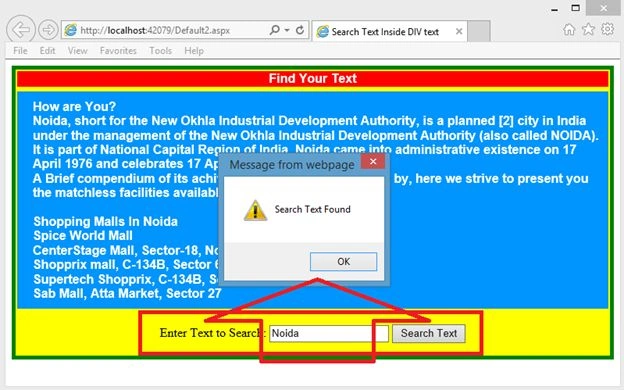
Image 2.
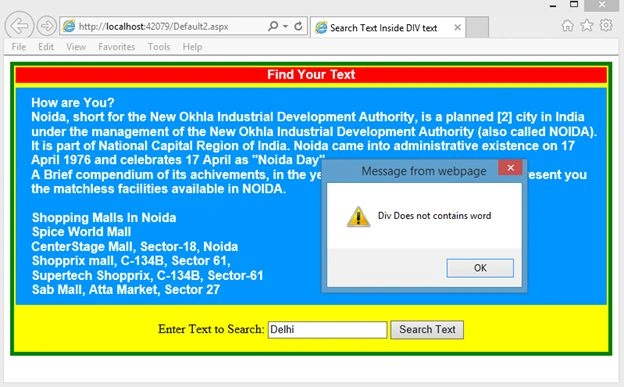
Image 3.
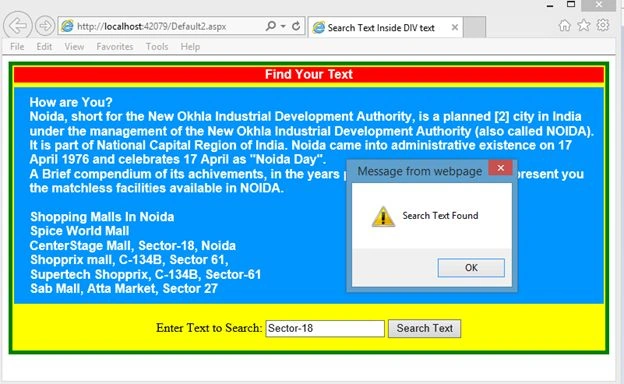
Image 4.
Abhishek KumarPosted Oct 16, 2015, 12:54 AM
Sr i have a problem i want to drag and drop column and insert these column values from their original files(csv) into sql server table as the same sequence they dragged.. Please help me sr..
Santhakumar MunuswamyPosted Jul 23, 2015, 2:56 PM
Thanks for nice article:)
Rahul Kumar SaxenaPosted Jul 22, 2015, 3:40 AM
Thanks Sharad...
Rahul Kumar SaxenaPosted Jul 22, 2015, 3:40 AM
Thanks Sibeesh Venu bro...
SharadPosted Jul 22, 2015, 12:42 AM
Excellent...
Sibeesh VenuPosted Jul 21, 2015, 9:35 AM
Nice Share.