
Introduction
In this article I am displaying a record from a database table in a DataGridView and searching the records in a DataGridView. At first we should have a database with some
records. In this example my Database name is "student" and Database table name
is "student_detail" which has some records. I will bind these records with
DataGridView and perform a different operation.
- Take a Windows Forms Application.
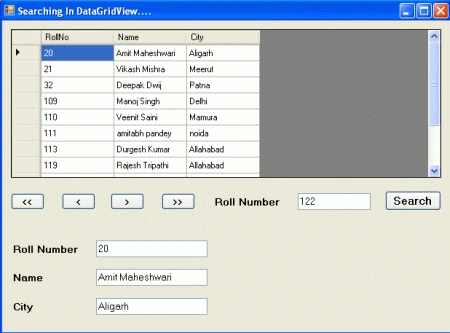
- Take some UI controls and arrange them like in the following figure.
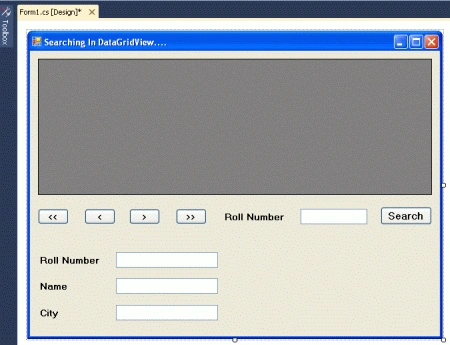
Write the following code:
using System;
using System.Collections.Generic;
using System.ComponentModel;
using System.Data;
using System.Drawing;
using System.Linq;
using System.Text;
using System.Windows.Forms;
using System.Data.SqlClient;
namespace searchingrecord
{
public partial
class Form1
: Form
{
public Form1()
{
InitializeComponent();
}
SqlDataAdapter dadapter;
DataSet dsset;
CurrencyManager cmgr;
DataRowView drv;
string connatring =
"server=.;database=student;user=sa;password=wintellect";
private void
Form1_Load(object sender,
EventArgs e)
{
dadapter = new
SqlDataAdapter("select
* from student_detail", connatring);
dsset = new
DataSet();
dadapter.Fill(dsset);
dataGridView1.DataSource = dsset.Tables[0];
cmgr = (CurrencyManager)dataGridView1.BindingContext[dsset.Tables[0]];
}
private void
btnfirst_Click(object sender,
EventArgs e)
{
cmgr.Position = 0;
drv = (DataRowView)cmgr.Current;
txtrollno.Text = drv.Row[0].ToString();
txtname.Text = drv.Row[1].ToString();
txtcity.Text = drv.Row[2].ToString();
}
private void
btnnext_Click(object sender,
EventArgs e)
{
if (cmgr.Position != cmgr.Count)
{
cmgr.Position += 1;
drv = (DataRowView)cmgr.Current;
txtrollno.Text = drv.Row[0].ToString();
txtname.Text = drv.Row[1].ToString();
txtcity.Text = drv.Row[2].ToString();
}
}
private void
btnprevious_Click(object sender,
EventArgs e)
{
if (cmgr.Position != 0)
{
cmgr.Position -= 1;
drv = (DataRowView)cmgr.Current;
txtrollno.Text = drv.Row[0].ToString();
txtname.Text = drv.Row[1].ToString();
txtcity.Text = drv.Row[2].ToString();
}
}
private void
btnlast_Click(object sender,
EventArgs e)
{
cmgr.Position = cmgr.Count;
drv = (DataRowView)cmgr.Current;
txtrollno.Text = drv.Row[0].ToString();
txtname.Text = drv.Row[1].ToString();
txtcity.Text = drv.Row[2].ToString();
}
private void
btnsearch_Click(object sender,
EventArgs e)
{
try
{
DataView dview =
new DataView(dsset.Tables[0]);
dview.Sort = "rollno";
int i =
dview.Find(txtrollnosearch.Text);
if (i < 0)
{
MessageBox.Show("No
Recods Found");
}
else
{
cmgr.Position = i;
drv = (DataRowView)cmgr.Current;
txtrollno.Text = drv.Row[0].ToString();
txtname.Text = drv.Row[1].ToString();
txtcity.Text = drv.Row[2].ToString();
}
}
catch (Exception)
{
MessageBox.Show("Incorrect
Input..");
txtrollnosearch.Clear();
txtrollnosearch.Focus();
}
}
}
}
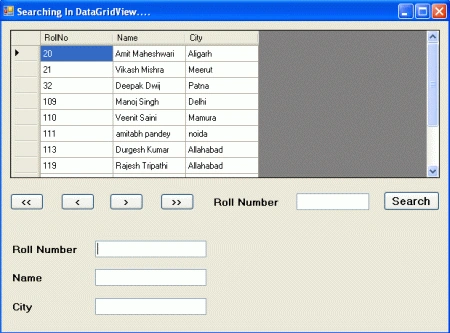
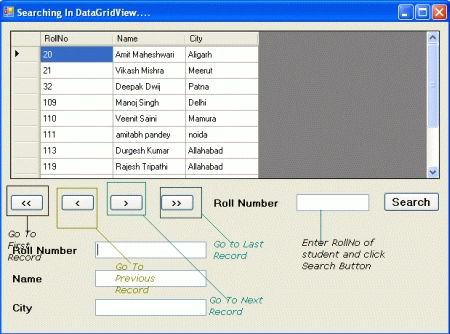
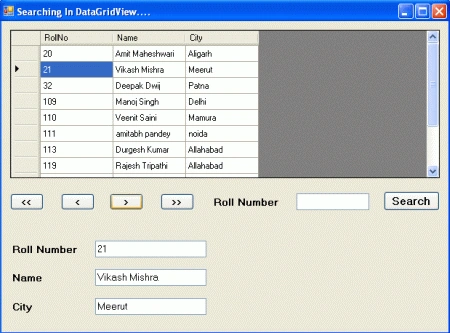
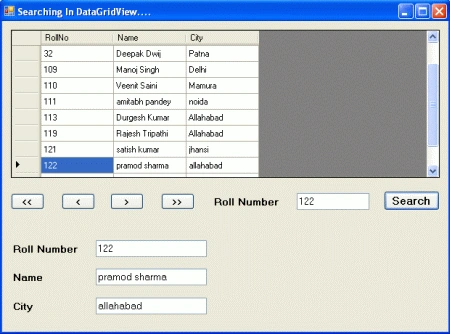
Run the application.
Output
Gowtham RajamanickamPosted Apr 17, 2016, 7:19 AM
Try to use exception handling
Gowtham RajamanickamPosted Apr 17, 2016, 7:19 AM
Good
Pradip PandeyPosted Jan 16, 2012, 12:53 AM
Good but always use exception handling in your code.