

Introduction
The Power Platform enables organizations to build applications, workflows, and data-driven digital solutions. With increasing adoption, environment governance and access control become critical. One of the most important governance tools is Security Groups, which restrict who can access a Power Platform environment.
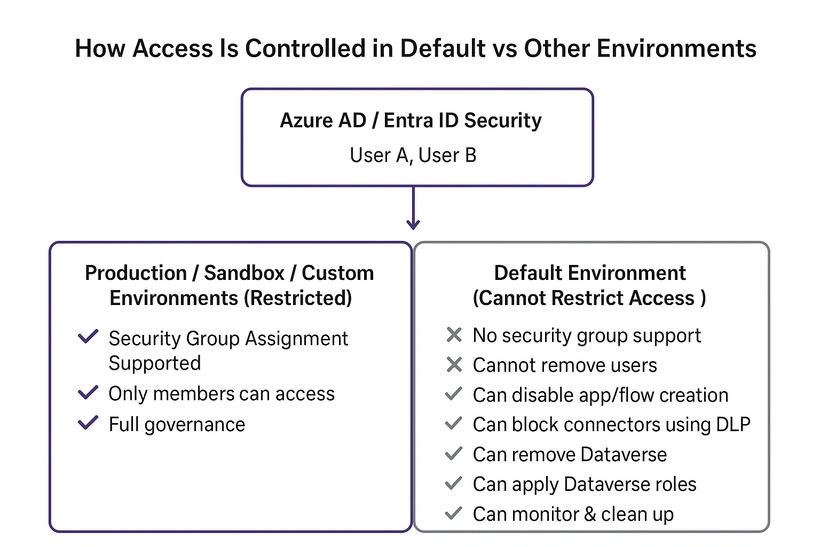
However, many admins face confusion when they discover that security groups cannot be assigned to the Default and Developer environments.
This article explains:
What security groups are
Which environments support them
Why Default/Developer environments cannot be restricted
Indirect ways to control and govern the Default environment
Best practices and governance recommendations
What Are Security Groups in Power Platform?
Security groups originate from Azure AD / Entra ID and are used to restrict who can access a Power Platform environment.
When a security group is assigned:
Only group members can access the environment
Only members can create apps/flows
Only members can use Dataverse in that environment
Members still require proper licensing
This provides a controlled, governed approach for managing environments.
Which Environments Support Security Group Assignment?
| Environment Type | Security Group Supported? | Notes |
|---|---|---|
| Production | Yes | Recommended for serious development |
| Sandbox | Yes | For Dev/Test/UAT |
| Trial (Production-like) | Yes | For evaluation |
| Custom Environments | Yes | Full control |
| Default | No | Cannot be restricted |
| Developer (Personal) | No | Single-user environment |
Join the conversation! Your thoughts help the community grow.