

For this I will create a new project as in the following: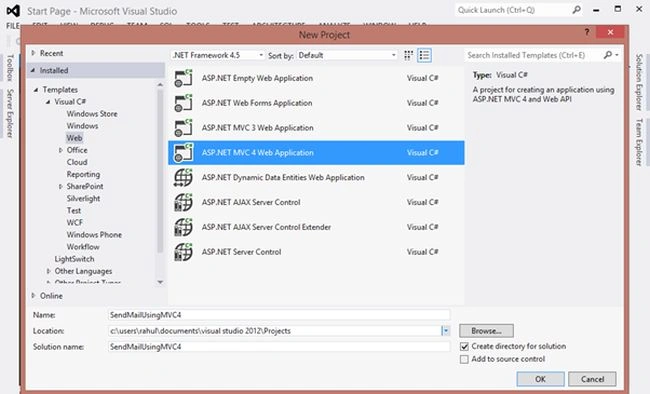
Image 1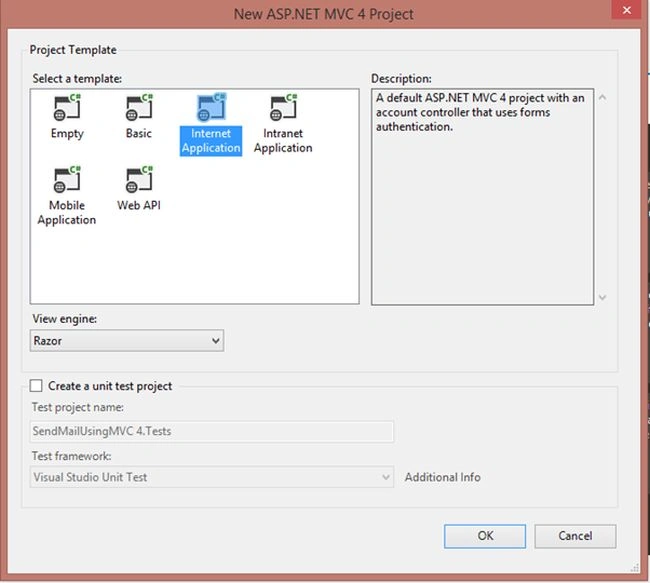
Image 2
Now right-click on the Model Folder in the solution and click on "Add" | "New Item...".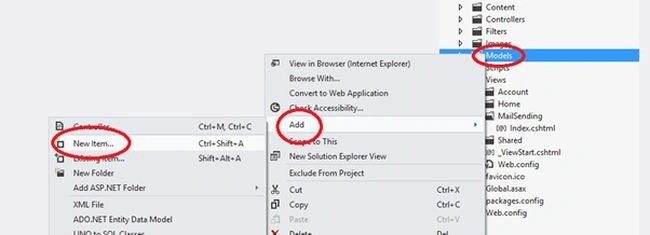
Image 3
Add a new class.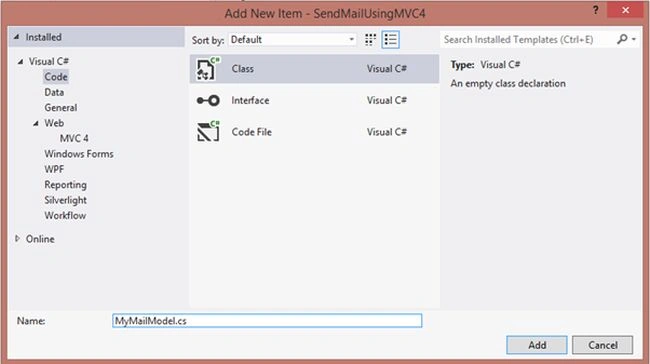
Image 4
And here the MyMailModel.cs file has the following code:
- using System;
- using System.Collections.Generic;
- using System.Linq;
- using System.Web;
- namespace SendMailUsingMVC4.Models
- {
- public class MyMailModel
- {
- public string To { get; set; }
- public string Subject { get; set; }
- public string Body { get; set; }
- }
- }
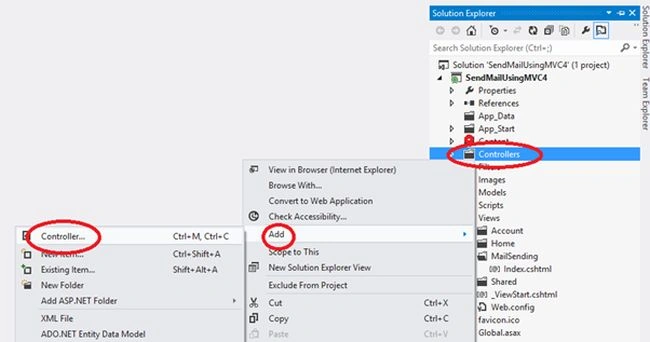
Image 5
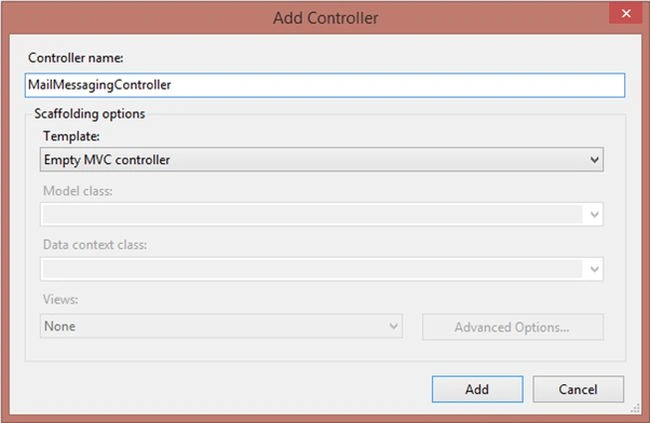
Image 6
Now place the following code in MailessageController:
- using System;
- using System.Collections.Generic;
- using System.Linq;
- using System.Web;
- using System.Web.Mvc;
- using System.Net.Mail;
- using System.IO;
- using System.Net;
- using SendMailUsingMVC4.Models;
- namespace SendMailUsingMVC4.Controllers
- {
- public class MailMessagingController : Controller
- {
- //
- // GET: /MailMessaging/
- public ActionResult Index()
- {
- return View();
- }
- [HttpPost]
- public ActionResult Index( MyMailModel objModelMail, HttpPostedFileBase fileUploader)
- {
- if (ModelState.IsValid)
- {
- string from = "[email protected]"; //any valid GMail ID
- using (MailMessage mail = new MailMessage(from, objModelMail.To))
- {
- mail.Subject = objModelMail.Subject;
- mail.Body = objModelMail.Body;
- if (fileUploader != null)
- {
- string fileName = Path.GetFileName(fileUploader.FileName);
- mail.Attachments.Add(new Attachment(fileUploader.InputStream, fileName));
- }
- mail.IsBodyHtml = false;
- SmtpClient smtp = new SmtpClient();
- smtp.Host = "smtp.gmail.com";
- smtp.EnableSsl = true;
- NetworkCredential networkCredential = new NetworkCredential(from, "Gmail Id Password");
- smtp.UseDefaultCredentials = true;
- smtp.Credentials = networkCredential;
- smtp.Port = 587;
- smtp.Host = "localhost";
- smtp.Send(mail);
- ViewBag.Message = "Sent";
- return View("Index", objModelMail);
- }
- }
- else
- {
- return View();
- }
- }
- }
- }
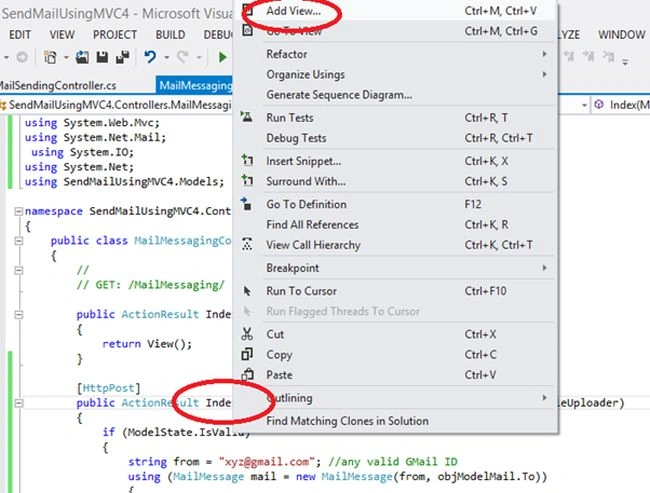
Image 7
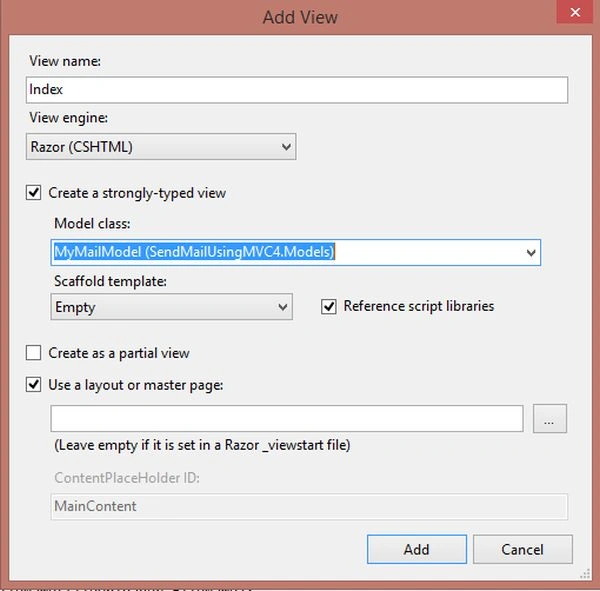
Image 8
Now place the following code in your View:
- @model SendMailUsingMVC4.Models.MyMailModel
- @{
- ViewBag.Title = "Sending Mail In MVC4";
- }
- <script src="~/Scripts/jquery-1.7.1.min.js"></script>
- <script>
- $(document).ready(function () {
- if ('@ViewBag.Message' == 'Sent') {
- alert('Mail has been sent successfully');
- }
- });
- </script>
- <fieldset>
- <legend>Send Email
- </legend>
- @using (@Html.BeginForm("Index", "MailMessaging", FormMethod.Post, new { @id = "form1", @enctype = "multipart/form-data" }))
- {
- @Html.ValidationSummary()
- <table style="background-color:aliceblue;">
- <tr>
- <td> To:
- </td>
- <td>
- @Html.TextBoxFor(m => m.To)
- </td>
- </tr>
- <tr>
- <td>Subject:
- </td>
- <td>
- @Html.TextBoxFor(m => m.Subject)
- </td>
- </tr>
- <tr>
- <td>Attachment
- </td>
- <td>
- <input type="file" name="fileUploader" />
- </td>
- </tr>
- <tr>
- <td>Mail Body:
- </td>
- <td>
- @Html.TextAreaFor(m => m.Body)
- </td>
- </tr>
- <tr>
- <td></td>
- <td>
- <input type="submit" value="Send" style="width: 100px;" /></td>
- </tr>
- </table>
- }
- </fieldset>
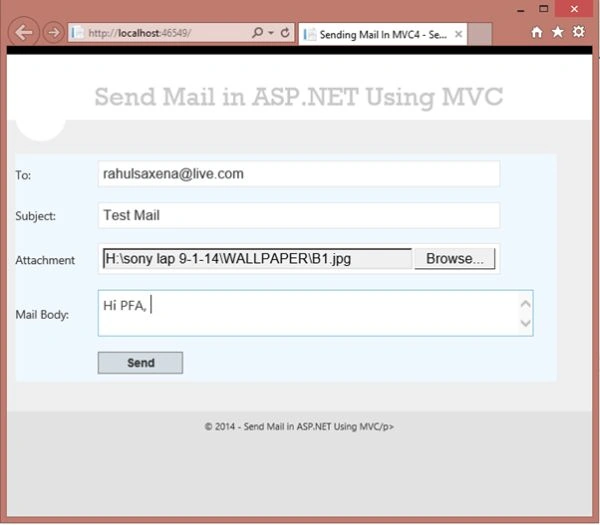
Image 9
EspEn DisSofPosted Sep 26, 2018, 4:16 AM
You only need to comment the line: smtp.Host = "localhost";
jay PatilPosted Aug 3, 2017, 7:38 AM
Have this prob pls solve
jay PatilPosted Aug 3, 2017, 7:37 AM
Line 45: smtp.Port = 587;Line 46: smtp.Host = "localhost"; Line 47: smtp.Send(mail); Line 48: ViewBag.Message = "Sent"; Line 49: return View("Index", objModelMail);
jay PatilPosted Aug 3, 2017, 7:37 AM
No connection could be made because the target machine actively refused it 127.0.0.1:587
Budagavi ChandraPosted Dec 7, 2015, 6:47 AM
Why My Application Showing this error:-The SMTP server requires a secure connection or the client was not authenticated. The server response was: 5.5.1 Authentication Required. Learn more at
manoj kumarPosted Sep 16, 2015, 4:19 AM
Why my application showing this error after copy the code from your source "No connection could be made because the target machine actively refused it 127.0.0.2.XXX" Could you help me sir...
Rahul Kumar SaxenaPosted Feb 27, 2015, 11:50 PM
Thanks Leger Djiba
Rahul Kumar SaxenaPosted Feb 27, 2015, 11:50 PM
Thanks Paco M Tyshme..
Rahul Kumar SaxenaPosted Feb 26, 2015, 12:56 PM
Thanks to all...
suman gangulyPosted Nov 20, 2014, 5:43 AM
Nice Article....
Hussain AfridiPosted Nov 19, 2014, 11:36 PM
nice
Manish Kumar ChoudharyPosted Nov 19, 2014, 6:17 AM
nice one @Rahul Kumar Saxena sir. This will help me a lot.
Vithal WadjePosted Nov 17, 2014, 9:54 PM
good one keep it up