

REST API is used for remotely interacting with SharePoint sites. Now, you can interact directly with SharePoint objects by using any technology that supports standard REST capabilities.
REST API uses HTTP protocol, OData protocol, Client.SVC Web Service, and JSON (JavaScript Object Notation) to communicate between apps and SharePoint.
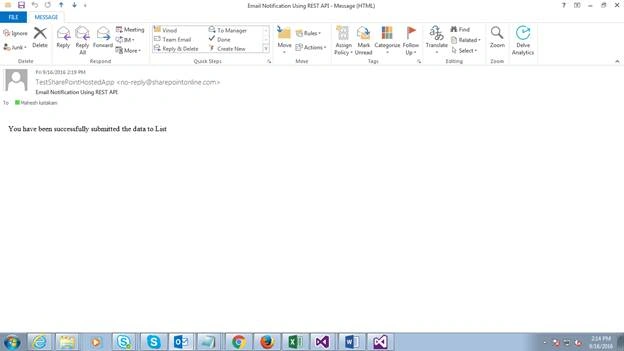
The below example is used to send email notification to users after submission of the list item in the List.
Find the below steps to send email notification.
- Create project, add the list to Site Collection, and code for submission.
- Send e-mail notification to users, using REST API for Button click.
For the first step, please find the below article about adding list, creation of project, and code for submission.
For the second step -
- Write the method for sending email notification in App.js file.
- Call the method under Submit button after inserting data to list.
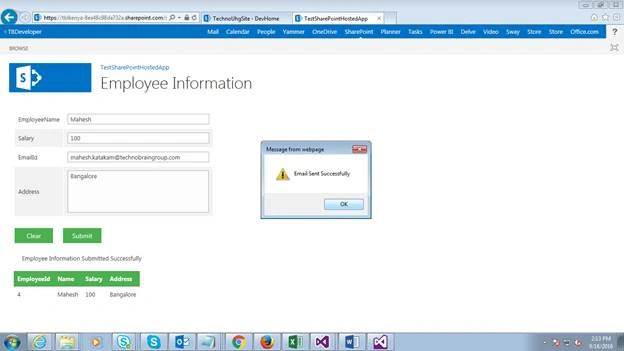
- Provide the Alert for a successful message.
Write the below method in App.js file for sending e-mail notification through REST API.
- function processSendEmail() {
- if ($("#empEmailId").val() != null) {
- var userEmaiId = $("#empEmailId").val();
- }
- else {
- alert("EmailId Should not be empty");
- }
- var From = '';
- var To = userEmaiId;
- var Body = 'You have been successfully submitted the data to List';
- var SubjectOfEmail = 'Email Notification Using REST API';
- sendEmailNotification(From, To, Body, SubjectOfEmail);
- }
- function sendEmailNotification(From, To, Body, SubjectOfEmail) {
- hostWebUrl = decodeURIComponent(manageQueryStringParameter('SPHostUrl'));
- var constructedURL = appWebUrl + "/_api/SP.Utilities.Utility.SendEmail";
- $.ajax({
- contentType: 'application/json',
- url: constructedURL,
- type: "POST",
- data: JSON.stringify({
- 'properties': {
- '__metadata': { 'type': 'SP.Utilities.EmailProperties' },
- 'From': From,
- 'To': { 'results': [To] },
- 'Body': Body,
- 'Subject': SubjectOfEmail
- }
- }
- ),
- headers: {
- "Accept": "application/json;odata=verbose",
- "content-type": "application/json;odata=verbose",
- "X-RequestDigest": $("#__REQUESTDIGEST").val()
- },
- success: function (data) {
- alert('Email Sent Successfully');
- },
- error: function (err) {
- alert('Error in sending Email: ' + JSON.stringify(err));
- }
- });
- }
The e-mail id which you are going to enter in textbox, should be of the users that are from the group in SharePoint.
I am attaching the source code for this. Please try and let me know if you face any issues.
Bobi GaragaPosted Jul 10, 2020, 12:50 AM
How can we add an attachment...? is there any possibility in this code...?
Tanvi TanuPosted Aug 19, 2019, 2:56 AM
Hi, I wanted to send an email on Save button click on editform.aspx and it should contain all the details from the form to the mail.
ankur agarawalPosted Nov 18, 2018, 2:00 AM
How to restrict user to change from e-mail address as this property can be missued?
Jonatan NGPosted Aug 16, 2017, 12:02 PM
Any option to change the sender email [email protected]?
Aakash MauryaPosted Mar 22, 2017, 2:09 AM
Thanks for great share. What if I have to send the email to multiple user at the same time? In CSOM C#, It accepts array of email addresses, Is there any workaround to achieve the same here? I don't want to iterate through the loop.
Humayun Kabir MamunPosted Sep 21, 2016, 12:52 AM
Nice...
Prasanna MuraliPosted Sep 20, 2016, 9:39 PM
Nice share
Mahesh BabuPosted Sep 20, 2016, 2:45 AM
Thanks Tarun.
Tarun DPosted Sep 20, 2016, 12:51 AM
Thanks for sharing..
Mahesh BabuPosted Sep 19, 2016, 8:59 AM
Thanks Vignesh
Vignesh ManiPosted Sep 19, 2016, 8:22 AM
Nice