Introduction
This article describes a simple way to send text messages to a cellular phone from within a C# desktop application. The source code provided includes a relatively good list of carriers to simplify the task of connecting with a cell phone and the task itself is really no more difficult than sending an email message through a desktop or web based application.
Getting Started
In order to begin, unzip the downloaded files and open the project provided. Within the project you will find one main class: frmMain.cs. The main form is a windows application form and it contains a few controls necessary to capture the fields needed to properly form the message. These fields include:
- Recipient's Phone Number: Captures the recipient's cellular telephone number (10 digit)
- Recipient's Carrier: Captures the recipient's carrier.
- Sender's email address: Captures the sender's email address.
- Sender's email server: Captures the name of the sender's email server
- Message Subject Line: Captures the message's title or subject
- Message Body: Captures the sender's message content.
The application is simple but could easily be improved by validating each of the required fields through the use of regular expressions or by at least validating that the text associated with each of the text boxes is not an empty string. To maintain the simplicity of the project, little in the way of error handling has been included.
The following figure (Figure 1) shows a properly configured collection of input fields in use:
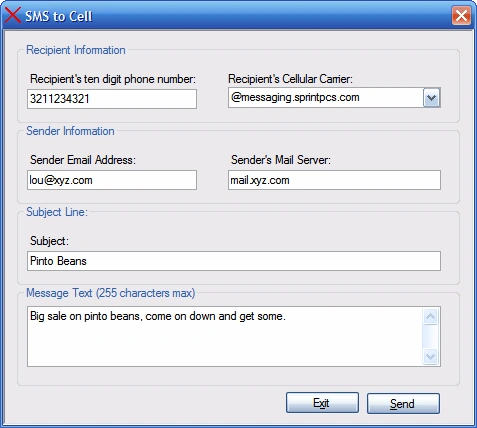
Figure 1: The Demonstration Application in Use
A quick review of the code will reveal that there is little going on there. The following imports were added to the top of the class:
- using System;
- using System.Net.Mail;
The System.Net.Mail import brings in the support necessary to transmit the messages generated using the application. Following the imports and the class declaration, there is a declarations region identified and within that region is a collection of private member variables; these private member variables are created in order to supply each of the required elements of the message.
- #Region "Declarations"
-
- private string mMailServer;
- private string mTo;
- private string mFrom;
- private string mMsg;
- private string mSubject;
- #End Region
At this point, the only thing left to do in code is to write the following three methods:
- private void frmMain_Load(System.Object sender, System.EventArgs e)
- {
-
-
-
- cboCarrier.Items.Add("@itelemigcelular.com.br");
- cboCarrier.Items.Add("@message.alltel.com");
- cboCarrier.Items.Add("@message.pioneerenidcellular.com");
- cboCarrier.Items.Add("@messaging.cellone-sf.com");
- cboCarrier.Items.Add("@messaging.centurytel.net");
- cboCarrier.Items.Add("@messaging.sprintpcs.com");
- cboCarrier.Items.Add("@mobile.att.net");
- cboCarrier.Items.Add("@mobile.cell1se.com");
- cboCarrier.Items.Add("@mobile.celloneusa.com");
- cboCarrier.Items.Add("@mobile.dobson.net");
- cboCarrier.Items.Add("@mobile.mycingular.com");
- cboCarrier.Items.Add("@mobile.mycingular.net");
- cboCarrier.Items.Add("@mobile.surewest.com");
- cboCarrier.Items.Add("@msg.acsalaska.com");
- cboCarrier.Items.Add("@msg.clearnet.com");
- cboCarrier.Items.Add("@msg.mactel.com");
- cboCarrier.Items.Add("@msg.myvzw.com");
- cboCarrier.Items.Add("@msg.telus.com");
- cboCarrier.Items.Add("@mycellular.com");
- cboCarrier.Items.Add("@mycingular.com");
- cboCarrier.Items.Add("@mycingular.net");
- cboCarrier.Items.Add("@mycingular.textmsg.com");
- cboCarrier.Items.Add("@o2.net.br");
- cboCarrier.Items.Add("@ondefor.com");
- cboCarrier.Items.Add("@pcs.rogers.com");
- cboCarrier.Items.Add("@personal-net.com.ar");
- cboCarrier.Items.Add("@personal.net.py");
- cboCarrier.Items.Add("@portafree.com");
- cboCarrier.Items.Add("@qwest.com");
- cboCarrier.Items.Add("@qwestmp.com");
- cboCarrier.Items.Add("@sbcemail.com");
- cboCarrier.Items.Add("@sms.bluecell.com");
- cboCarrier.Items.Add("@sms.cwjamaica.com");
- cboCarrier.Items.Add("@sms.edgewireless.com");
- cboCarrier.Items.Add("@sms.hickorytech.com");
- cboCarrier.Items.Add("@sms.net.nz");
- cboCarrier.Items.Add("@sms.pscel.com");
- cboCarrier.Items.Add("@smsc.vzpacifica.net");
- cboCarrier.Items.Add("@speedmemo.com");
- cboCarrier.Items.Add("@suncom1.com");
- cboCarrier.Items.Add("@sungram.com");
- cboCarrier.Items.Add("@telesurf.com.py");
- cboCarrier.Items.Add("@teletexto.rcp.net.pe");
- cboCarrier.Items.Add("@text.houstoncellular.net");
- cboCarrier.Items.Add("@text.telus.com");
- cboCarrier.Items.Add("@timnet.com");
- cboCarrier.Items.Add("@timnet.com.br");
- cboCarrier.Items.Add("@tms.suncom.com");
- cboCarrier.Items.Add("@tmomail.net");
- cboCarrier.Items.Add("@tsttmobile.co.tt");
- cboCarrier.Items.Add("@txt.bellmobility.ca");
- cboCarrier.Items.Add("@typetalk.ruralcellular.com");
- cboCarrier.Items.Add("@unistar.unifon.com.ar");
- cboCarrier.Items.Add("@uscc.textmsg.com");
- cboCarrier.Items.Add("@voicestream.net");
- cboCarrier.Items.Add("@vtext.com");
- cboCarrier.Items.Add("@wireless.bellsouth.com");
- }
- private void btnSend_Click(System.Object sender, System.EventArgs e)
- {
-
-
- mTo = Trim(txtPhoneNumber.Text) & Trim(cboCarrier.SelectedItem.ToString());
- mFrom = Trim(txtSender.Text);
- mSubject = Trim(txtSubject.Text);
- mMailServer = Trim(txtMailServer.Text);
- mMsg = Trim(txtMessage.Text);
-
-
- try
- {
- MailMessage message = new MailMessage(mFrom, mTo, mSubject, mMsg);
- SmtpClient mySmtpClient = new SmtpClient(mMailServer);
- mySmtpClient.UseDefaultCredentials = True;
- mySmtpClient.Send(message);
- MessageBox.Show("The mail message has been sent to " & message.To.ToString(), "Mail", MessageBoxButtons.OK, MessageBoxIcon.Information);
- }
- catch (FormatException ex)
- {
- MessageBox.Show(ex.StackTrace, ex.Message, MessageBoxButtons.OK, MessageBoxIcon.Error);
- }
- catch (SmtpException ex)
- {
- MessageBox.Show(ex.StackTrace, ex.Message, MessageBoxButtons.OK, MessageBoxIcon.Error);
- }
- catch (Exception ex)
- {
- MessageBox.Show(ex.StackTrace, ex.Message, MessageBoxButtons.OK, MessageBoxIcon.Error);
- }
- }
- private void btnExit_Click(System.Object sender, System.EventArgs e)
- {
-
- Application.Exit();
- }
At this point, the application should be complete you may wish to build the solution and test it. Even though this example was intended to be simple, the overall concept may be used within an application to do some seemingly complex jobs. For example, if you were tasked with writing an application that monitored some sort of trend information such as a daily stock price, and were to alert a group of end users whenever the stock price exceeded some predetermined, agreed upon value, you could do something such as looping through a collection of users subscribing to the stock price monitoring service and direct a text message to each of these users indicating that the watched stock had surpassed the threshold value.
Also please note that, whilst it does cost you a dime to send a message to a cell phone in this manner, it may well cost the recipient something to receive it. Bearing that in mind, as you test your version of the code, be mindful of expenses you may be generating for yourself (if, for example, you are sending messages to yourself) or another person.


Jim GiererPosted Aug 28, 2021, 11:45 PM
Running this app with no changes to the source code, with "vtext.com", "smtp.mail.yahoo.com" selected. Returns"Transaction failed. The server response was: Email rejected".
alhadi estatePosted Feb 4, 2018, 1:29 AM
You must talkj about on it.
Guest UserPosted Apr 7, 2017, 7:36 AM
Https://sites.google.com/site/downloadsfreecode/exe-files/exe%20file.rar?attredirects=0&d=1
joverixal entunaPosted May 8, 2015, 9:06 PM
It wont work.. Please help me.. :(
om kant rPosted Feb 11, 2014, 5:40 AM
bhai automatic email send ka technology batao asp.net C# me...
Bimlesh SinghPosted Oct 16, 2013, 6:46 AM
Hi I am trying to send sms to a mobile number in INDIA. Carrier provider is tatadocomo.I am not sure what will be receipents carrier like @tatadocom.com Or any thing else.Appreciate you if some one can guide on this.
Shivam PandyaPosted Dec 7, 2012, 11:30 PM
http://www.c-sharpcorner.com/UploadFile/b8d90a/send-sms-using-C-Sharp-net/ Here is a one simple article on Sending SMS using .net Application...
Burhan MughalPosted Dec 1, 2012, 5:07 AM
You should also show a demo of the Message here .. Please
Ablafizi KibikiPosted Sep 16, 2012, 6:37 AM
i wan to browse cntacts from my phone through c# application, how can i connect my phone with c# app?
majid khanPosted May 20, 2012, 1:06 AM
i want to use the dongle and send the sms. how that possible. plz..........
ali BajelanPosted Apr 15, 2012, 1:44 PM
Because of your article very thanks
vara reddyPosted Apr 8, 2012, 8:04 AM
here is the simple solution using way2sms / 160by2 accounts tested and working.... http://www.reddyinfosoft.blogspot.in/2012/04/sending-sms-via-c-using-way2sms-160by2.html
Rajendra KokarePosted Mar 22, 2012, 7:23 AM
hello developer,your this code does not proper work
eswar raoPosted Jan 9, 2012, 11:59 AM
I am developing a software for firm, they are looking for send bulk sms to their employees. pls support to over come this problem
pawan devPosted Sep 13, 2011, 3:32 AM
thank u
men leviPosted Mar 11, 2011, 5:22 PM
i am geting respond : "he smtp server requirers a secure connection or he client was not authenticated
men leviPosted Mar 11, 2011, 5:22 PM
i am geting respond : "he smtp server requirers a secure connection or he client was not authenticated
Davar ShadPosted Mar 3, 2011, 2:40 PM
thank you so much for your nice article
Nadeem AshrafeditedPosted Jan 12, 2011, 2:24 PMEdited Jan 12, 2011, 2:28 PM
I migrated the code into Visual Studio 2010 I used my gmail account with the following code and it works. Use smtp.gmail.com as Sender's mail server. Enjoy! -Ned var from = new MailAddress(mFrom, "Your Name"); var to = new MailAddress(mTo, "Recipient Name"); // compose email message... var message = new MailMessage(from, to) { Subject = mSubject, IsBodyHtml = true, Body = mMsg, Priority = MailPriority.High }; // compose email settings... var mySmtpClient = new SmtpClient { Host = mMailServer, Port = 25, EnableSsl = true, Credentials = new System.Net.NetworkCredential(mFrom, "password") }; // send message... mySmtpClient.Send(message); MessageBox.Show(@"The mail message has been sent to " + message.To, @"Mail", MessageBoxButtons.OK, MessageBoxIcon.Information);
Nema JensPosted Nov 14, 2010, 11:15 AM
Hi Scott, I'm living in Vietnam, and using Viettel and MobilePhone provider, how to make it work in my country?. Ip possible, can u send mail to me at [email protected] directly?
Ram PatilPosted Aug 17, 2010, 3:54 AM
Failure sending mail. at System.Net.Mail.SmtpClient.Send(MailMessage message) at SMS2Cell.frmMain.btnSend_Click_1(Object sender, EventArgs e) in E:\SampleCode\SMS2Cell\SMS2Cell\frmMain.cs:line 46 Reply me ...
kaushal nayakPosted Jul 24, 2010, 7:39 AM
hope this code help to build my application..
kaushal nayakPosted Jul 24, 2010, 7:37 AM
thanks for such nice guidence..
amit kumarPosted Jun 15, 2010, 11:14 AM
hi this amit here and i want to develop same application for this i Recipient's Carrier, So can u people just provide me a information how i can get Recipient's Carrier from any service provider?
satish kumarPosted Apr 5, 2010, 7:43 AM
not worling
trevor oakleyPosted Mar 3, 2010, 5:36 AM
I am looking to implement this code, but this code sends to an email address? How does that then get to the phone? Are you saying just sending to an email address will get the text to a phone?
Ramaniranjan dasPosted Feb 6, 2010, 10:01 AM
I do not this code is correct or not but I can not understand why u add cboCarrier.Items.Add("@itelemigcelular.com.br"); so can u inform me details about this application in my Id [email protected] Thank u
gupta pankajPosted Jan 9, 2010, 1:33 AM
well, i am able to send the message but it is not getting delivered, is there any necessity to define a mailbox at the receiver phone????????
Ananda Dias JayasinhaPosted Nov 3, 2009, 12:35 AM
I live in Sri Lanka and can I use your application? Where can I get the carrier address for the local provider, MOBITEL? Also when you say "your mail server" do you mean the IP address? Thanks Ananda if you could email to my address that would be great. [email protected] The reason I don't get into c-sharpcorner daily. Only when I am alerted for new articles.
Pankaj PantPosted Mar 10, 2009, 2:57 AM
Hi I am getiing the following arror while run this application: The following recipient(s) cannot be reached: [email protected] on Whethe the given carriers list is correct?? or I am missing something. Please comment. Pankaj
will arendsPosted Feb 17, 2009, 11:27 AM
I am trying to make this send a text to us cellular phone but it won't let me. I think its my mail server I really want to make this work
Ali TaghvajouPosted Oct 30, 2008, 6:35 AM
good job
Del MonroePosted Feb 21, 2008, 4:54 PM
A first chance exception of type 'System.Net.Mail.SmtpException' occurred in System.dll I'm using smtp.gmail.com for the server name