

Introduction:
This article describes a simple way to send text messages to a cellular phone from within a VB.NET desktop application. The source code provided includes a relatively good list of carriers to simplify the task of connecting with a cell phone and the task itself is really no more difficult than sending an email message through a desktop or web based application.
Getting Started:
In order to begin, unzip the downloaded files and open the project provided. Within the project you will find one main class: frmMain.vb. The main form is a windows application form and it contains a few controls necessary to capture the fields needed to properly form the message. These fields include:
- Recipient's Phone Number: Captures the recipient's cellular telephone number (10 digit)
- Recipient's Carrier: Captures the recipient's carrier.
- Sender's email address: Captures the sender's email address.
- Sender's email server: Captures the name of the sender's email server
- Message Subject Line: Captures the message's title or subject
- Message Body: Captures the sender's message content.
The application is simple but could easily be improved by validating each of the required fields through the use of regular expressions or by at least validating that the text associated with each of the text boxes is not an empty string. To maintain the simplicity of the project, little in the way of error handling has been included.
The following figure (Figure 1) shows a properly configured collection of input fields in use:
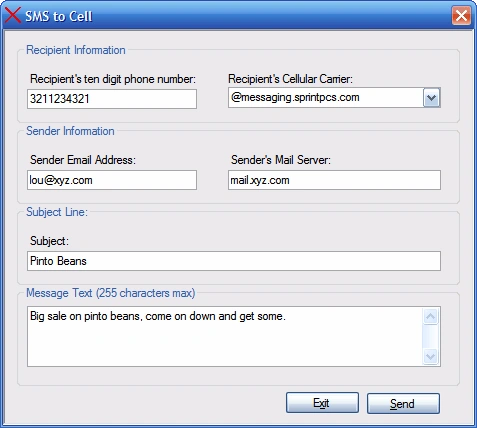
Figure 1: The Demonstration Application in Use
A quick review of the code will reveal that there is little going on there. The following imports were added to the top of the class:
Imports System
Imports System.Net.Mail
The System.Net.Mail import brings in the support necessary to transmit the messages generated using the application. Following the imports and the class declaration, there is a declarations region identified and within that region is a collection of private member variables; these private member variables are created in order to supply each of the required elements of the message.
#Region "Declarations"
' message elements
Private mMailServer As String
Private mTo As String
Private mFrom As String
Private mMsg As String
Private mSubject As String
#End Region
At this point, the only thing left to do in code is to write the following three methods:
#Region "Methods"
Private Sub frmMain_Load(ByVal sender As System.Object, ByVal e As
System.EventArgs) Handles MyBase.Load
' set up the carriers list - this is a fair list, you may wish to
' research the topic and add others, it took a while to generate this
' list...
cboCarrier.Items.Add("@itelemigcelular.com.br")
cboCarrier.Items.Add("@message.alltel.com")
cboCarrier.Items.Add("@message.pioneerenidcellular.com")
cboCarrier.Items.Add("@messaging.cellone-sf.com")
cboCarrier.Items.Add("@messaging.centurytel.net")
cboCarrier.Items.Add("@messaging.sprintpcs.com")
cboCarrier.Items.Add("@mobile.att.net")
cboCarrier.Items.Add("@mobile.cell1se.com")
cboCarrier.Items.Add("@mobile.celloneusa.com")
cboCarrier.Items.Add("@mobile.dobson.net")
cboCarrier.Items.Add("@mobile.mycingular.com")
cboCarrier.Items.Add("@mobile.mycingular.net")
cboCarrier.Items.Add("@mobile.surewest.com")
cboCarrier.Items.Add("@msg.acsalaska.com")
cboCarrier.Items.Add("@msg.clearnet.com")
cboCarrier.Items.Add("@msg.mactel.com")
cboCarrier.Items.Add("@msg.myvzw.com")
cboCarrier.Items.Add("@msg.telus.com")
cboCarrier.Items.Add("@mycellular.com")
cboCarrier.Items.Add("@mycingular.com")
cboCarrier.Items.Add("@mycingular.net")
cboCarrier.Items.Add("@mycingular.textmsg.com")
cboCarrier.Items.Add("@o2.net.br")
cboCarrier.Items.Add("@ondefor.com")
cboCarrier.Items.Add("@pcs.rogers.com")
cboCarrier.Items.Add("@personal-net.com.ar")
cboCarrier.Items.Add("@personal.net.py")
Rem YanPosted Jul 8, 2013, 1:00 PM
how can I make the authentication automatic, because gmail and other local email settings I tried requires authentication that's why it's not running. Thanks for your help..
Ankur GuptaPosted Apr 15, 2013, 3:52 AM
at System.Net.Mail.SmtpClient.Send(MailMessage,message) at SMS2Cell.frmMain.btnSend_Click(Object sender,EventArgs e) line 101 Failure Sending main Found
Ankur GuptaPosted Apr 15, 2013, 3:52 AM
at System.Net.Mail.SmtpClient.Send(MailMessage,message) at SMS2Cell.frmMain.btnSend_Click(Object sender,EventArgs e) line 101 Failure Sending main Found
Mansi ZaveriPosted Mar 25, 2013, 6:07 AM
its not working ! there is an error occured while its in running !