
For sending an email using Node.js, we need a node package called nodemailer.
Before this, we need to set up the Node environment. To download the latest version of Node, click this link and download.
Once downloaded, install the local environment and make it ready. For confirming the Node installation, open command prompt and type the following command and press enter.
node -v
We will get the currently installed version of Node.js. After completion of all this, follow the below steps.
- Install the nodemailer package using Node.js command prompt with this command.
npm install nodemailer –s
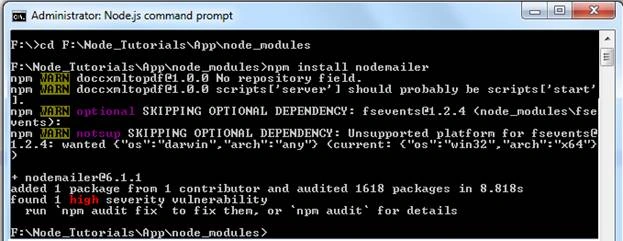
- Once installed, the package.json file will be modified with the dependencies of the nodemailer package.
- After installing nodemailer package, import the file to our node.js file which we are using for sending an email. For importing any node package, we need to use -
- var nodemailer = require('nodemailer');
- Here, we have created an instance for nodemailer package as nodemailer. Now, we need to use the createTransport method for assigning the host and credentials for authentication. Find the below one.
- var transporter = nodemailer.createTransport({
- host: 'mail.yourserver.com',
- auth: {
- user: [email protected]',
- pass: 'password'
- }
- })
- Once we're finished with the above things, we need to construct the list of objects which are required to send an email. Check below.
- var mailOptions = {
- from: emailFrom,
- to: emailTo,
- cc: emailCc,
- bcc: emailBcc,
- subject: emailSubject,
- html: emailContent
- };
Mushtaq M APosted May 18, 2019, 9:51 AM
Hi Karthik, i am facing an issue by using nodemailer with gmail account after hosting the app to server like Heroku.