

Background
In this the article we will learn how to send emails with attachment from an ASP.Net C# web application. Let us see step-by-step so beginners also can understand the logic to send emails from any provider. There are many techniques to
send emails from ASP.Net with attachments but in this article, we will use an SMTP server with the Gmail provider to send the emails.
Prerequisites
- Active internet connection.
- Email id of any provider such as Gmail, Yahoo or your organization to send emails.
Let us create the application to send the emails from ASP.Net as:
- "Start" - "All Programs" - "Microsoft Visual Studio 2010".
- "File" - "New Project" - "C#" - "Empty web site" (to avoid adding a master page).
- Provide the project a name, such as "Sending Emails with file" or another as you wish and specify the location.
- Then right-click on Solution Explorer and select "Add New Item" - "Default.aspx" page and one class file.
- Drag and drop three Text Boxes and two buttons and one file upload control to attach files.
- using System.Net.Mail;
- using System.Net;
Now, move to the web.config file and add the email credentials in the app setting section so in the future, if your email credentials are changed then their is no need to change them in your code file since you can simply the change values in your app settings of the web.config file. After adding the credentials, the app setting section of the web.config file looks as in the following:
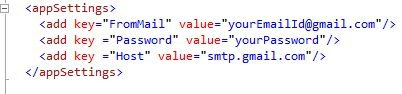
In the preceding app settings section, we are adding the sender email details credentials such as email id and word, so we can send the emails and later on we will read these values in the .cs file.
Note
In the preceding app Settings section add your valid email and word so emails can be sent from your email id to others.
now open default.aspx.cs page and create the function to send Email with attachment as
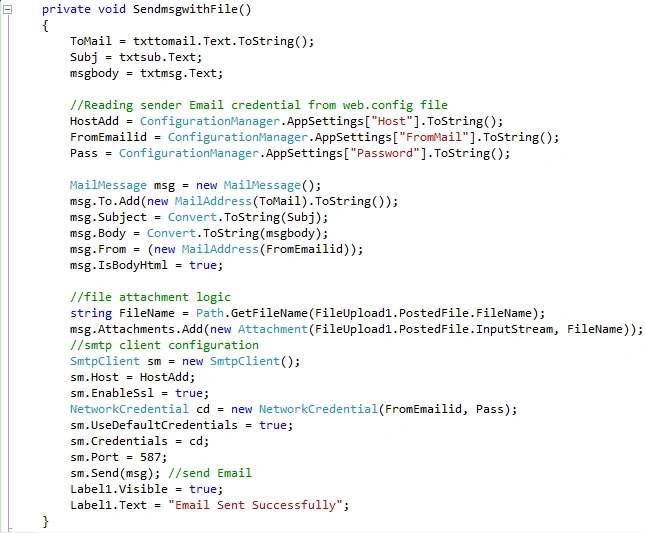
Now call the preceding function on the button send click of the "default.aspx.cs" page as in the following:
- protected void btnsend_Click(object sender, EventArgs e)
- {
- SendmsgwithFile();
- }
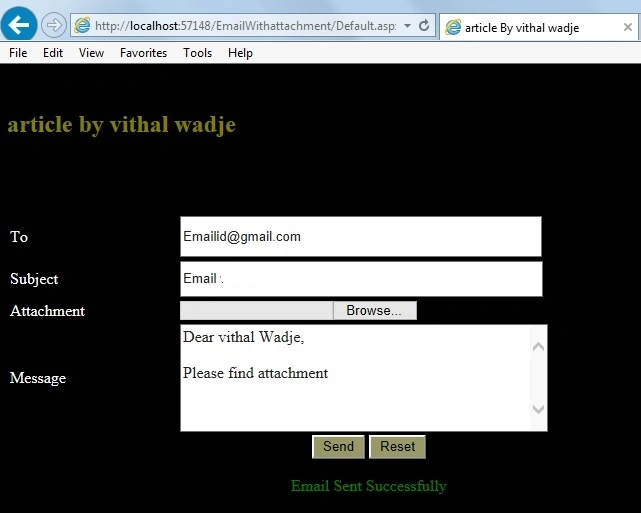
From the preceding example we learned how to send emails with attachment, I hope you have done it.
Note
- For detailed code please download the Zip file attached above.
- Don't forget to update the "Web.config" file for your email credential details.
Summary
We
learned how to send emails in ASP.Net with attachment. I hope this article is useful for all students and beginners. If you have any suggestion related to this article then please contact me.
Amirtha EstharPosted Jan 31, 2014, 3:57 AM
Hi i have used this code. But i got one error.That is in the sm.Send(msg); What shall i do.Can you help me please. Urgent.
Vithal WadjePosted Jan 6, 2014, 11:39 AM
thanks
chamara coorayPosted Jan 3, 2014, 1:03 AM
Great one..Thanx :)