

Introduction
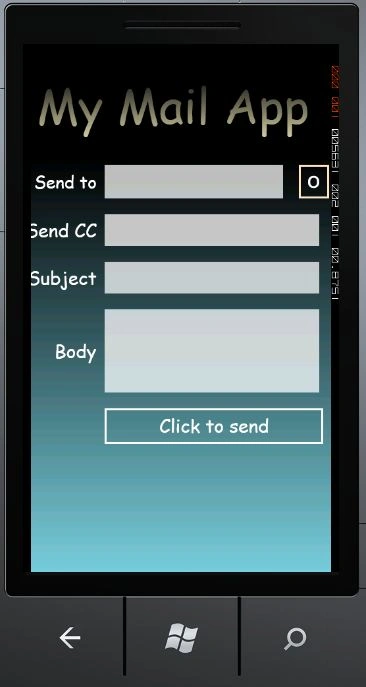
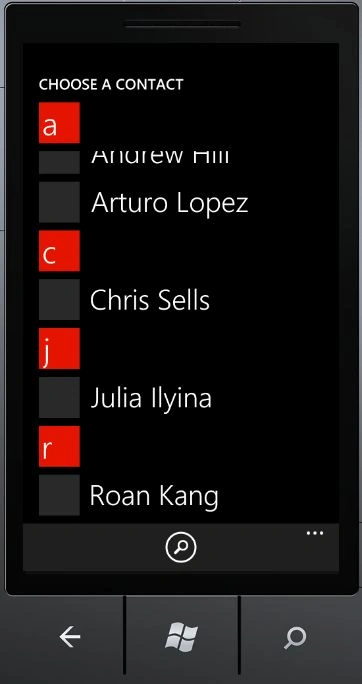
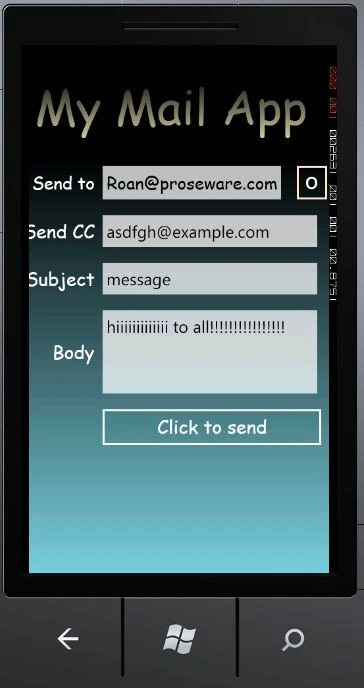
In this article we are going to explore how to send mail in Windows Phone 7. Further in details we will see how it is possible to do that with Windows Phone 7. In this we will working with some mail task of Windows Phone 7 named as EmailAddressChooserTask and EmailComposeTask. Further we are going to discuss how to choose email addresses and compose tasks to compose an mail to an email address. So to do that you should follow the steps given below.
Step 1: In this step first of all we have to open a Windows Phone application; let's see how you will open it.
- Go to Visual Studio 2010
- File->New->Project
- Select the template named Silverlight for Windows Phone
- Select the Windows Phone application
- Give it a name as you want.

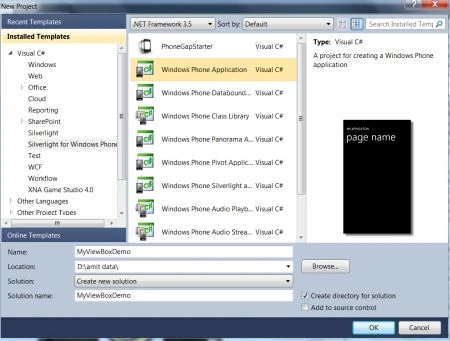
Step 2: In this step we will see that you have to add a namespace to your application named as given below.

Step 3: In this step we will see the button click event handler to send a message; inside it we will introduce some properties of EmailComposeTask class which is given below.
Code:
private void btnMail_Click(object sender, RoutedEventArgs e)
{
EmailComposeTask Myemail_Composetask = new EmailComposeTask();
Myemail_Composetask.To = txtTo.Text;
Myemail_Composetask.Cc = txtCC.Text;
Myemail_Composetask.Subject = txtSbj.Text;
Myemail_Composetask.Body = txtbd.Text;
Myemail_Composetask.Show();
}
Step 4: In this step we will see the complete code for the MainPage.xaml.cs file which is shown below.
Code:
using System;
using System.Collections.Generic;
using System.Linq;
using System.Net;
using System.Windows;
using System.Windows.Controls;
using System.Windows.Documents;
using System.Windows.Input;
using System.Windows.Media;
using System.Windows.Media.Animation;
using System.Windows.Shapes;
using Microsoft.Phone.Controls;
using Microsoft.Phone.Tasks;
namespace SendingMail
{
public partial class MainPage : PhoneApplicationPage
{
EmailAddressChooserTask emailAddresstask;// Constructor
public MainPage()
{
InitializeComponent();
this.emailAddresstask = new EmailAddressChooserTask();
this.emailAddresstask.Completed += new EventHandler<EmailResult>(emailAddresstask_Completed);
}
#region Events
//Open Contact button click
private void btnOpenContact_Click(object sender, RoutedEventArgs e)
{
emailAddresstask.Show();
}
//Email Address Chooser Task Completed
private void emailAddresstask_Completed(object sender, EmailResult e)
{
if (e.TaskResult == TaskResult.OK)
{
txtTo.Text = e.Email;
}
}
//Send mail button click
private void btnMail_Click(object sender, RoutedEventArgs e)
{
EmailComposeTask Myemail_Composetask = new EmailComposeTask();
Myemail_Composetask.To = txtTo.Text;
Myemail_Composetask.Cc = txtCC.Text;
Myemail_Composetask.Subject = txtSbj.Text;
Myemail_Composetask.Body = txtbd.Text;
Myemail_Composetask.Show();
}
#endregion
}
}
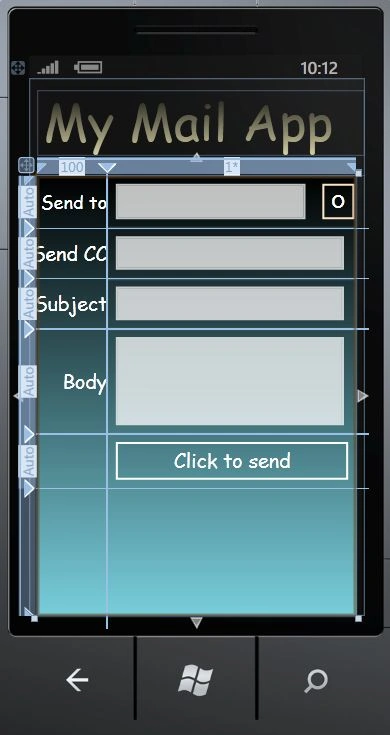
Step 5: In this step we will see the code for the MainPage.xaml file which is shown below.
Code:
<phone:PhoneApplicationPage
x:Class="SendingMail.MainPage"
xmlns="http://schemas.microsoft.com/winfx/2006/xaml/presentation"
xmlns:x="http://schemas.microsoft.com/winfx/2006/xaml"
xmlns:phone="clr-namespace:Microsoft.Phone.Controls;assembly=Microsoft.Phone"
xmlns:shell="clr-namespace:Microsoft.Phone.Shell;assembly=Microsoft.Phone"
xmlns:d="http://schemas.microsoft.com/expression/blend/2008"
xmlns:mc="http://schemas.openxmlformats.org/markup-compatibility/2006"
mc:Ignorable="d" d:DesignWidth="480" d:DesignHeight="768"
FontFamily="{StaticResource PhoneFontFamilyNormal}"
FontSize="{StaticResource PhoneFontSizeNormal}"
Foreground="{StaticResource PhoneForegroundBrush}"
SupportedOrientations="Portrait" Orientation="Portrait"
shell:SystemTray.IsVisible="True">
<!--LayoutRoot is the root grid where all page content is placed-->
<Grid x:Name="LayoutRoot">
<Grid.RowDefinitions>
<RowDefinition Height="Auto"/>
<RowDefinition Height="*"/>
</Grid.RowDefinitions>
<!--TitlePanel contains the name of the application and page title-->
<StackPanel x:Name="TitlePanel" Grid.Row="0" Margin="12,17,0,28">
<TextBlock x:Name="PageTitle" Text="My Mail App" Margin="9,-7,0,0" Style="{StaticResource PhoneTextTitle1Style}" FontFamily="Comic Sans MS">
<TextBlock.Foreground>
<LinearGradientBrush EndPoint="0.5,1" StartPoint="0.5,0">
<GradientStop Color="Black" Offset="0" />
Join the conversation! Your thoughts help the community grow.