
Introduction
As search engines are playing a major role in the number of visits to the site, it is definitely advisable to keep your site optimized to the search engines. There are multiple factors that impact the site to be properly search optimized. One of them is the URL for the site.
It’s better to have an URL which is human readable and easily understandable than an URL which is not.
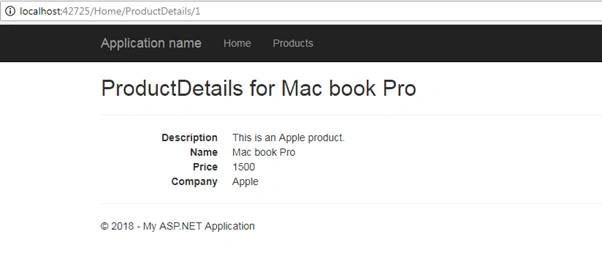
Bad URL - http://localhost:42725/Home/ProductDetails/1
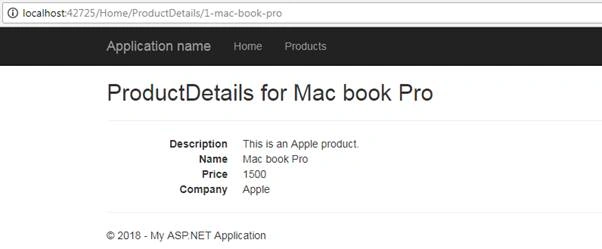
Good URL - http://localhost:42725/Home/ProductDetails/1-mac-book-pro
In the case of a good URL, the user will be able to get an idea of the page itself, unlike the bad one.
Let’s get started to create SEO (Search Engine Optimized) friendly URL using MVC.
Details
MVC is having Default route like “{controller}/{action}/{id}” where the “id” is normally a number which acts as a key for the record. But to ensure the URL to be SEO friendly we need to change the “id” to contain a name. There can be multiple records with the same name existing in the database. That creates an issue while using a name of a record as “id” or key.
Here, I will be using the name and id combination to get the uniqueness for the view.
How to modify the URL?
- Let’s have a method which will create an URL with combination of {id}-{name}.
- public string GenerateItemNameAsParam()
- {
- string phrase = string.Format("{0}-{1}", Id, Name);// Creates in the specific pattern
- string str = GetByteArray(phrase).ToLower();
- str = Regex.Replace(str, @"[^a-z0-9\s-]", "");// Remove invalid characters for param
- str = Regex.Replace(str, @"\s+", "-").Trim(); // convert multiple spaces into one hyphens
- str = str.Substring(0, str.Length <= 30 ? str.Length : 30).Trim(); //Trim to max 30 char
- str = Regex.Replace(str, @"\s", "-"); // Replaces spaces with hyphens
- return str;
- }
- private string GetByteArray(string text)
- {
- byte[] bytes = System.Text.Encoding.GetEncoding("Cyrillic").GetBytes(text);
- return System.Text.Encoding.ASCII.GetString(bytes);
- }
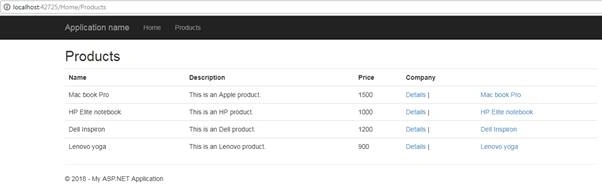
- We need to modify the actionlink to point to the SEO friendly URL.Here, you can observe that we are invoking the GenerateItemNameAsParam method as “id” to create the URL.
- <a href="@Url.Action("ProductDetails", "Home", new { id = item.GenerateItemNameAsParam() })">@item.Name</a>
Bhavesh PatelPosted Sep 7, 2019, 2:02 AM
Can also refer this link directly from route setting.It's very help full for me .. .......................... Can also refer this link directly from route setting.It's very help full for me .. ............................. http://freshmindcode.com/?qa=104/seo-friendly-url-in-asp-net-mvc http://freshmindcode.com/?qa=104/seo-friendly-url-in-asp-net-mvc
Jignesh PrajapatiPosted Aug 7, 2019, 5:58 AM
Public string GenerateSlug(string Name) { string phrase = string.Format("{0}", Name); string str = RemoveAccent(phrase).ToLower(); // invalid chars str = Regex.Replace(str, @"[^a-z0-9\s-]", ""); // convert multiple spaces into one space str = Regex.Replace(str, @"\s+", " ").Trim(); // cut and trim str = str.Substring(0, str.Length <= 45 ? str.Length : 45).Trim(); str = Regex.Replace(str, @"\s", "-"); // hyphens return str; } private string RemoveAccent(string text) { byte[] bytes = System.Text.Encoding.GetEncoding("Cyrillic").GetBytes(text); return System.Text.Encoding.ASCII.GetString(bytes); } public ActionResult PostBlogDetails(string BlogId) { var blogModel = _BlogService.GetBlogById(Convert.ToInt64(BlogId)); Session["BlogId"] = BlogId; return RedirectToAction("BlogDetails/" + GenerateSlug(blogModel.Title)); } public ActionResult BlogDetails() { long BlogId = Convert.ToInt64(Session["BlogId"]); ViewBag.Description = "Create an account with RubikQuest, hopeful students will have access to the most powerful datamart ever assembled for higher education in USA"; ViewBag.Keywords = "Education in USA"; LoginViewModel model = new LoginViewModel(); var blogModel = _BlogService.GetBlogById(Convert.ToInt64(BlogId)); model.Title = blogModel.Title; model.Content = blogModel.Content; model.BlogImagePath = blogModel.BlogImagePath; model.BlogId = blogModel.BlogId; model.IsActive = blogModel.IsActive; model.PublishedOn = blogModel.PublishedOn; ViewBag.RecentPost = _BlogService.GetBlogList(10, 1, ""); return View(model); }
Jignesh PrajapatiPosted Aug 7, 2019, 5:57 AM
Public string GenerateSlug(string Name) { string phrase = string.Format("{0}", Name); string str = RemoveAccent(phrase).ToLower(); // invalid chars str = Regex.Replace(str, @"[^a-z0-9\s-]", ""); // convert multiple spaces into one space str = Regex.Replace(str, @"\s+", " ").Trim(); // cut and trim str = str.Substring(0, str.Length <= 45 ? str.Length : 45).Trim(); str = Regex.Replace(str, @"\s", "-"); // hyphens return str; } private string RemoveAccent(string text) { byte[] bytes = System.Text.Encoding.GetEncoding("Cyrillic").GetBytes(text); return System.Text.Encoding.ASCII.GetString(bytes); } public ActionResult PostBlogDetails(string BlogId) { var blogModel = _BlogService.GetBlogById(Convert.ToInt64(BlogId)); Session["BlogId"] = BlogId; return RedirectToAction("BlogDetails/" + GenerateSlug(blogModel.Title)); } public ActionResult BlogDetails() { long BlogId = Convert.ToInt64(Session["BlogId"]); ViewBag.Description = "Create an account with RubikQuest, hopeful students will have access to the most powerful datamart ever assembled for higher education in USA"; ViewBag.Keywords = "Education in USA"; LoginViewModel model = new LoginViewModel(); var blogModel = _BlogService.GetBlogById(Convert.ToInt64(BlogId)); model.Title = blogModel.Title; model.Content = blogModel.Content; model.BlogImagePath = blogModel.BlogImagePath; model.BlogId = blogModel.BlogId; model.IsActive = blogModel.IsActive; model.PublishedOn = blogModel.PublishedOn; ViewBag.RecentPost = _BlogService.GetBlogList(10, 1, ""); return View(model); }
Jignesh PrajapatiPosted Aug 7, 2019, 5:57 AM
I have done with without routing below is code
Inżynier UmairPosted Jun 25, 2019, 3:59 AM
I have implemented your code and its working perfectly fine. But I have 1 problem here in the url : http://localhost:42725/Home/ProductDetails/1-mac-book-pro ... in the given URL "1-mac-book-pro" here "1" is the product Id so if when i change that value manually from the url it send me to that id and display its content with the same url ie "2-mac-book-pro".. so how do i remove that Id option from the url and get only "mac-book-pro" ??
Adnan SarwarPosted Aug 20, 2018, 3:21 PM
It throws me HTTP Error 400.0 - Bad Request. Could you please help?
Vikas SrivastavaPosted Jul 23, 2018, 12:49 AM
Its really awesome about SEO Friendly
Hiten PandyaPosted Jul 22, 2018, 11:32 PM
Good article. Keep sharing.
Jignesh KumarPosted Jul 22, 2018, 11:50 AM
It's informative article. Thanks for sharing.
Hadshana KamalanathanPosted Jul 20, 2018, 7:34 PM
Nice.. Thanks for sharing