

Introduction
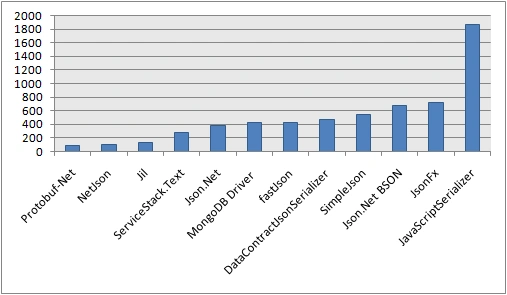
Protobuf-net is a faster .NET library for serialization and deserialization based on Google's Protocol Buffers. It is designed to be a language-neutral, platform-neutral, extensible way of serializing structured data for use in communications protocols and efficient data storage (far smaller than xml). You can define how you want your data to be structured once; then, you can use specially generated source code to easily write and read your structured data to and from a variety of data streams and using a variety of languages. It allows you to serialize your .NET objects efficiently and easily. It is compatible with .NET 2.0/3.0/3.5/4.0, .NET CF 2.0/3.5, Mono 2.x, Silverlight, etc.
It contains a few attributes which have significance in serializing an object:
- [ProtoContract]: ProtoContract is a sealed class that inherits from the Attribute class. It needs to be defined above a class and indicates that this class will serialize.
- [ProtoMember(N)]: ProtoMember is a sealed class that inherits from the Attribute class. It needs to be defined above a property/field and indicate that this field will serialize. Here, N represents the number in which order it will serialize. It will start numbering at 1 even if your class uses ProtoMember(N) explicitly in some fields because it serializes in alphabetical order.
- [ProtoIgnore]: ProtoContract is a sealed class that inherits from the Attribute class. It needs to be defined above a property/field and indicates that this field will ignore (won’t serialize) when serialization occurs.
Protobuf-net is not compatible with the standard .NET serialization system, which means,
- It ignores the [Serializable] attribute.
- It does not support custom serialization using ISerializable.
We will discuss the following points,
- Installation of protobuf-net.
- Serializing an object.
- Deserialize byte array to an object.
- Advantages of protobuf-net.
Installation
To install protobuf-net, you need to use NuGet Package Manager, which provides the latest version of the dll. Follow Figure 1, which shows how to install the dll.

Figure 1. Install through Nuget Package Manager
or
TOOLS -> Library Package Manager -> Package Manager Console.
Install-Package protobuf-net
Note. If you are using VS 2012/2013 or lower, then you need to provide a version in command.
Install-Package protobuf-net -Version 2.0.0.668.
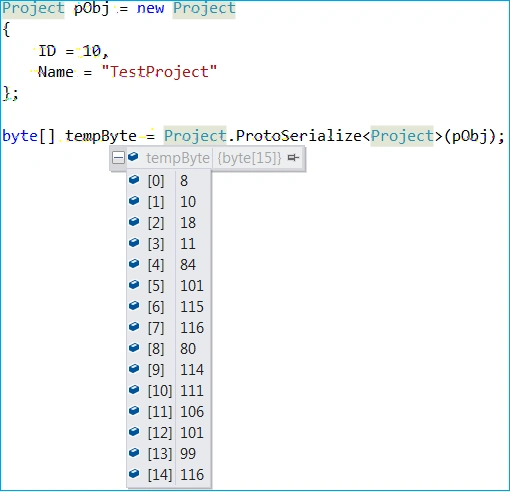
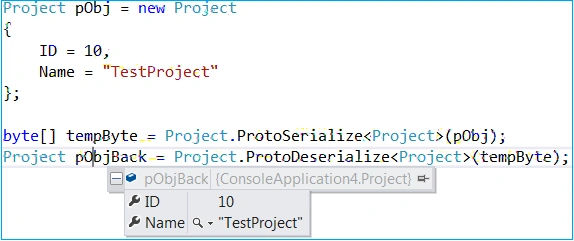
Before starting the demonstration, we need to decorate the entity. Let's say Project is the entity that has two fields, ID and Name. The ProtoContract attribute defines to make a class serializable, and Protomember defines to make members/properties serializable.
Marcelo SilvaPosted Oct 6, 2021, 8:40 AM
Severity Code Description Project File Line Suppression StateError CS0117 'Serializer' does not contain a definition for 'Serialize' ProtoBuf serialization C:\Users\silva\OneDrive\Desktop\learning C#\ProtoBuf serialization\Project.cs 33 Active. please explain where the serialize and deserialize methods are coming from??
Alfred TarngPosted Jul 22, 2020, 9:27 AM
The typo here is really bothering me and shows up on google searches as the top result: "[ProtoIgnore]ProtoContract is a sealed class which inherits from Attribute class. " Where it uses ProtoContract instead of ProtoIgnore
sathiya narayananPosted Mar 6, 2020, 1:46 PM
Is it possible to serialise methods as services using protobuf? Your example shows only properties serialisation using protobuf
suresh sPosted Nov 17, 2017, 1:13 AM
Hi , Is this work for larger json file ( >600MB) to deserialize?. I guess memory stream will through OutOf.Memory exception isn't it ?
Jayant SatkarPosted Apr 18, 2017, 1:51 AM
Syntax = "proto2";package Atos.ReaderCommunicator; option csharp_namespace = "Atos.ReaderCommunicator"; message DataPacket { required uint32 readerId=1; optional uint32 ack=2;// 0xAA required uint32 cmdType=3; optional uint32 configType=4; repeated UploadUsers uploadusers=5; repeated DownloadSwipes downloadSwipes=6; optional string extraData=7; optional uint32 subCmdType=8; repeated Configuration cfg=9; repeated ScsConfiguration scsCfg=10; } I've compiled this .proto file using protoc.exe, I got Aadhar.cs class. But I'm unable to use fields in DataPacket as error is getting from Protection level. If you have any project with Protobuff, Please share it.
Jayant SatkarPosted Apr 18, 2017, 1:49 AM
Hi Manas, syntax = "proto2";package Atos.ReaderCommunicator; option csharp_namespace = "Atos.ReaderCommunicator"; message DataPacket { required uint32 readerId=1; optional uint32 ack=2;// 0xAA required uint32 cmdType=3; optional uint32 configType=4; repeated UploadUsers uploadusers=5; repeated DownloadSwipes downloadSwipes=6; optional string extraData=7; optional uint32 subCmdType=8; repeated Configuration cfg=9; repeated ScsConfiguration scsCfg=10; }
Jayant SatkarPosted Apr 17, 2017, 6:59 AM
Many bugs in this programm.
Jayant SatkarPosted Apr 11, 2017, 2:17 AM
I'm unable to compile code. error.: not getting reference for ProtoMember