
Server side pagination is very useful when we are dealing with huge amounts of data. At that time client side pagination will take a long time to get all the data at the same time, so it's better to make a Server call on every page request.
We are going to see all employee data with pagination and we will make a Server call on every page request.
Also, we are going to use Web API for HTTP Service call and will use ADO.NET to access the data from the database. Our database will be SQL Server and we are using AngularJS and ui-bootstrap library to make UI ready.
Let's start with a sample Application for better understanding. We are going to use Visual Studio 2015 for this example.
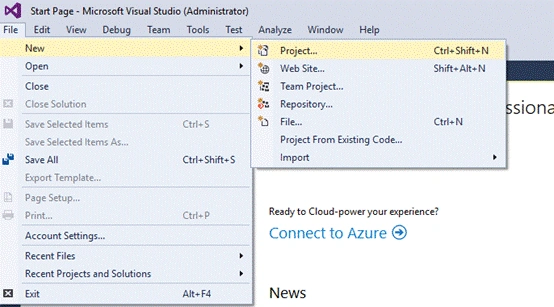
First, open the Visual Studio and click File -> New - > Project, as shown below.
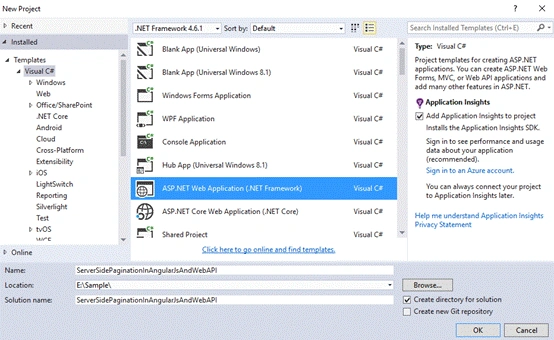
Now, select ASP.NET Web Application and enter the name as ServerSidePaginationInAngularJsAndWebAPI and click OK, as shown below.
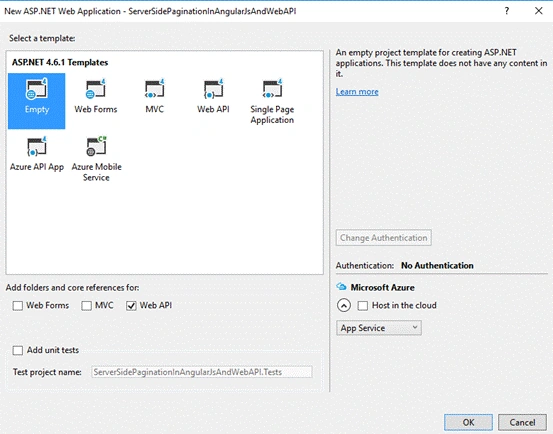
Now, select Empty from a template and check Web API from check box list and click OK, as shown below.
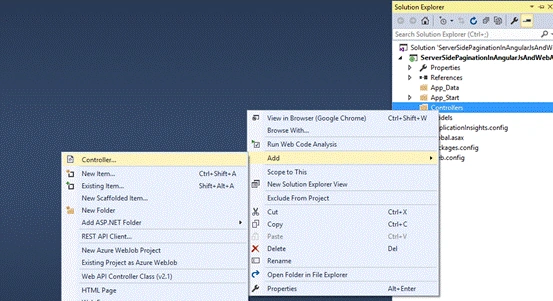
Now, our Web API project is ready. Right click on Controller folder and click Add -> Controller from Solution Explorer, as shown below.
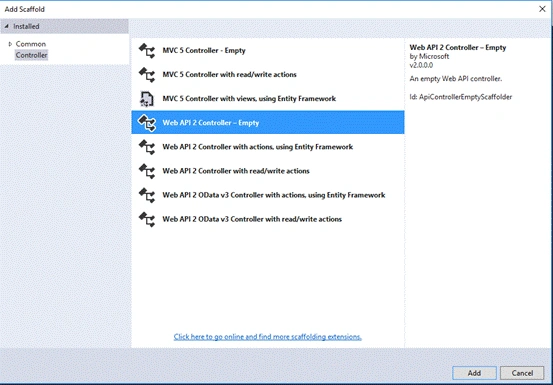
Select Web API 2 Controller - Empty and click Add button, as shown below.
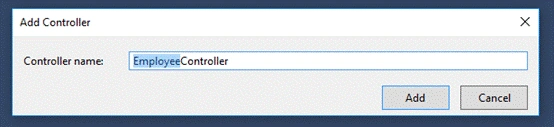
Give the Controller name as EmployeeController and click Add button, as shown below.
Our Controller is ready for writing HTTP action methods. We will write GET Action method later in this article.
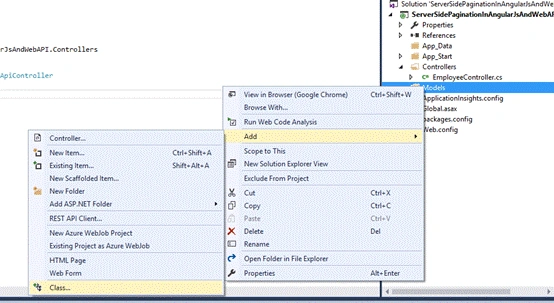
Now, right click on Models folder and add click Add -> Class, as shown below.
Give the class name Employee.cs, as shown below.
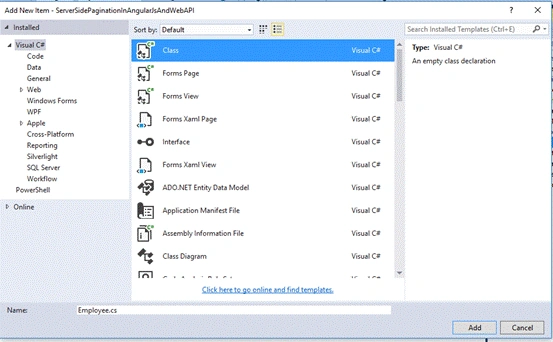
Write all the properties in Employee.cs class, as shown below.
- namespace ServerSidePaginationInAngularJsAndWebAPI.Models
- {
- public class Employee
- {
- public string Id { get; set; }
- public string Name { get; set; }
- public string Email { get; set; }
- public string Address { get; set; }
- }
- }
In a similar way, add one more class as EmployeeList.cs to get the employee list and total count for pagination details, as shown below.
- using System.Collections.Generic;
- namespace ServerSidePaginationInAngularJsAndWebAPI.Models
- {
- public class EmployeeList
- {
- public List<Employee> employees { get; set; }
- public string totalCount { get; set; }
- }
- }
Now, add one more folder for database operation as DBOperation and inside this folder, add class as EmployeeInfo.cs and write the code snippet given below.
- using System;
- using System.Collections.Generic;
- using System.Data.SqlClient;
- using System.Data;
- using System.Configuration;
- using ServerSidePaginationInAngularJsAndWebAPI.Models;
- namespace ServerSidePaginationInAngularJsAndWebAPI.DBOperation
- {
- public class EmployeeInfo
- {
- public EmployeeList GetEmployees(int pageIndex, int pageSize)
- {
- EmployeeList employeeList = new EmployeeList();
- using (SqlConnection connection = new SqlConnection(ConfigurationManager.ConnectionStrings["conn"].ConnectionString))
- {
- SqlCommand cmd = new SqlCommand("GetEmployees", connection);
- cmd.Parameters.Add("@PageIndex", SqlDbType.Int).Value = pageIndex;
- cmd.Parameters.Add("@pageSize", SqlDbType.Int).Value = pageSize;
- cmd.CommandType = CommandType.StoredProcedure;
- try
- {
- connection.Open();
- SqlDataReader dr = cmd.ExecuteReader();
- List<Employee> listEmp = new List<Employee>();
- while (dr.Read())
- {
- Employee emp = new Employee();
- emp.Id = dr["id"].ToString();
- emp.Name = dr["name"].ToString();
- emp.Email = dr["email"].ToString();
- emp.Address = dr["address"].ToString();
- listEmp.Add(emp);
- }
- dr.NextResult();
- while (dr.Read())
- {
- employeeList.totalCount = dr["totalCount"].ToString();
- }
- employeeList.employees = listEmp;
- }
- catch (Exception ex)
- {
- throw;
- }
- }
- return employeeList;
- }
- }
- }
Inside this class, we are using ADO.NET to make a SQL Server database call and retrieve all employee information and the total count of the employees.
Now, time to write our GET Action in the controller has come, where you can get the employees information from GetEmployees methods.
The code snippet for Web API Controller is given below.
- using System.Web.Http;
- using ServerSidePaginationInAngularJsAndWebAPI.Models;
- using ServerSidePaginationInAngularJsAndWebAPI.DBOperation;
- namespace ServerSidePaginationInAngularJsAndWebAPI.Controllers
- {
- public class EmployeeController : ApiController
- {
- public EmployeeList GetEmployees(int pageIndex, int pageSize)
- {
- EmployeeInfo empInfo = new EmployeeInfo();
- EmployeeList empList = empInfo.GetEmployees(pageIndex, pageSize);
- return empList;
- }
- }
- }
In the code given above, we are using two parameters as pageIndex and pageSize to get the current page information and a total number of employees to be displayed respectively.
Now, it’s time to create a database, table and stored procedure.
Create a database
We are going to create a database named as sample.
The query is given below to create a database in our SQL Server.
- USE [master]
- GO
- CREATE DATABASE [sample]
- CONTAINMENT = NONE
- ON PRIMARY
- ( NAME = N'sample', FILENAME = N'C:\Program Files\Microsoft SQL Server\MSSQL13.SQLEXPRESS\MSSQL\DATA\sample.mdf' , SIZE = 8192KB , MAXSIZE = UNLIMITED, FILEGROWTH = 65536KB )
- LOG ON
- ( NAME = N'sample_log', FILENAME = N'C:\Program Files\Microsoft SQL Server\MSSQL13.SQLEXPRESS\MSSQL\DATA\sample_log.ldf' , SIZE = 8192KB , MAXSIZE = 2048GB , FILEGROWTH = 65536KB )
- GO
- ALTER DATABASE [sample] SET COMPATIBILITY_LEVEL = 130
- GO
- IF (1 = FULLTEXTSERVICEPROPERTY('IsFullTextInstalled'))
- begin
- EXEC [sample].[dbo].[sp_fulltext_database] @action = 'enable'
- end
- GO
- ALTER DATABASE [sample] SET ANSI_NULL_DEFAULT OFF
- GO
- ALTER DATABASE [sample] SET ANSI_NULLS OFF
- GO
- ALTER DATABASE [sample] SET ANSI_PADDING OFF
- GO
- ALTER DATABASE [sample] SET ANSI_WARNINGS OFF
- GO
- ALTER DATABASE [sample] SET ARITHABORT OFF
- GO
- ALTER DATABASE [sample] SET AUTO_CLOSE OFF
- GO
- ALTER DATABASE [sample] SET AUTO_SHRINK OFF
- GO
- ALTER DATABASE [sample] SET AUTO_UPDATE_STATISTICS ON
- GO
- ALTER DATABASE [sample] SET CURSOR_CLOSE_ON_COMMIT OFF
- GO
- ALTER DATABASE [sample] SET CURSOR_DEFAULT GLOBAL
- GO
- ALTER DATABASE [sample] SET CONCAT_NULL_YIELDS_NULL OFF
- GO
- ALTER DATABASE [sample] SET NUMERIC_ROUNDABORT OFF
- GO
- ALTER DATABASE [sample] SET QUOTED_IDENTIFIER OFF
- GO
- ALTER DATABASE [sample] SET RECURSIVE_TRIGGERS OFF
- GO
- ALTER DATABASE [sample] SET DISABLE_BROKER
- GO
- ALTER DATABASE [sample] SET AUTO_UPDATE_STATISTICS_ASYNC OFF
- GO
- ALTER DATABASE [sample] SET DATE_CORRELATION_OPTIMIZATION OFF
- GO
- ALTER DATABASE [sample] SET TRUSTWORTHY OFF
- GO
- ALTER DATABASE [sample] SET ALLOW_SNAPSHOT_ISOLATION OFF
- GO
- ALTER DATABASE [sample] SET PARAMETERIZATION SIMPLE
- GO
- ALTER DATABASE [sample] SET READ_COMMITTED_SNAPSHOT OFF
- GO
- ALTER DATABASE [sample] SET HONOR_BROKER_PRIORITY OFF
- GO
- ALTER DATABASE [sample] SET RECOVERY SIMPLE
- GO
- ALTER DATABASE [sample] SET MULTI_USER
- GO
- ALTER DATABASE [sample] SET PAGE_VERIFY CHECKSUM
- GO
- ALTER DATABASE [sample] SET DB_CHAINING OFF
- GO
- ALTER DATABASE [sample] SET FILESTREAM( NON_TRANSACTED_ACCESS = OFF )
- GO
- ALTER DATABASE [sample] SET TARGET_RECOVERY_TIME = 60 SECONDS
- GO
- ALTER DATABASE [sample] SET DELAYED_DURABILITY = DISABLED
- GO
- ALTER DATABASE [sample] SET QUERY_STORE = OFF
- GO
- USE [sample]
- GO
- ALTER DATABASE SCOPED CONFIGURATION SET MAXDOP = 0;
- GO
- ALTER DATABASE SCOPED CONFIGURATION FOR SECONDARY SET MAXDOP = PRIMARY;
- GO
- ALTER DATABASE SCOPED CONFIGURATION SET LEGACY_CARDINALITY_ESTIMATION = OFF;
- GO
- ALTER DATABASE SCOPED CONFIGURATION FOR SECONDARY SET LEGACY_CARDINALITY_ESTIMATION = PRIMARY;
- GO
- ALTER DATABASE SCOPED CONFIGURATION SET PARAMETER_SNIFFING = ON;
- GO
- ALTER DATABASE SCOPED CONFIGURATION FOR SECONDARY SET PARAMETER_SNIFFING = PRIMARY;
- GO
- ALTER DATABASE SCOPED CONFIGURATION SET QUERY_OPTIMIZER_HOTFIXES = OFF;
- GO
- ALTER DATABASE SCOPED CONFIGURATION FOR SECONDARY SET QUERY_OPTIMIZER_HOTFIXES = PRIMARY;
- GO
- ALTER DATABASE [sample] SET READ_WRITE
- GO
Creating a table
Now, we are going to create a table named as an employee.
The query is given below to create a table in the database.
- USE [sample]
- GO
- SET ANSI_NULLS ON
- GO
- SET QUOTED_IDENTIFIER ON
- GO
- CREATE TABLE [dbo].[employee](
- [id] [int] IDENTITY(1,1) NOT NULL,
- [name] [nvarchar](50) NULL,
- [email] [nvarchar](max) NULL,
- [address] [nvarchar](max) NULL,
- CONSTRAINT [PK_employee] PRIMARY KEY CLUSTERED
- (
- [id] ASC
- )WITH (PAD_INDEX = OFF, STATISTICS_NORECOMPUTE = OFF, IGNORE_DUP_KEY = OFF, ALLOW_ROW_LOCKS = ON, ALLOW_PAGE_LOCKS = ON) ON [PRIMARY]
- ) ON [PRIMARY] TEXTIMAGE_ON [PRIMARY]
- GO
Now, insert dummy values in our created employee table, as shown below.
- USE [sample]
- GO
- SET IDENTITY_INSERT [dbo].[employee] ON
- INSERT [dbo].[employee] ([id], [name], [email], [address]) VALUES (1, N'Vivek', N'[email protected]', N'Hyderabad')
- INSERT [dbo].[employee] ([id], [name], [email], [address]) VALUES (2, N'Ranjeet', N'[email protected]', N'Hyderabad')
- INSERT [dbo].[employee] ([id], [name], [email], [address]) VALUES (3, N'Sunil', N'[email protected]', N'Hyderabad')
- INSERT [dbo].[employee] ([id], [name], [email], [address]) VALUES (4, N'Ganesh', N'[email protected]', N'Hyderabad')
- INSERT [dbo].[employee] ([id], [name], [email], [address]) VALUES (5, N'Subhadip', N'[email protected]', N'Hyderabad')
- INSERT [dbo].[employee] ([id], [name], [email], [address]) VALUES (6, N'Vijay', N'[email protected]', N'Hyderabad')
- INSERT [dbo].[employee] ([id], [name], [email], [address]) VALUES (7, N'Gajanan', N'[email protected]', N'Hyderabad')
- INSERT [dbo].[employee] ([id], [name], [email], [address]) VALUES (8, N'Santosh', N'[email protected]', N'Hyderabad')
- INSERT [dbo].[employee] ([id], [name], [email], [address]) VALUES (9, N'Praveen', N'[email protected]', N'Hyderabad')
- INSERT [dbo].[employee] ([id], [name], [email], [address]) VALUES (10, N'Suresh', N'[email protected]', N'Hyderabad')
- INSERT [dbo].[employee] ([id], [name], [email], [address]) VALUES (11, N'Priya', N'[email protected]', N'Hyderabad')
- INSERT [dbo].[employee] ([id], [name], [email], [address]) VALUES (12, N'Sharath', N'[email protected]', N'Hyderabad')
- INSERT [dbo].[employee] ([id], [name], [email], [address]) VALUES (13, N'Nishu', N'[email protected]', N'Hyderabad')
- INSERT [dbo].[employee] ([id], [name], [email], [address]) VALUES (14, N'Mukesh', N'[email protected]', N'Hyderabad')
- INSERT [dbo].[employee] ([id], [name], [email], [address]) VALUES (15, N'Raghavendra', N'[email protected]', N'Hyderabad')
- INSERT [dbo].[employee] ([id], [name], [email], [address]) VALUES (16, N'Ashish', N'[email protected]', N'Hyderabad')
- INSERT [dbo].[employee] ([id], [name], [email], [address]) VALUES (17, N'Saroj', N'[email protected]', N'Hyderabad')
- INSERT [dbo].[employee] ([id], [name], [email], [address]) VALUES (18, N'Sarthak', N'[email protected]', N'Hyderabad')
- INSERT [dbo].[employee] ([id], [name], [email], [address]) VALUES (19, N'Rajeev', N'[email protected]', N'Hyderabad')
- INSERT [dbo].[employee] ([id], [name], [email], [address]) VALUES (20, N'Kaveri', N'[email protected]', N'Hyderabad')
- INSERT [dbo].[employee] ([id], [name], [email], [address]) VALUES (21, N'Sunil', N'[email protected]', N'Hyderabad')
- INSERT [dbo].[employee] ([id], [name], [email], [address]) VALUES (22, N'Nagalaxmi', N'[email protected]', N'Hyderabad')
- INSERT [dbo].[employee] ([id], [name], [email], [address]) VALUES (23, N'Anusha', N'[email protected]', N'Hyderabad')
- INSERT [dbo].[employee] ([id], [name], [email], [address]) VALUES (24, N'Vicky', N'[email protected]', N'Hyderabad')
- INSERT [dbo].[employee] ([id], [name], [email], [address]) VALUES (25, N'Anu', N'[email protected]', N'Hyderabad')
- INSERT [dbo].[employee] ([id], [name], [email], [address]) VALUES (26, N'Divya', N'[email protected]', N'Hyderabad')
- SET IDENTITY_INSERT [dbo].[employee] OFF
Create a stored procedure
We are going to use GetEmployees stored procedure to get all the employee information from Web API.
The script is given below to create a stored procedure.
- USE [sample]
- GO
- SET ANSI_NULLS ON
- GO
- SET QUOTED_IDENTIFIER ON
- GO
- CREATE Procedure [dbo].[GetEmployees]
- (
- @PageIndex INT,
- @pageSize INT
- )
- As
- Begin
- SELECT * FROM employee ORDER BY id OFFSET @PageSize*(@PageIndex-1) ROWS FETCH NEXT @PageSize ROWS ONLY;
- SELECT count(*) as totalCount FROM employee;
- End
- GO
Now, It’s time for UI coding.
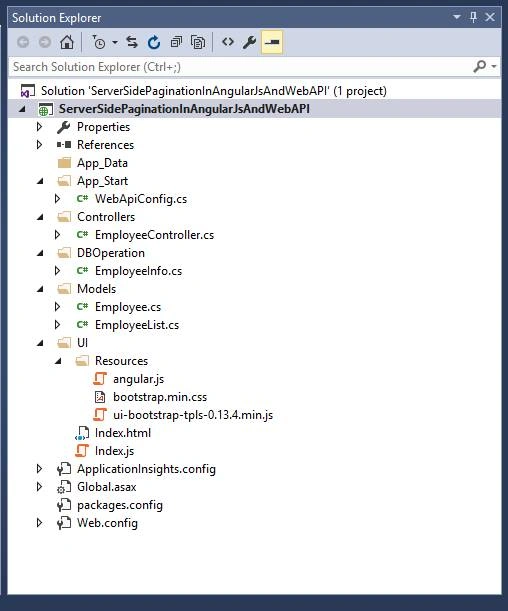
Right click on the project from Solution Explorer and click add -> New Folder and give the name as UI.
Similarly, inside the UI folder, create one more folder named as Resources and keep the angular.js, ui-bootstrap-tpls-0.13.4.min.js and bootstrap.min.css files for our use.
Create HTML page named as Index.html and JavaScript file named as Index.js files.
Our solution structure looks, as shown below.

Here, the complete code for index.html page is given below.
Complete code for HTML
- <!DOCTYPE html>
- <html>
- <head>
- <title>Employee List</title>
- <script src="Resources/angular.js"></script>
- <script src="Resources/ui-bootstrap-tpls-0.13.4.min.js"></script>
- <script src="Index.js"></script>
- <link href="Resources/bootstrap.min.css" rel="stylesheet" />
- </head>
- <body>
- <div ng-app="employeeApp" ng-controller="employeeCtrl">
- <div class="container">
- <div class="row">
- <h1>Employee List</h1>
- <div class="table-responsive">
- <table class="table table-striped table-bordered table-hover tabel-condensed">
- <thead>
- <tr>
- <th>Id</th>
- <th>Name</th>
- <th>Email</th>
- <th>Address</th>
- </tr>
- </thead>
- <tbody>
- <tr ng-repeat="employee in employees">
- <td>{{employee.Id}}</td>
- <td>{{employee.Name}}</td>
- <td>{{employee.Email}}</td>
- <td>{{employee.Address}}</td>
- </tr>
- </tbody>
- <tfoot>
- <tr>
- <td align="center" colspan="6 ">
- <span class="form-group pull-left page-size form-inline">
- <select id="ddlPageSize" class="form-control control-color"
- ng-model="pageSizeSelected"
- ng-change="changePageSize()">
- <option value="5">5</option>
- <option value="10">10</option>
- <option value="25">25</option>
- <option value="50">50</option>
- </select>
- </span>
- <div class="pull-right">
- <pagination total-items="totalCount" ng-change="pageChanged()" items-per-page="pageSizeSelected" direction-links="true" ng-model="pageIndex" max-size="maxSize" class="pagination" boundary-links="true" rotate="false" num-pages="numPages"></pagination>
- <a class="btn btn-primary">Page: {{pageIndex}} / {{numPages}}</a>
- </div>
- </td>
- </tr>
- </tfoot>
- </table>
- </div>
- </div>
- </div>
- </div>
- </body>
- </html>
In the code given above, the main thing is that we have to understand is pagination element and its attributes.
Below is the brief description for the attributes of pagination element.
- total-items - Total number of items in all the pages.
- items-per-page (Defaults: 10) - Maximum number of items per page. A value less than one indicates all the items on one page.
- max-size (Defaults: null) - Limit number for pagination display number.
- ng-change - It can be used together with ng-model to call a function whenever the page changes.
- num-pages - It is read-only and an optional expression assigns the total number of pages to display.
- rotate (Defaults: true) - Whether to keep the current page in the middle of the visible ones.
- direction-links(Default: true) - Whether to display Previous/ Next buttons.
- boundary-links (Default: false) - Whether to display First/ Last buttons.
- ng-model - Current page number.
- first-text (Default: First) - Text for First button.
- last-text (Default: Last) - Text for Last button.
- previous-text (Default: Previous) - Text for Previous button.
- next-text (Default: Next) - Text for Next button.
Here, I didn’t use first-text, last-text, previous-text and next-text attributes because we are going to use default value for them.
Now, we are going to write the code for index.js page.
Complete code for AngularJS.
- var app = angular.module('employeeApp', ['ui.bootstrap']);
- app.controller('employeeCtrl', function ($scope, $http) {
- $scope.maxSize = 5; // Limit number for pagination display number.
- $scope.totalCount = 0; // Total number of items in all pages. initialize as a zero
- $scope.pageIndex = 1; // Current page number. First page is 1.-->
- $scope.pageSizeSelected = 5; // Maximum number of items per page.
- $scope.getEmployeeList = function () {
- $http.get("http://localhost:52859/api/Employee?pageIndex=" + $scope.pageIndex + "&pageSize=" + $scope.pageSizeSelected).then(
- function (response) {
- $scope.employees = response.data.employees;
- $scope.totalCount = response.data.totalCount;
- },
- function (err) {
- var error = err;
- });
- }
- //Loading employees list on first time
- $scope.getEmployeeList();
- //This method is calling from pagination number
- $scope.pageChanged = function () {
- $scope.getEmployeeList();
- };
- //This method is calling from dropDown
- $scope.changePageSize = function () {
- $scope.pageIndex = 1;
- $scope.getEmployeeList();
- };
- });
In the code given above, we are using getEmployeeList() Method and passing pageIndex and pageSizeSelected as a query string for getting all the employees information from the Web API.
Whenever a user will click any page number, the pageIndex value will change and it will call pageChanged() method and we are calling getEmployeeList() method from pageChanged() method.
Here, the users can also change the maximum number of items per page by using the drop-down. Whenever a user will change the drop-down value from the drop-down list, the changePageSize() Method will be called and inside the method, we are setting pageIndex = 1 and calling the getEmployeeList() method.
Output

Summary
In this article, we have covered the Server side pagination, using AngularJS, Web API and SQL Server. We also saw that we can change the maximum number of items per page from the dropdown.
Download the attachment for the source code of the sample Application and the script files for the database operations.

Faisal PathanPosted Nov 13, 2018, 12:22 AM
Thanks, This code isn't useful for me (I have different coding style) but after reading this article I got an idea, Thanks for sharing.
Soundar Kumar NPosted Oct 6, 2018, 6:59 AM
Hello brother sql management studio 2014 error in offset and fetch please tell me how to fix this error
Ahmad AL AamaPosted Aug 10, 2018, 4:39 AM
How I can use sorting also with this code ? thank you again
Ahmad AL AamaPosted Aug 10, 2018, 4:39 AM
Thank you dear,
v chandanPosted Nov 3, 2017, 12:26 PM
Hi where is the pagination directive code for the pagination ,, can you please share it its not even in the code download folder
Andres Felipe Naranjo HenaoPosted Jun 13, 2017, 3:58 PM
Good Code, Thanks, I am Looking for a good exercise that allow to paginate from Database. Works Great!
Venkat KumarPosted May 26, 2017, 11:45 PM
Hi Vivek,Nice article. I want to know whether its Angular2 or older version Angular 1+?
Raj KumarPosted Mar 28, 2017, 9:15 PM
Nice explanation..keep it up
Former memberPosted Mar 28, 2017, 7:54 AM
How to use smart table in angular js where data will be given by web api.