

Introduction
In this article, we will learn how to create server-side paging, which is very useful whenever we have to display a large number of records.
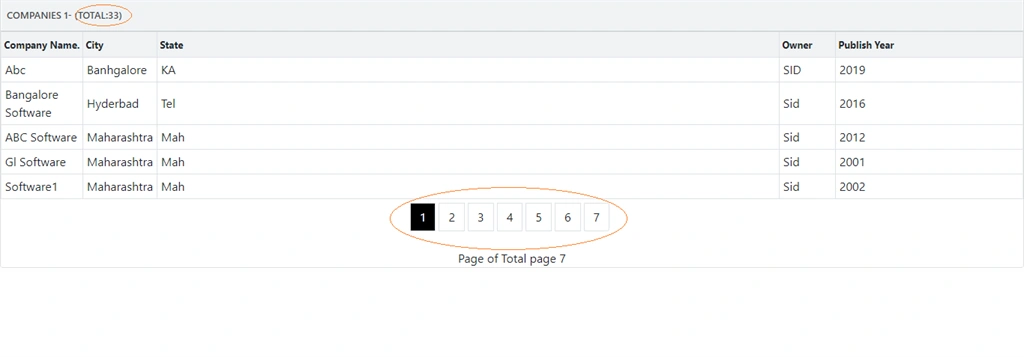
This will come in a total of 3 articles. In this article, we are displaying the number of records. With that, it will calculate the number of pages, but on one page we can see only the selected records, so rather than fetching all of the records, we are going to fetch records based on pages all at once, which will increase our performance.
How will it work?
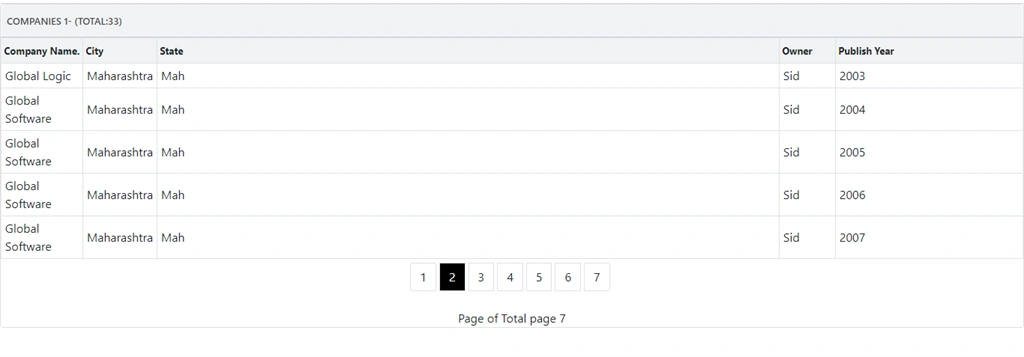
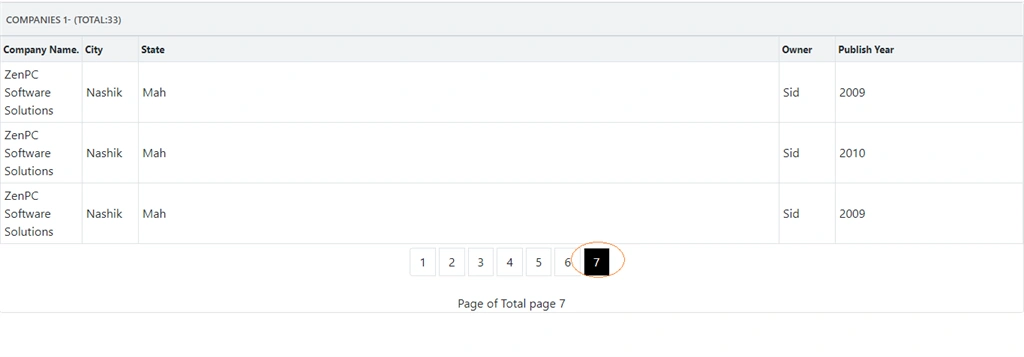
Suppose that we have 500 records to display in the front end, and we are displaying only 100 records per page. After you click on page 2, it will display the next 100 records and so on. In angular, we can use pipes and install some packages to display pagination, but here if we are only showing 100 records at one time then why we are fetching all 500 records this will decrease our performance.
So, it would be better if we fetch only 100 records at one time and when you click on the next page, it will fetch the next 100 records of that particular page. Here, every time when you click on the page, it will fetch records from the database table.
Prerequisites
- Basic knowledge of Angular
- Visual Studio Code must be installed
- Angular CLI must be installed
- Node JS must be installed
- Microsoft Visual Studio 2017 must be installed
- SQL server 2014.
BACK END
Here Backend related code we will do it using SQL server
The very first step is to create a database
Step 1
Let’s create a database on your local SQL Server. I hope you have installed SQL Server 2017 in your machine (you can use SQL Server 2008, 2012, or 2016, as well).
- create database company
Step 2
Create CompanyDetails Table using the following code
- CREATE TABLE [dbo].[CompanyDetails](
- [CompanyId] [int] IDENTITY(1,1) NOT NULL,
- [CompanyName] [nvarchar](100) NULL,
- [City] [nvarchar](50) NULL,
- [State] [nvarchar](50) NULL,
- [Owner] [nvarchar](50) NULL,
- [PublishYear] [int] NULL,
- CONSTRAINT [PK_CompanyDetails] PRIMARY KEY CLUSTERED
- (
- [CompanyId] ASC
- )WITH (PAD_INDEX = OFF, STATISTICS_NORECOMPUTE = OFF, IGNORE_DUP_KEY = OFF, ALLOW_ROW_LOCKS = ON, ALLOW_PAGE_LOCKS = ON) ON [PRIMARY]
- ) ON [PRIMARY]
- GO
Now let's add Store Procedures
Step 3
Create Stored Procedure of the following:
GetAllCompanies
- Create Proc [dbo].[Usp_GetAllCompanies]
- @PageNo INT ,
- @PageSize INT ,
- @SortOrder VARCHAR(200)
- As
- Begin
- Select * From (Select ROW_NUMBER() Over (
- Order by CompanyName ) AS 'RowNum', *
- from [CompanyDetails]
- )t where t.RowNum Between ((@PageNo-1)*@PageSize +1) AND (@PageNo*@pageSize)
- End
- Create Proc [dbo].[Usp_getAllCompaniesCount]
- As
- Begin
- select count(CompanyId) from [CompanyDetails]
- End
WEB API
Create an ASP.NET Core application
Follow these steps to create an ASP.NET Core application.
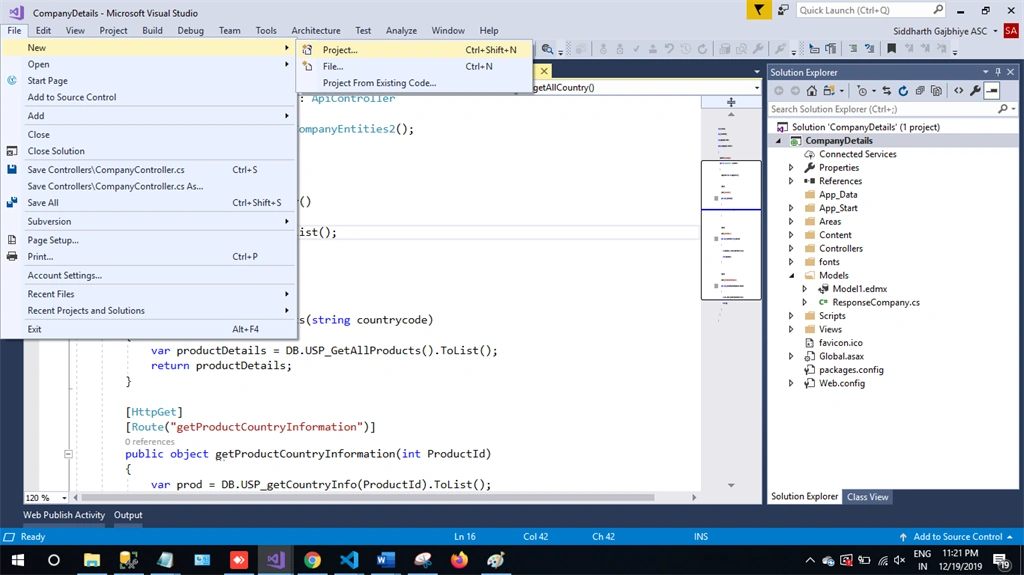
Step 1
In Visual Studio 2019, click on File -> New -> Project.
Step 2
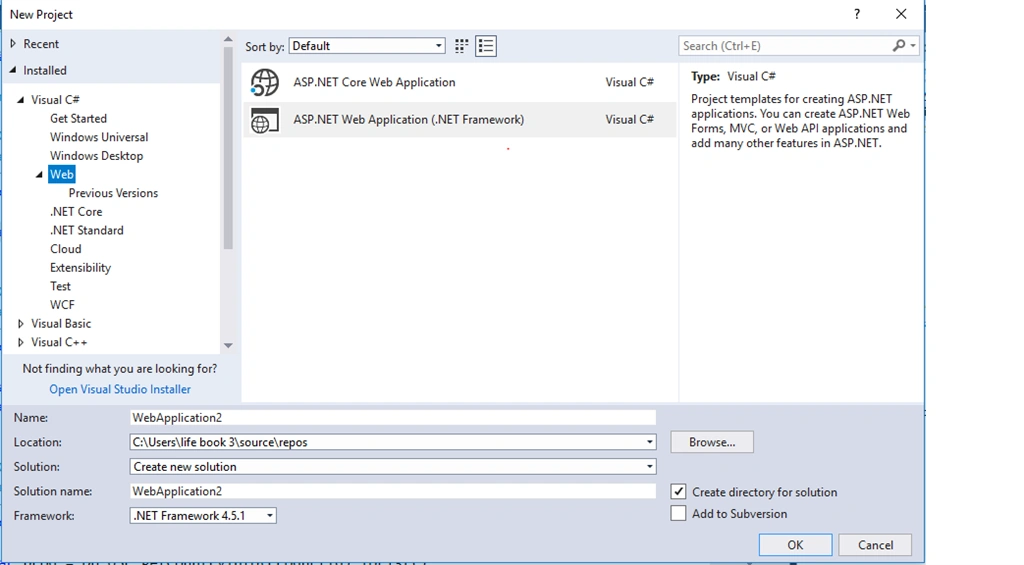
Choose the Create option and select the ASP.NET web application.
Step 3
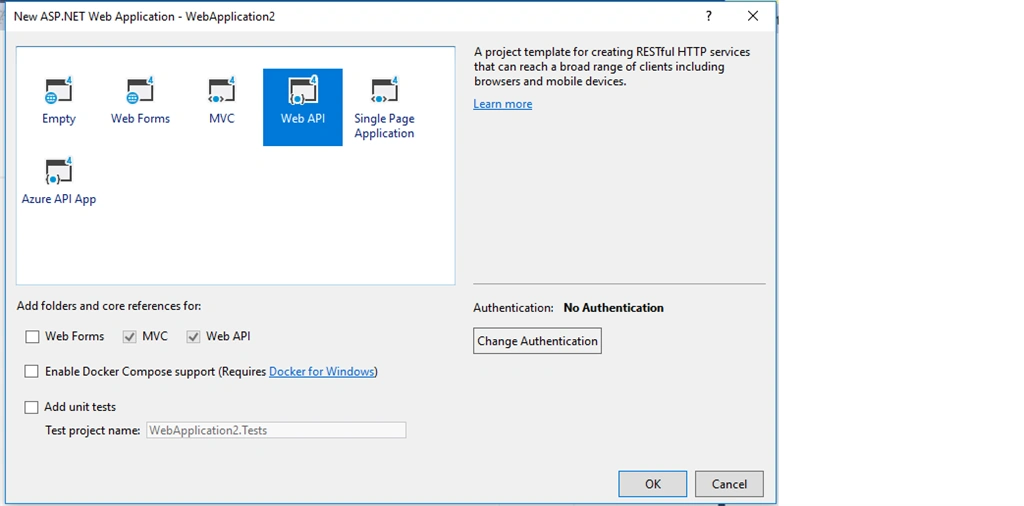
Select Web API and click Ok.
Step 4
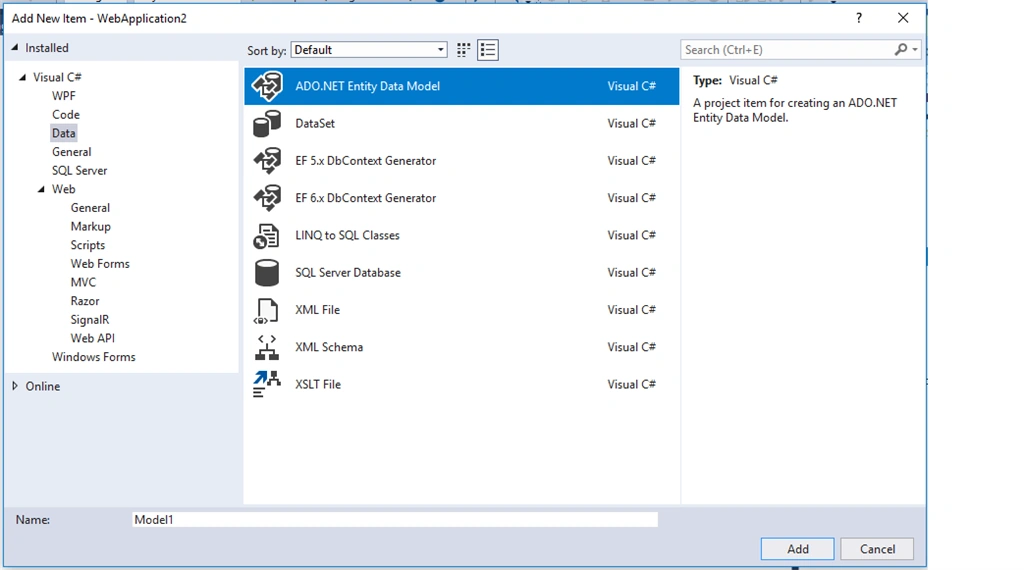
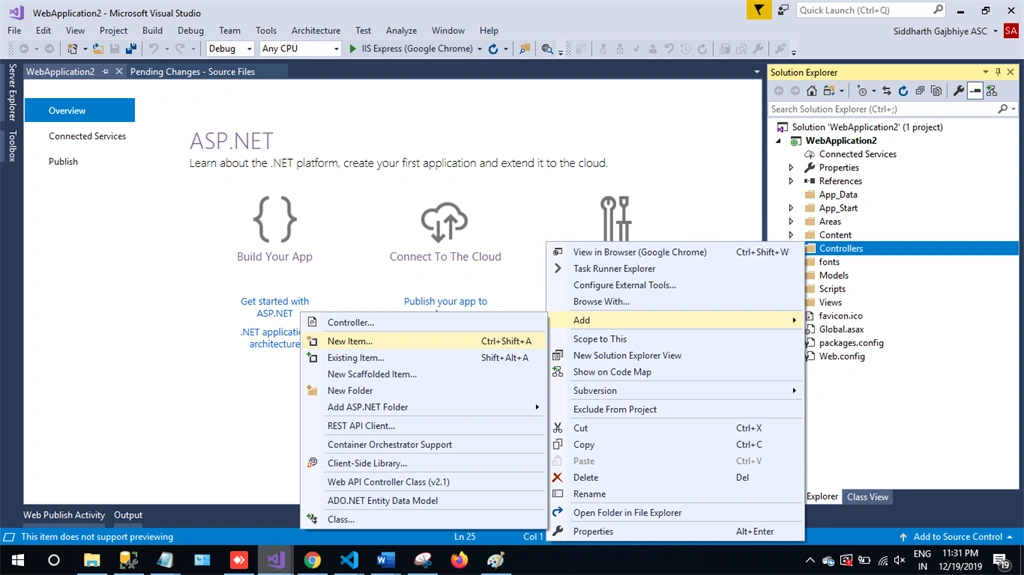
Now right click on the controller and add a new item.
Step 5
Choose Ado.net Entity Data Model and then click on Add
Step 6
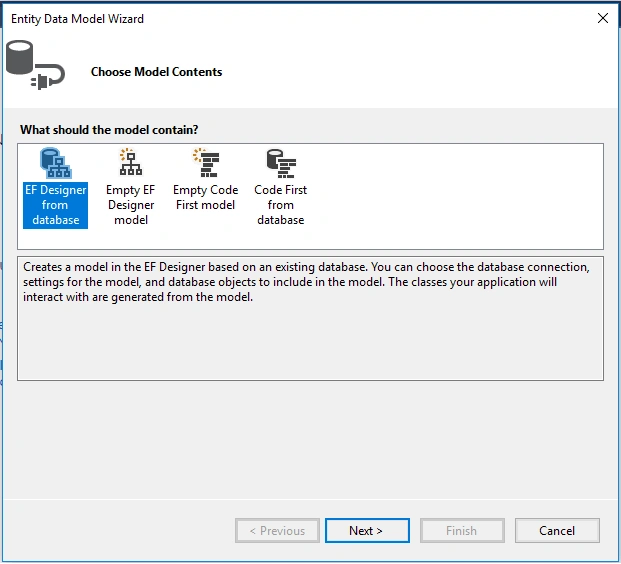
Next Step is EF Designer, just click on next.
Step 7
A new pop-up will show. Click on next. If your's isn't established, then click on new connection
Step 8
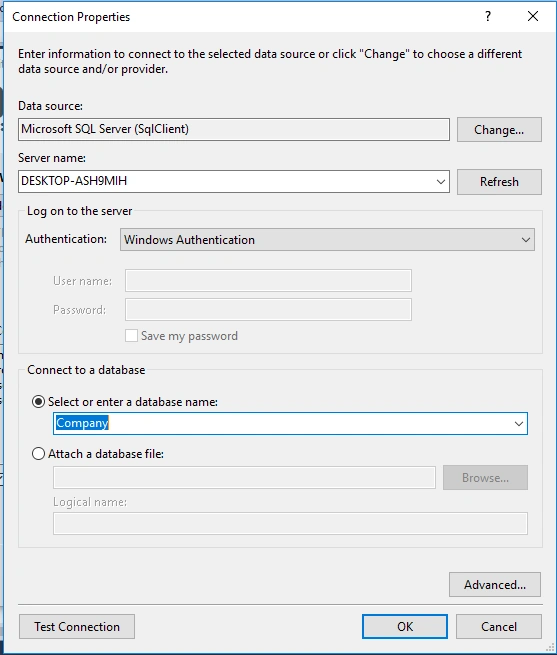
Copy your database connection server name and paste it in the server name textbox. You will see all the database, select your database and click on ok.
Step 9
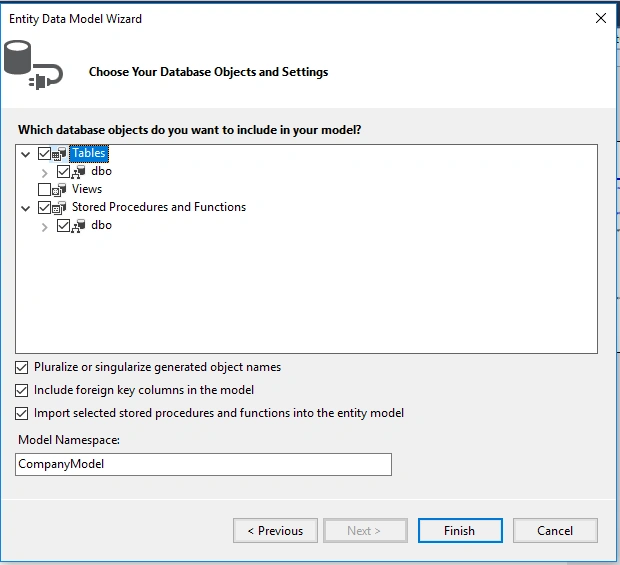
The next popup will show, paste your database server name, and choose for the database and test for the connection then click on next. Here, in the new screen, select your tables and store the procedure. Then click on finish.
Our next step is to right-click on the Controllers folder and add a new controller. Name it as "Paginationcontroller" and add the following namespace in the Paginationcontroller.
Here is the complete code for getting all the Pagination records.
Complete Pagination controller code
- using System.Collections.Generic;
- using System.Data.Entity.Core.Objects;
- using System.Linq;
- using System.Web.Http;
- using Pagination.Models;
- namespace Pagination.Controllers
- {
- public class PaginationController : ApiController
- {
- CompanyEntities2 db = new CompanyEntities2();
- [HttpGet]
- public object getAllCompanies(int pageNo, int pageSize, string sortOrder)
- {
- var oMyString = new ObjectParameter("totalCount", typeof(int));
- var companyDetails = db.Usp_GetAllCompanies(pageNo, pageSize, sortOrder).ToList();
- return companyDetails;
- }
- [HttpGet]
- public object getAllCompaniesCount()
- {
- var companyDetailsCount = db.Usp_getAllCompaniesCount().SingleOrDefault();
- return companyDetailsCount;
- }
- }
- }
FRONT END
Step 1
Let's create an angular project using following npm command
- ng new pagination
Step 2
Open the newly created project in visual studio code and install bootstrap in this project
- npm install bootstrap --save
Now open styles.css file and add Bootstrap file reference.To add reference in styles.css file add this line.
- @import '~bootstrap/dist/css/bootstrap.min.css';
Step 3
Now let's create a new component by using the following command.
- ng g c pagination
Step 4
Now create a new service using the following command.
- ng generate service pagination
Step 5
Now open the pagination.component.html and paste the following code to see the HTML template.
- <div class="row">
- <div class="col-12 col-md-12">
- <div class="card">
- <div class="card-header">
- Companies 1-{{pageSize}} (Total:{{totalCompaniesCount}})
- </div>
- <div class="card-body position-relative">
- <div class="table-responsive cnstr-record companie-tbl">
- <table class="table table-bordered heading-hvr">
- <thead>
- <tr>
- <th style="cursor: pointer;" [ngClass]="order =='CompanyNumber'? 'active':''"
- (click)="setOrder('CompanyNumber')" width="80">Company Name.</th>
- <th style="cursor: pointer;" [ngClass]="order =='CompanyType'? 'active':''"
- (click)="setOrder('CompanyType')" width="75">City</th>
- <th [ngClass]="order =='CompanyName'? 'active':''" style="cursor: pointer;"
- (click)="setOrder('CompanyName')">State
- </th>
- <th [ngClass]="order =='OrgNo'? 'active':''" style="cursor: pointer;" (click)="setOrder('OrgNo')"
- width="75">Owner
- </th>
- <th [ngClass]="order =='Street'? 'active':''" style="cursor: pointer; width:250px"
- (click)="setOrder('Street')">Publish Year</th>
- </tr>
- </thead>
- <tbody>
- <tr *ngFor="let item of companies">
- <td>{{item.CompanyName}}</td>
- <td>{{item.City}}</td>
- <td>{{item.State}}</td>
- <td>{{item.Owner}}</td>
- <td>{{item.PublishYear}}</td>
- </tr>
- </tbody>
- </table>
- </div>
- <!-- Code by pagination -->
- <div class="container mw-100">
- <div class="row">
- <div class="col-md-3"> </div>
- <div *ngIf="companies !=0" class="col-md-6">
- <ul class="pagination justify-content-center">
- <li *ngFor="let page of pageField;let i=index" class="page-item">
- <a (click)="showCompaniesByPageNumber(page,i)" [ngClass]="pageNumber[i] ? 'pageColor':'page-link'"
- style=" margin-right: 5px;;margin-top: 5px">{{page}}</a>
- </li>
- </ul>
- <div style="text-align: center;">
- Page {{currentPage}} of Total page {{paginationService.exactPageList}}
- </div>
- </div>
- </div>
- </div>
- </div>
- </div>
- </div>
- </div>
Step 6
Open the pagination.component.ts file and add the following code in this file where our logic has been written.
- import { Component, OnInit } from '@angular/core';
- import { ApiService } from './api.service';
- import { PaginationService } from './pagination.service';
- @Component({
- selector: 'app-pagination',
- templateUrl: './pagination.component.html',
- styleUrls: ['./pagination.component.css']
- })
- export class PaginationComponent implements OnInit {
- companies = [];
- pageNo: any = 1;
- pageNumber: boolean[] = [];
- sortOrder: any = 'CompanyName';
- //Pagination Variables
- pageField = [];
- exactPageList: any;
- paginationData: number;
- companiesPerPage: any = 5;
- totalCompanies: any;
- totalCompaniesCount: any;
- constructor(public service: ApiService, public paginationService: PaginationService) { }
- ngOnInit() {
- this.pageNumber[0] = true;
- this.paginationService.temppage = 0;
- this.getAllCompanies();
- }
- getAllCompanies() {
- this.service.getAllCompanies(this.pageNo, this.companiesPerPage, this.sortOrder).subscribe((data: any) => {
- this.companies = data;
- this.getAllCompaniesCount();
- })
- }
- //Method For Pagination
- totalNoOfPages() {
- this.paginationData = Number(this.totalCompaniesCount / this.companiesPerPage);
- let tempPageData = this.paginationData.toFixed();
- if (Number(tempPageData) < this.paginationData) {
- this.exactPageList = Number(tempPageData) + 1;
- this.paginationService.exactPageList = this.exactPageList;
- } else {
- this.exactPageList = Number(tempPageData);
- this.paginationService.exactPageList = this.exactPageList
- }
- this.paginationService.pageOnLoad();
- this.pageField = this.paginationService.pageField;
- }
- showCompaniesByPageNumber(page, i) {
- this.companies = [];
- this.pageNumber = [];
- this.pageNumber[i] = true;
- this.pageNo = page;
- this.getAllCompanies();
- }
- getAllCompaniesCount() {
- this.service.getAllCompaniesCount().subscribe((res: any) => {
- this.totalCompaniesCount = res;
- this.totalNoOfPages();
- })
- }
- }
awais awanPosted Aug 2, 2024, 10:42 AM
@SortOrder WHO TO APPLY
awais awanPosted Aug 2, 2024, 10:41 AM
@SortOrder KEY IS MISSING
Jerry ChanPosted Apr 19, 2024, 8:42 AM
About Backend Step 3: Over ( Order by CompanyName ) should be Over ( Order by @SortOrder )
Taher El-HaresPosted Sep 26, 2021, 4:29 PM
Bro there are some missing stuff in your code
Roger DelislePosted Apr 11, 2020, 2:48 PM
Following this code exactly, I never get past the "Complete Pagination controller code". I get error on the "using Pagination.Models;" and "CompanyEntities2". I have to add "using WebApplication2.Controllers;" and change "CompanyEntities2" to "CompanyEntities". Is this right? Thank you, Roger
Raj KumarPosted Jan 10, 2020, 9:13 AM
Good one #Siddharth Gajbhiye. Keep it up