

Introduction
Microsoft’s Windows 10 operating system is loaded with a brand new Web browser, Microsoft Edge. Microsoft Edge is designed and developed from scratch to overcome the issues and problems current Web browsers face such as security, adware, and performance.
However, the default search engine for Microsoft Edge is Microsoft’s Bing. You may not like Bing results and may want to go back go Google.
Here are the steps to set Google as your default search provider in Microsoft Edge.
Go to Edge > Settings
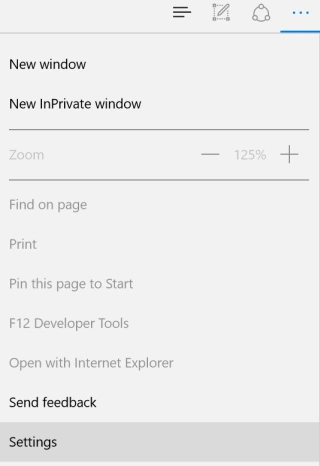
Find View advanced settings button and click on it.

Scroll down and you will see Search in the address bar with Bing and a Change button.
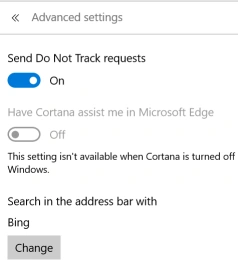
Click on the Change button and select Google from the list and click Set as default button.

Summary
In this article, we learned about set google as your default search engine in Microsoft Edge.
Mukesh KumarPosted Oct 31, 2015, 11:22 AM
Good One Sir
Gowtham KPosted Oct 31, 2015, 10:43 AM
Thanks for sharing
Sibeesh VenuPosted Oct 31, 2015, 6:13 AM
Nice Share
Nilesh JadavPosted Oct 31, 2015, 3:47 AM
Good Share sir !
Vinodh NarayananPosted Oct 31, 2015, 1:20 AM
Good one
Harshad PansuriyaPosted Oct 31, 2015, 12:05 AM
Nice one