

Introduction
In this article, we will learn how to configure or set up the HomeGroup feature in Windows 8 for connecting with other Windows PCs.
The Homegroup feature in Windows provides a great way to share files and resources in the network computers easily in an efficient manner. The new HomeGroup feature makes sharing files and printers between Windows 7 and Windows 8 machines easy. Set up a Homegroup, and Windows automatically begins sharing those items.
However, The HomeGroup feature was first introduced in Windows 7 and is still supported in Windows 8.
So the conclusion is that only Windows 8 and Windows 7 machines have the ability to set up and join the Homegroup.
Step 1
First Go to the Start Screen of your Windows 8.
Step 2
Open the right Charm bar and select the Setting option from it.
 Step 3
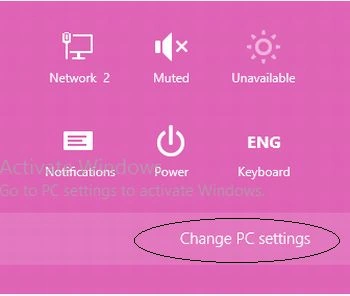
Now, click on the Change PC Settings.
Step 3
Now, click on the Change PC Settings.
 Step 4
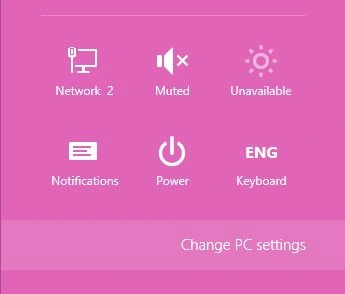
Or you can directly open the Change PC Settings option using the shortcut Win+I keys.
Step 4
Or you can directly open the Change PC Settings option using the shortcut Win+I keys.
 Step 5
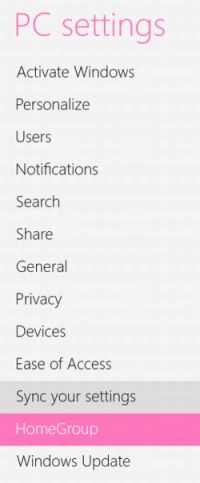
Select the HomeGroup option from the left panel of the PC Setting window.
Step 5
Select the HomeGroup option from the left panel of the PC Setting window.
 Step 6
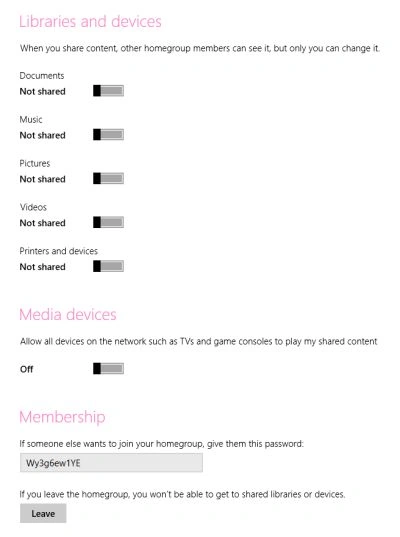
You will see the HomeGroup options in the right panel of the window.
Step 6
You will see the HomeGroup options in the right panel of the window.
 Step 7
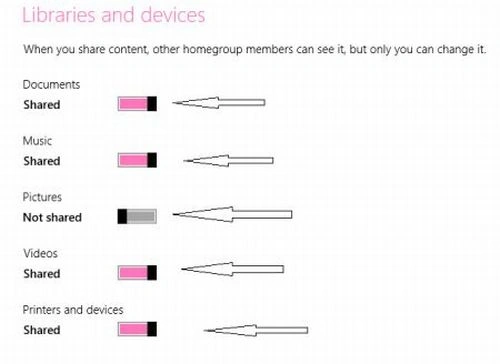
Then in the left panel under Libraries and Devices, to share an item, slide its toggle switch to the right.
Step 7
Then in the left panel under Libraries and Devices, to share an item, slide its toggle switch to the right.
 Step 9
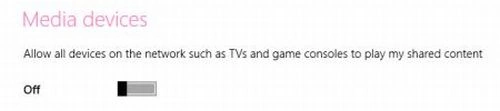
To share those folders with home theater components and game consoles, turn the Media Devices option on, as well.
Step 9
To share those folders with home theater components and game consoles, turn the Media Devices option on, as well.
 Step 8
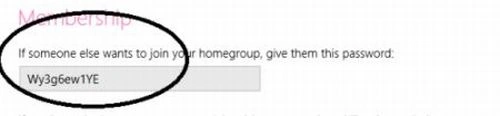
You will notice that a password is automatically generated for you under Membership.
Step 8
You will notice that a password is automatically generated for you under Membership.
 Note
Note
HomeGroup Sharing Feature in Windows 8
Here are some steps you must use to connect to a HomeGroup with Windows 8
You must enter that same password into each computer you want to include in your Homegroup.
Step 9
Press Alt+F4 to close the window.
This should help get you started sharing files and printers between your Windows 7 machines on your home network.
Summary
In this article, we learned about Set Up HomeGroup Sharing Feature in Windows 8.
Join the conversation! Your thoughts help the community grow.