

Here, we will discuss how to share data between sibling components using Rxjs Behavior Subject in Angular 5 project with step by step demonstration. As we know, we can share data between components in the different scenario like parent component to child component, child component to parent component, one component to another component which is siblings etc. And there are different ways available to share data between components like using Services, Event or Ngrx Store but these can be used as per their feasibility. Here, we will only discuss how we can share data between siblings component. So, let start practical demonstration and see how to achieve this.
For this practical implementation, we will use API which we have already created in the previous article. Here, we are using ASP.NET Core Web API with Oracle database. This API will show the list of employees and its details if we provide Employee Id as well. So, don't be confused if we make any HTTP call inside this demonstration. Please visit my previous article How to create Asp.Net Core Web API with Oracle database and Dapper ORM.
RxJS is a library for composing asynchronous and event-based programs by using observable sequences. It provides one core type, the Observable, satellite types (Observer, Schedulers, Subjects) and operators inspired by Array#extras (map, filter, reduce, every, etc) to allow handling asynchronous events as collections.
More about RxJS, Read Here.
Create Angular 5 Project
To create Angular 5 project, open Visual Studio Code [We can also use other editors like Visual Studio, Plnkr etc.] and press Ctrl+`. It will open a terminal window inside Visual Studio Code. Where we have to type following CLI command to create new Angular 5 project.
ng new BehaviorSubjectDemo --routing
To know more about how to create Angular 5 CLI project step by step, you can follow my previous article "Building Angular 5 CLI project with ngx-bootstrap". Once you execute the command it will create an Angular 5 CLI project for you. Now, its time to run the project and see "is everything working fine?". To run the project, we have to fire one more command as follows.
ng serve --open
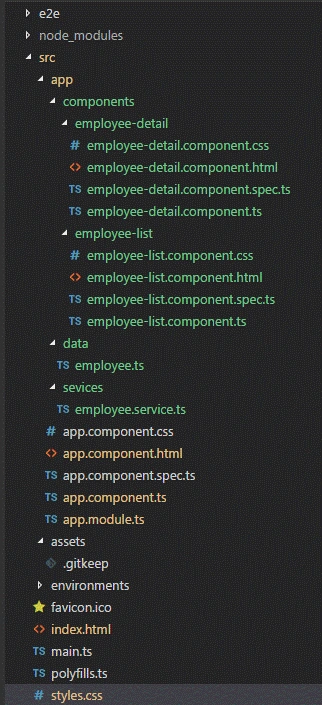
Below screenshot is the final architecture of this application after adding required components and service.
Add Bootstrap CDN
Once the project is ready and runs smoothly. First, we have to add bootstrap in the project so that we can easily access and implement bootstrap controls like textbox, dropdown etc. So, here I am not going to install bootstrap using "npm install bootstrap" process. To make it simple, just adding bootstrap CDN with Index.html page. We can also install bootstrap using NPM and use it to import it into the styles.scss file which is nothing but main CSS file. We can see that we have added bootstrap CDN path just before the end of body tag.
- <!doctype html>
- <html lang="en">
- <head>
- <meta charset="utf-8">
- <title>BehaviorSubjectDemo</title>
- <base href="/">
- <meta name="viewport" content="width=device-width, initial-scale=1">
- <link rel="icon" type="image/x-icon" href="favicon.ico">
- </head>
- <body>
- <app-root></app-root>
- <link href="//maxcdn.bootstrapcdn.com/bootstrap/3.3.0/css/bootstrap.min.css" rel="stylesheet" id="bootstrap-css">
- </body>
- </html>
Create Employee Service
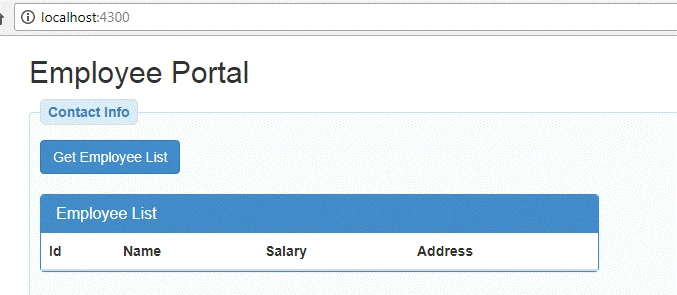
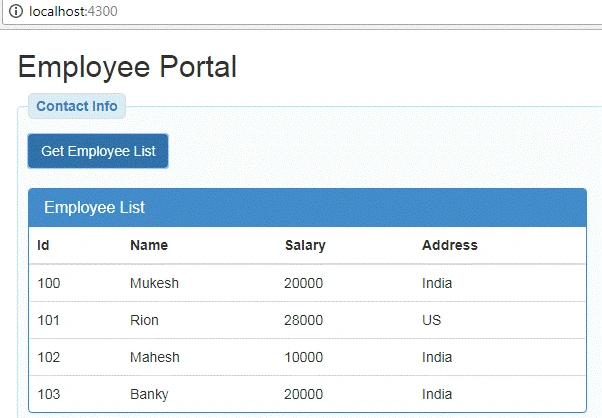
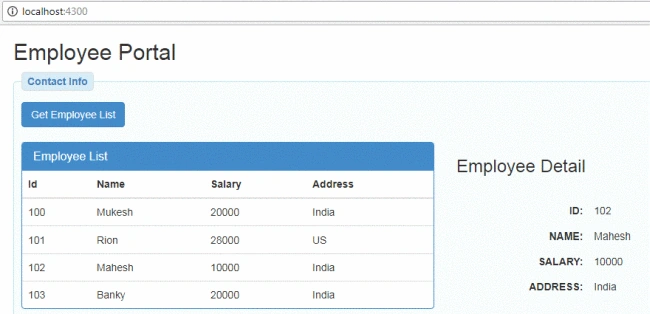
As we have already discussed, this application will use API which is already created and show the list of employees and employee details. So, let's create new service file in Angular 5 project inside service folder and name as "EmployeeService". This service is responsible for getting the list of data for the employee when a user clicks on the button "Get Employee List" and get the employee detail when a user clicks any of the employee rows from the table.
We can see with below code, here we have created one base URL, which is nothing but our API Base URL which is running locally. Apart from this, we have one method "getEmployeeList()" which will get the list of the employee from the Oracle database. Just move to next method which is "sendEmployeeDetail(id: number)". It takes one parameter as an employee id and gets the details for that particular employee.
Here we are using Next() function of the Rxjs/BehaviorSubject which set the current value of the object and if any observer is looking for it then it will update the value for that observer. The observer will not be directly calling "sendEmployeeDetail()" but it will be associated with some other method which is returning Observable data and the observer will subscribe to it.
- import { Injectable } from "@angular/core";
- import { HttpClient } from "@angular/common/http";
- import { Employee } from "../data/employee";
- import { Observable, BehaviorSubject } from "rxjs";
- @Injectable()
- export class EmployeeService {
- private baseURL: string;
- private empDetailSubject = new BehaviorSubject(null);
- constructor(private http: HttpClient) {
- this.baseURL = 'http://localhost:60769/';
- }
- getEmployeeList() {
- return this.http.get<Employee[]>(this.baseURL + 'api/GetEmployeeList');
- }
- sendEmployeeDetail(id: number) {
- let data = this.http.get<Employee>(this.baseURL + 'api/GetEmployeeDetails/'+id);
- this.empDetailSubject.next(data);
- }
- getEmployeeDetail(){
- return this.empDetailSubject.asObservable();
- }
- }
Enable CORS in Asp.Net Core Web API
As we using Asp.Net Core Web API project for creating API. To use it and getting data from API on your angular project, first, we have to enable CORS in the API. So, if you have created any Web API then you can enable CORS, but for me, we are using API created in the previous article. So, just go to that code and enable CORS adding following line of code.
- app.UseCors(builder => builder.WithOrigins("http://localhost:4300").AllowAnyMethod().AllowAnyHeader());
- using Core2API.Repositories;
- using Microsoft.AspNetCore.Builder;
- using Microsoft.AspNetCore.Hosting;
- using Microsoft.Extensions.Configuration;
- using Microsoft.Extensions.DependencyInjection;
- namespace Core2API
- {
- public class Startup
- {
- public Startup(IConfiguration configuration)
- {
- Configuration = configuration;
- }
- public IConfiguration Configuration { get; }
- // This method gets called by the runtime. Use this method to add services to the container.
- public void ConfigureServices(IServiceCollection services)
- {
- services.AddTransient<IEmployeeRepository, EmployeeRepository>();
- services.AddSingleton<IConfiguration>(Configuration);
- services.AddMvc();
- }
- // This method gets called by the runtime. Use this method to configure the HTTP request pipeline.
- public void Configure(IApplicationBuilder app, IHostingEnvironment env)
- {
- if (env.IsDevelopment())
- {
- app.UseDeveloperExceptionPage();
- }
- //Enable CORS
- app.UseCors(builder => builder.WithOrigins("http://localhost:4300").AllowAnyMethod().AllowAnyHeader());
- app.UseMvc();
- }
- }
- }
Create Employee.ts
So, let create one interface which is nothing but defining the type of the result which will return from the database. Create an interface "Employee" with its properties as follows.
- export interface Employee{
- ID: number,
- NAME: string,
- SALARY: number,
- ADDRESS: string
- }
Create two new components
Now we will create two new components as "EmployeeList" and "EmployeeDetail" using the following commands in "components" folder.
- ng g c EmployeeList --save
- ng g c EmployeeDetail --save
Update App.Module.ts
So, we have service ready which will bring data from a database and created two components which will display contents. Now we have to update our main module "AppModule" and add service in "Providers", so that service can access anywhere in components which are related to AppModule and components in "Declarations" section. As we can see with below code how we have added our components and service and imported from their location. Please kind attention with import statements, we are importing "HttpClientModule" for HTTP operation and "FormsModule" for using inbuilt directives like *ngFor, *ngIf etc.
aravind hariPosted Oct 23, 2019, 3:56 PM
EmployeeDetail property on employeeDetailComponent is not observable. Already subscribed to getEmployeeDetail observable and the data is assigned to employeeDetail property. I believe no need to use Async pipe on that in html for Employee Detail.
abdo mohamedPosted Jun 4, 2018, 8:23 PM
I want to know how the data be shared between the two components ( parent and child)
Mahesh VermaPosted May 29, 2018, 4:40 AM
Very informative, thanks for sharing.
Bhairab DuttPosted May 29, 2018, 3:31 AM
Nice Article .....