

Introduction
This article shows how to preview a listitem on a hover using simple jQuery and a calculated column. Many SharePoint2013 users are expecting this kind of small and interesting feature. I hope this one will help all of you.
Prerequisites
- Calculated Column (here I have used the Column name Preview).
- Add Jquery-1.11.2.js and spjs-utility.js files to the site assets library.
- PreviewItem.js This is our Important file to display the content in dialog box preview method. This is the reusable code downloaded from Preview Item.
- Page preview.js this is our final code JavaScript file that all the fields need to be displayed in the page.
Procedure
Create a Calculated Column in your Custom List. Here I named it ”Preview”.
Then add the following code to the Description box of your calculated column.
Description box Code
- {"headerCss":"",
- "clickToView":false,
- "hoverDelay":200,
- "showEditBtn":true,
- "editInDlg":true,
- "hoverIcon":{
- "off":"fa-arrow-circle-o-right",
- "on":"fa-arrow-circle-down",
- "css":"color:#FF6103;"
- },
- "dlgTitleField":"Title",
- "maxHeight":400,
- "maxWidth":600,
- "dateFormat":"dd.MM.yyyy",
- "fields":[
- {"fin":"Title","label":true},*****here you have to enter the coulmn name to be displayed in the previewi item(enteer the internal field name from sharepoint list)
- {"fin":"Descrption","label":true}**********Don’t copy the lines enterd by red font.Jus for understading purpose
- ],
- "footer":{
- "show":true,
- "css":"",
- "dateFormat":"dd.MM.yyyy hh:mm",
- "strings":{
- "default":["Created at","by","Last modified at","by"],
- "1044":["Opprettet","av","Sist endret","av"]
- }
- },
- "editFormUrl":null,
- "listGuid":null,
- "listBaseUrl":null
- }
- ="<img src='/_layouts/images/loadingcirclests16.gif' fin='Preview' list='efae4942-1474-4565-a833-807fb5910dfd' configindescription='1' onload='spjs.listItemPreview.init(this)'>"
List=’Copy your List id’
And the screen will look like the following. Save this column.
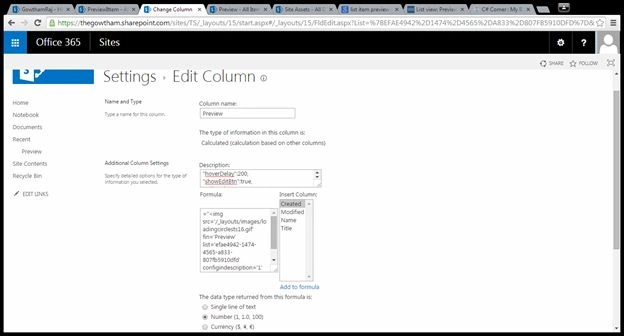
Go to the SharePoint List and edit the page then select Add CEWP then click the Final script file link.Here I named it page Preview.
Final Code
- //Reference Files
- <link href="//netdna.bootstrapcdn.com/font-awesome/4.0.3/css/font-awesome.css" rel="stylesheet">
- <script type="text/javascript" src="https://thegowtham.sharepoint.com/sites/TS/SiteAssets/jquery-1.11.2.js"></script>
- <script type="text/javascript" src="https://thegowtham.sharepoint.com/sites/TS/SiteAssets/spjs-utility.js"></script>
- <script type="text/javascript" src="https://thegowtham.sharepoint.com/sites/TS/SiteAssets/PreviewItem.js"></script>
- //Final script
- <script type="text/javascript">
- var spjs_listItemPreviewConfig = {
- "Preview":{
- "headerCss":"",
- "clickToView":false,
- "hoverDelay":200,
- "showEditBtn":true,
- "editInDlg":true,
- "hoverIcon":{
- "off":"fa-arrow-circle-o-right",
- "on":"fa-arrow-circle-down",
- "css":"color:#FF6103;"
- },
- "dlgTitleField":"Title",
- "maxHeight":400,
- "maxWidth":600,
- "dateFormat":"dd.MM.yyyy",
- "fields":[
- {"fin":"Title","label":true},// Title Column Internal name
- {"fin":"Descrption","label":true} //Description Column Internal name
- ],
- "fieldData":{
- "Title":{"disp":{"default":"Title","1044":"Tittel"},"type":"Text"},//Title Column Internal name and type
- "Descrption":{"disp":{"default":"Multiline","1044":"Flerlinje tekst"},"type":"Note"} //Description Column Internal name and type
- },
- "footer":{
- "show":true,
- "css":"",
- "dateFormat":"dd.MM.yyyy hh:mm",
- "strings":{
- "default":["Created at","by","Last modified at","by"],
- "1044":["Opprettet","av","Sist endret","av"]
- }
- },
- "editFormUrl":"/Lists/Preview/EditForm.aspx",
- "listGuid":null,
- "listBaseUrl":null
- }
- };
- </script>
Note: If you are adding other column types then use this.
- "MyChoiceCol":{"disp":{"default":"Choice column","1044":"Valgkolonne"},"type":"MultiChoice"}
- "MultiUser":{"disp":{"default":"Multi select people picker","1044":"Flervalgs personvelgerfelt"},"type":"UserMulti"},
- "Lookup":{"disp":{"default":"Lookup","1044":"Oppslag"},"type":"Lookup"},
- "Attachments":{"disp":{"default":"Attachments","1044":"Vedlegg"},"type":"Attachments"}
- DateAndTime":{"disp":{"default":"Date / time","1044":"Dato / klokkeslett"},"type":"DateTime"}
Check the output
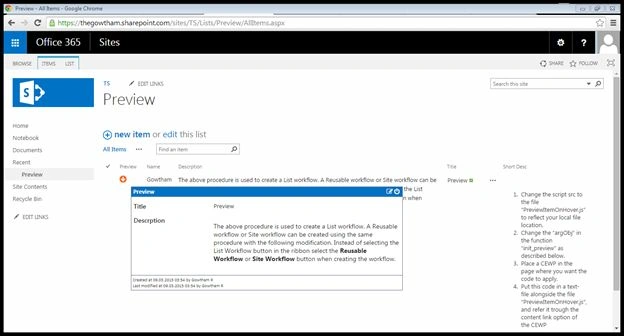
Reference : SPJSBlog
Ashutosh AgarwalPosted Aug 12, 2018, 11:43 PM
What about managed metadata column? It fetched with some weird format like "24;#test". Instead of this, I want test only to be fetched.
Raymond GramkePosted Jun 6, 2017, 10:51 AM
Could you call out the specific fields we need to change both in the code you have on the page here OR in the referenced .js files? I'm new to this and it's difficult for me to get this working because I'm not sure if I have everything in order.
Alexandre RousseauPosted Mar 18, 2016, 11:58 AM
Thanks for this great work. Do you know how can I change the header font color of the pop up in red?
Alex GonsalesPosted Mar 10, 2016, 6:22 PM
the idea above is awesome and it is originaly from Alexander Baltz at http://spjsblog.com/2013/12/03/list-view-preview-item-on-hover/
Mangat RamPosted Jul 15, 2015, 9:56 AM
where is the code for Jquery-1.11.2.js and spjs-utility.js
Vijay SPosted Apr 8, 2015, 9:20 AM
Nice
Gowtham RajamanickamPosted Mar 13, 2015, 1:19 AM
welcome...
Prasham SabadraPosted Mar 10, 2015, 7:37 AM
Thanks!