

Introduction:
When you are installing the SharePoint 2013 server the SharePoint Configuration wizard will create a Search service application at that time. To verify whether a Search service application exists, go to the central admin and select application management then click Manage service applications the Search service will be available there.
Before we touch the Content Source we will see about how to create a Search Service application in SharePoint 2013.
Please follow the below configurations when you create search service applications,
- Create a domain user accounts
- Create a Search service application
- Configure the Search service application
- Configure the Search service application topology
Create Search Service application:
Go to the Central administration then click on Application Management then click the “Manage Service Applications".
Click on search service application from new service application list.
Enter all the details and it will take time to complete the process.Once service application has been created check the manage service application page and it look like below,
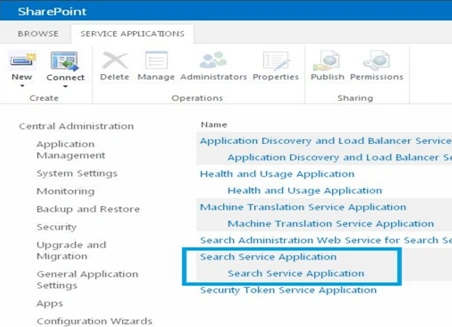
Then click the newly created service applicaton and it will redirect to the below page of service application to configure the search,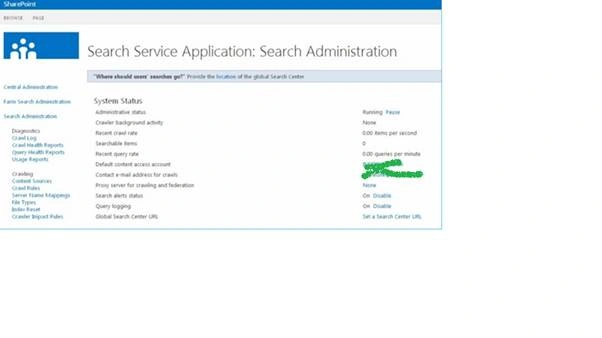
Below databases created by creation of Search service application.
- Administration database
- Analytics Reporting Database
- Crawl Database
- Link Database
And the search service application topology should be Right mark in green colour or else try to create a new one.
Content Source:
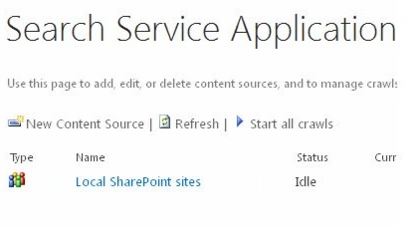
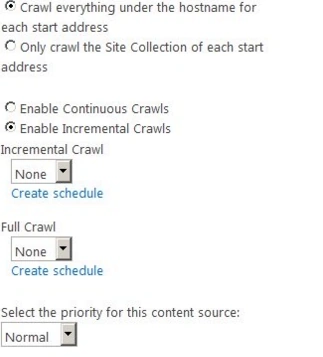
Create an additional content sources to specify other content to crawl and how the system should crawl that content,Use below Powershell script to create the Content source instead of creating manually,
Add-PSSnapin Microsoft.SharePoint.Powershell -ErrorAction SilentlyContinue
Saurabh JainPosted Dec 5, 2016, 5:25 AM
Help full Article .
Siva Krishna KumarPosted Aug 4, 2016, 3:24 AM
Nice work. thanks for sharing.
Amit DavePosted May 3, 2016, 10:36 AM
Keep up the Good work!
Sonu ChaudharyPosted May 2, 2016, 6:04 AM
Thanks for sharing
Kuppurasu NagarajPosted Apr 30, 2016, 2:28 PM
Nice Sharing..
Rahul Kumar SaxenaPosted Apr 30, 2016, 1:51 PM
Good Work