

When you click on the "Configure SharePoint Designer Settings" link, you land on the SharePoint Designer Settings page. This page lets you configure the SharePoint Designer settings for the web applications.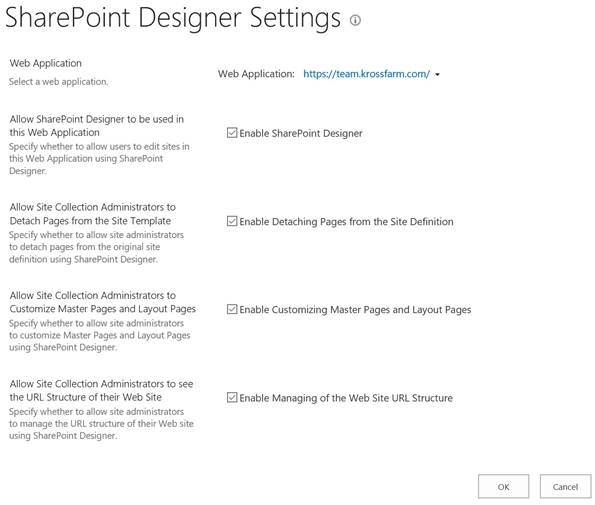
SharePoint Designer Settings page’s direct link - /_admin/SharePointDesignerAdmin.aspx
SharePoint Designer is key tool for power users to customize SharePoint sites, create custom workflows, customize the Master pages, create the external content types, and many more things.
But we should be careful while enabling this option in our SharePoint environment because it is easy to corrupt the site collection if not properly used. As per my experience, I have noticed that the companies which allow the SharePoint Designer in their farm, are facing too many site corruption issues.
The same thing was realized by the product group and they gave us an option to control SharePoint Designer usage at web application level or Site collection. If you disable the SharePoint Designer at web application, then no site collection can use it but if you enable it at web application level, then Site collection administrators have the option to disable it at their own site collection.
Note
It is official that SharePoint Designer 2013 will be the last version and there will be no new version of SharePoint Designer. But it will be fully supported by SharePoint Server 2016.
There are 4 major options you can configure at Web Application level.
- Enable SharePoint Designer
This option will enable / disable (depending upon settings) the SharePoint Designer for the entire web application (All site collections in the web application will be impacted). Even if you disable this option, the end-user still sees the "Edit in SharePoint Designer" link but which is, in reality, not active. - Enable Detaching Pages from the Site Definition
This option allows / disallows users to detach the pages from site definition. You should not allow this option if you want keep your sites branding intact. Also, if you detach the pages from site definition, then pages are stored in the content database instead of calling the page from the hard drive ( hive folder) which will put more pressure on the SharePoint and can cause the performance issues. - Enable Customizing Master Pages and Layout Pages
You can preserve Master pages and page layouts from the user. But, you have to uncheck this option. - Enable Managing of the Web Site URL Structure
If you want to hide all the file options from the user, then you should uncheck this option.
Configure the Settings
In order to configure the settings, please follow the below steps.
- Login to Central Admin with an account which is part of farm administrator group.
- On "Configure SharePoint Designer Settings" page, please select the web application you want to configure these settings for.
- Click on Drop-down next to Web Application and click "Change Web Application".
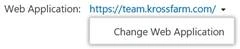
- Select the web application (click on the name of the web application).

- Click on Drop-down next to Web Application and click "Change Web Application".
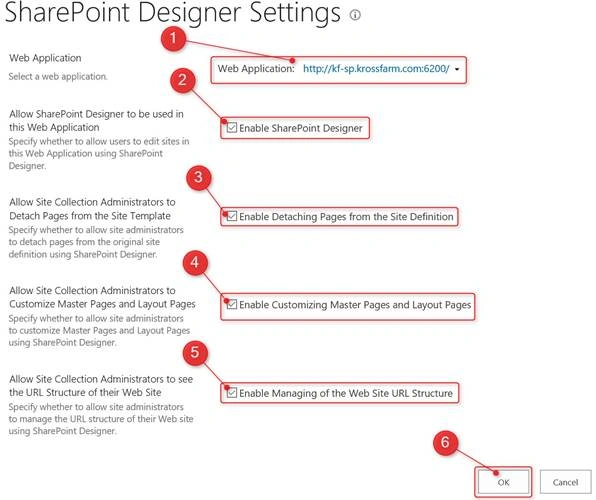
- Now, configure the following settings.
- Make sure that correct web application is selected.
- Enable SharePoint Designer - Enable or disable the SharePoint Designer as per your usage.
- Enable Detaching Pages from the Site Definition - Allow or Disallow Site collection administrator to detach pages from Site templates.
- Enable Customizing Master Pages and Layout Pages - Enabling or disabling the customization of the Master pages.
- Enable Managing of the Web Site URL Structure - Allowing or disallowing the administrators to see all files in SharePoint designer.
- Click "OK".
Join the conversation! Your thoughts help the community grow.