

You should be logged in to Farm administrator with local admin on the server, otherwise this option will not be visible.
When you click on the Convert Server role in this farm Link, you will land on Role Conversion. This page will give you the information about the Server along with the current role.

This farm consists of 2 SharePoint Servers and both Servers are listed on the page with their current role. You will see information given below.
- Server Name of the Server- All the Servers in the Farm will be listed here.
- Current Role- This will tell you the current role of the Server i.e. Custom, Front-End with Distributed Cache, Application Server etc.
- New Role in this column- You will get an option which changes the role of the Server from current to whatever you select. In the dropdown, you will see all the available roles, as shown below.
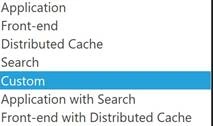
As I mentioned earlier, we can change the Role of the Server from this page. Krossfarm decided to change KF-SP1 Server role from Front-End with Distributed Cache to Custom Role.
In order to change the role of the Server, please follow the steps given below.
- Make sure you are logged in with Farm admin account with local admin on the Server.
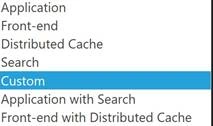
- Now, click on the Drop-Down, which is next to KF-SP1 Server and click Custom role.
- Like this (you see the * appears in front of the Custom role, which is an indication that the new role is different from the current role.)
- Now, click Apply.
- Wait for a couple of minutes. This shouldn’t take long.
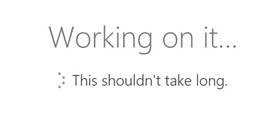
- Once it is successfully complete, you will get this message “Operation completed successfully”
- Click OK. Now, you can see the KF-SP1 role changed to custom role from front-end with distributed cache.



Note
You have to keep in mind a couple of things, which are given below.
- With the release of November CU (Feature Pack 1), SharePoint includes a pre-validation role conversion. Pre-validation checks if the Server is ready for the conversion, in case it is not ready; it will display the appropriate message.
- You have to do extra work for the Distributed Cache Role and Search Server role.
- This will cause the outage for the Server on which you are changing the role.
- You have to schedule the down time.
- Service on the Server will be impacted with role change, as the new role configures a new set of Services and stops the old set of Services. This is totally dependent upon the role which you select.
- To get more information about the Services associated with the role, check this MinRole and associated services for each server role
- You can use PowerShell to do the same thing.
See Also
- SharePoint 2016 Central Admin: System Settings – Manage Servers in Farm.
- SharePoint 2016 Central Admin: System Settings – Manage Services in this Farm.
- Convert Server role in this Farm (direct Link).
Join the conversation! Your thoughts help the community grow.