

When you click Manage Farm Feature link, you will land on Manage Farm features page. This page will give an option to activate / deactivate the features at SharePoint Farm level.
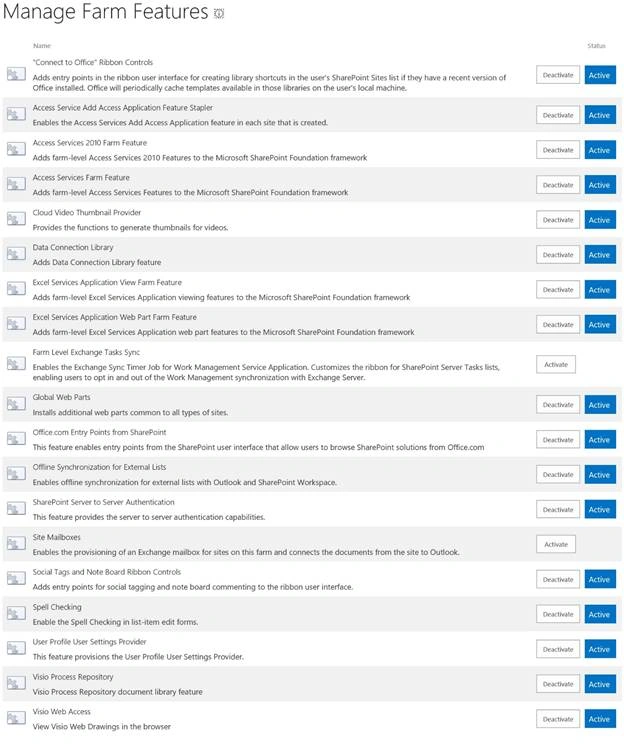
Manage Farm Features page’s direct link: /_admin/ManageFarmFeatures.aspx
We all know about the packaged functionality feature, which you can activate or deactivate in SharePoint. The features can be scoped to Farm level, Web Application level, Site collection level or Site level.
In SharePoint, we have OOTB features, which are deployed with the installation of SharePoint. It would be great, if we could have custom features, which are developed by our developer or if we could have any 3rd party product installed in SharePoint.
SharePoint Central Admin gives us control to activate the given features or deactivate the given feature.
Here is the list of OOTB features, which are deployed to SharePoint Server 2016 Enterprise Farm.
| Name of Feature | Description | Status |
| Connect to Office" Ribbon Controls | Adds the entry points in the ribbon user interface for creating library shortcuts in the user's SharePoint Sites list, if they have a recent version of Office installed. Office will periodically cache the templates available in those libraries on the user's local machine. | Active |
| Access Service Add Access Application Feature Stapler | Enables the Access Services Add Access Application feature in each site, which is created. | Active |
| Access Services 2010 Farm Feature | Adds Farm-level Access Services 2010 features to Microsoft SharePoint Foundation framework. | Active |
| Access Services Farm Feature | Adds Farm-level Access Services Features to Microsoft SharePoint Foundation framework. | Active |
| Cloud Video Thumbnail Provider | Provides the functions to generate thumbnails for the videos. | Active |
| Data Connection Library | Adds Data Connection Library feature. | Active |
| Excel Services Application View Farm Feature | Adds Farm-level Excel Services Application viewing features to Microsoft SharePoint Foundation framework. | Active |
| Excel Services Application Web Part Farm Feature | Adds Farm-level Excel Services Application Web part features to Microsoft SharePoint Foundation framework. | Active |
| Farm Level Exchange Tasks Sync | Enables Exchange Sync Timer Job for Work Management Service Application. Customizes the ribbon for SharePoint Server Tasks lists in addition to enabling the users to opt in and out of the Work Management synchronization with Exchange Server. | Not |
| Global Web Parts | Installs the additional Web parts, which are common to all the types of sites. | Active |
| Office.com Entry Points from SharePoint | This feature enables entry points from the SharePoint user interface that allow users to browse SharePoint solutions from Office.com | Active |
| Offline Synchronization for External Lists | Enables offline synchronization for external lists with Outlook and SharePoint Workspace. | Active |
| SharePoint Server to Server Authentication | This feature provides server to server authentication capabilities. | Active |
| Site Mailboxes | Enables the provisioning of an Exchange mailbox for the sites on this Farm and connects the documents from the site to Outlook. | Not |
| Social Tags and Note Board Ribbon Controls | Adds the entry points for social tagging and note board commenting to the ribbon user interface. | Active |
| Spell Checking | Enables the Spell Checking in te list-item edit forms. | Active |
| User Profile User Settings Provider | This feature provisions the User Profile User Settings provider. | Active |
| Visio Process Repository | Visio Process Repository document library feature. | Active |
| Visio Web Access | View Visio Web Drawings in the Browser | Active |
To activate a feature
Please follow the steps given below to activate a feature.
- Login to Central Admin with an account member of Farm administrator group and also local admin on the Server.
- Go to the System Settings > Manage Farm feature.
- On this page, click Activate Button in front of the feature. i.e. Access Services Farm feature.

- It will refresh the page and now the status changes to Active.

To deactivate a feature
Please follow the steps given below to deactivate a feature.
- Login to Central Admin with an account member of Farm administrator group and also local admin on the Server.
- Go to System Settings > Manage Farm feature.
- On this page, click Activate Button in front of the feature. i.e. Access Services Farm feature.
- It will show a warning page on the page click. Deactivate this feature

- It will return to Manage feature page and status of the feature is now deactivated.

In this article, we learnt how to activate/ deactivate the features, using Central Admin.
Join the conversation! Your thoughts help the community grow.