

In this article, we will discuss another obvious performance issue with SharePoint Solutions involving the large volume of data transactions surfacing SharePoint Custom Pages.
This could become more prominent if we have strict governance in place and we are not allowed to make use of advanced server side options (Custom Web Service End Point, MTA Enabled Modules etc.).
In one of my recent assignments, I came across a similar scenario where I needed to crawl the data from an external Web Service end-point and surface the data on SharePoint Pages. Since the anticipated data volume was huge and traditional caching approaches like Cookies wont’ work due to size limitations, in pursuit of the solution, I have gone through the “HTML5 Web Storage APIs” that allows you to set up an In-Browser Transactional Database System called “IndexedDB”.
Here is a quick introduction of IndexedDB but for details, I recommend you to visit IndexedDB.
“IndexedDB is a transactional database system, like an SQL-based RDBMS. However, unlike SQL-based RDBMSes, which use fixed-column tables, IndexedDB is a JavaScript-based object-oriented database. IndexedDB lets you store and retrieve objects that are indexed with a key; any objects supported by the structured clone algorithm can be stored. Operations performed using IndexedDB are done asynchronously, so as not to block applications.”
I also want to thank “Raymond Camden” for his detailed research on Storage Limits for IndexedDB. I believe you must refer this link to understand the limits carefully before getting into concrete implementations.
Now, let’s try to understand the implementation details by using the following diagram.
Solution Architecture Diagram & Explanation

In this solution, the SharePoint Page will try to look for the required data in Local Indexed DB created to support this page. If the data is not found in local database, the page will issue the request for data from SharePoint List.
Since we are dealing with “100,000” Items present in SharePoint List, I made use of “REST API + OData Continuation” data access strategy to overcome SharePoint List Threshold Limits. This mechanism will access only 100 List Items at a time and it is safe to extend this limit up to 2000 items per fetch.
Each fetch will a JSON Object that will be persisted into Indexed DB as individual record. I opt for this strategy to reduce the page load time. If the number of items are not much you can add each item as separate record.
Every subsequent data call will be automatically diverted to the local database as primary source.
Additionally we can add “Auto Refresh Modules” to keep the local database fresh with SharePoint List Changes and sync the changes with Indexed DB “Asynchronously”. Ideally speaking, for a complete solution, “Auto Refresh Modules” are must to have.
So, this is all about execution summary for this solution. Now, let’s have look at implementation details as follows-
I have created a SharePoint List with two columns and “100,000” Items added to it, as shown below.
Demo
This list will be acting as data source for the page. In actual scenarios, this source could be a Web Service End Point which can provide voluminous data on demand.


Before getting into the code, let’s see how this page will behave on execution. Demonstrating the page in action will be helpful later when we get a deep dive in code.
If we run the page, we will see this page took about “3 minutes” to get the execution completed.
The first execution cycle will include the following actions.
- Initialize IndexedDB Database
- Query SharePoint List
- Add REST API Response to IndexedDB
- Load page with data from IndexedDB
Since we are adding the data to the store asynchronously, the overall application will remain functional even it is taking 3 minutes to complete.
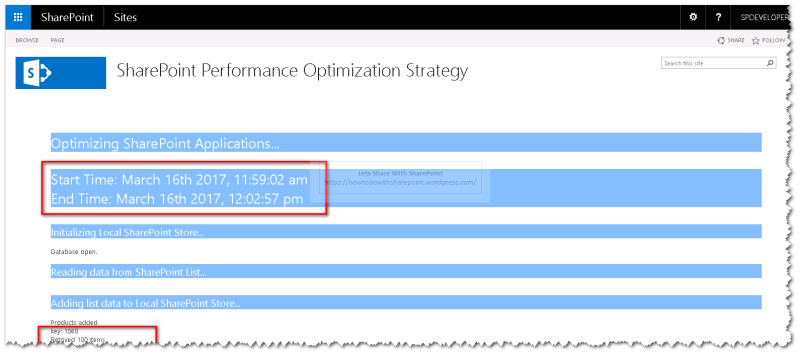
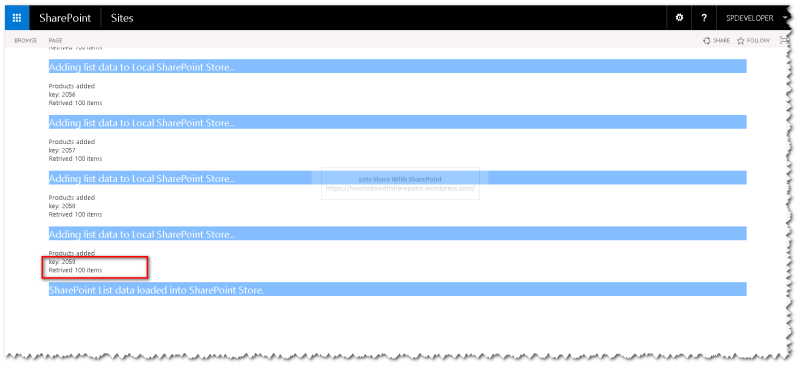
The following screenshot is showing the data adding to IndexedDB asynchronously.
We can also review the Indexed DB initialized as the part of this request using “Developer Tools or F12 Key” with in the browser, as shown below.

We can explore each item in each of the JSON Objects, as shown below.

Now, refresh the page to see the execution again and we can see roughly “1 second” to complete the page request.
The subsequent execution cycle will include the following actions.
- Query IndexedDB for data
- Load page with data from IndexedDB
So, we can see how we can trim the execution path by using a well-defined strategy.

Code Analysis
Let’s do the code analysis to understand the concrete implementation.
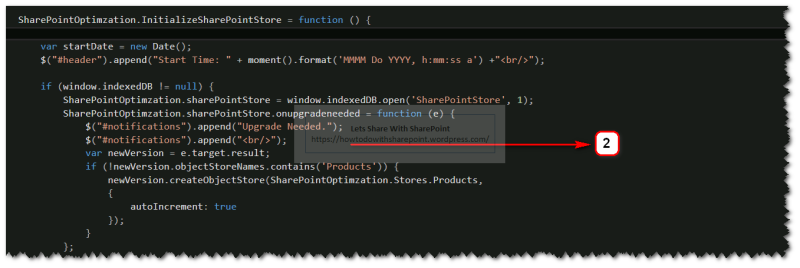
In Step 1, we are enclosing some of the literals as variables and will refer theses variables later in the code.



Join the conversation! Your thoughts help the community grow.