

Overview
SharePoint Framework client web parts are developed using TypeScript and any supporting JavaScript framework (for e.g. React, Angular, KnockOut, etc.). The SPFx solution provides a basic structure to start developing. However, we can take one step further to implement the best practices.
In this article, we will explore how we can implement the Separation of Concerns (SoC) principle in a SharePoint Framework solution.
Separation of Concerns (SoC) Overview
Separation of Concerns is a design principle for separating our program (or solution) into a distinct section, wherein, each section addresses a separate concern.
A code is split into sections with each one responsible for its own functionality (e.g. business logic, presentation logic, user interface, etc.).
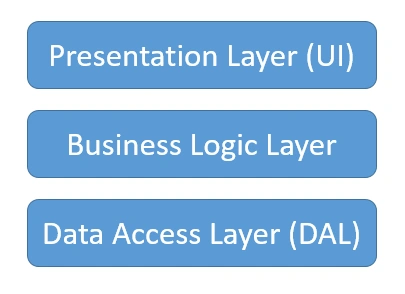
Each section is independent and does not need to know the internals of other section. They only need to know how to communicate with each other by passing a certain information and get the desired result.
Advantages
- Each section is easier to maintain
- Each section can be easily unit tested
- Each section can be rewritten if needed, without affecting the other sections
In an SPFx solution, we can refer to each section as a Service.
Build SoC Scenario
In this article, we will reuse React Based OrgChart implemented in the previous article. Download the source code from the previous article to get started with implementing SoC.
The React component OrgChartViewer.tsx at \src\webparts\orgChartViewer\components\ has all the data access, business and presentation logic. We will start implementing by services to develop an independent section.
An OrgChartService class
- Under src, create a folder named "services".
- Add a file OrgChartService.ts file under it.
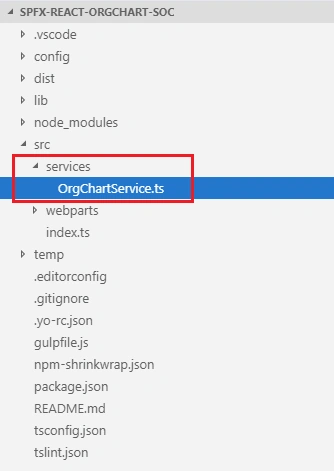
- We will move all the data related methods from UI to this service class
- Also, declare the public interface of the service
IDataService.ts
- import { IOrgChartItem, ChartItem } from './IOrgChartItem';
- export interface IDataService {
- getOrgChartInfo: (listName?: string) => Promise<any>;
- }
OrgChartService.ts
- import { ServiceScope, ServiceKey } from "@microsoft/sp-core-library";
- import { IOrgChartItem, ChartItem } from './IOrgChartItem';
- import { IDataService } from './IDataService';
- import { SPHttpClient, SPHttpClientResponse } from '@microsoft/sp-http';
- import { PageContext } from '@microsoft/sp-page-context';
- export class OrgChartService implements IDataService {
- public static readonly serviceKey: ServiceKey<IDataService> = ServiceKey.create<IDataService>('orgChart:data-service', OrgChartService);
- private _spHttpClient: SPHttpClient;
- private _pageContext: PageContext;
- private _currentWebUrl: string;
- constructor(serviceScope: ServiceScope) {
- serviceScope.whenFinished(() => {
- // Configure the required dependencies
- this._spHttpClient = serviceScope.consume(SPHttpClient.serviceKey);
- this._pageContext = serviceScope.consume(PageContext.serviceKey);
- this._currentWebUrl = this._pageContext.web.absoluteUrl;
- });
- }
- public getOrgChartInfo(listName?: string): Promise<IOrgChartItem[]> {
- return new Promise<IOrgChartItem[]>((resolve: (itemId: IOrgChartItem[]) => void, reject: (error: any) => void): void => {
- this.readOrgChartItems(listName)
- .then((orgChartItems: IOrgChartItem[]): void => {
- resolve(this.processOrgChartItems(orgChartItems));
- });
- });
- }
- private readOrgChartItems(listName: string): Promise<IOrgChartItem[]> {
- return new Promise<IOrgChartItem[]>((resolve: (itemId: IOrgChartItem[]) => void, reject: (error: any) => void): void => {
- this._spHttpClient.get(`${this._currentWebUrl}/_api/web/lists/getbytitle('${listName}')/items?$select=Title,Id,URL,Parent/Id,Parent/Title&$expand=Parent/Id&$orderby=Parent/Id asc`,
- SPHttpClient.configurations.v1,
- {
- headers: {
- 'Accept': 'application/json;odata=nometadata',
- 'odata-version': ''
- }
- })
- .then((response: SPHttpClientResponse): Promise<{ value: IOrgChartItem[] }> => {
- return response.json();
- })
- .then((response: { value: IOrgChartItem[] }): void => {
- resolve(response.value);
- }, (error: any): void => {
- reject(error);
- });
- });
- }
- private processOrgChartItems(orgChartItems: IOrgChartItem[]): any {
- let orgChartNodes: Array<ChartItem> = [];
- var count: number;
- for (count = 0; count < orgChartItems.length; count++) {
- orgChartNodes.push(new ChartItem(orgChartItems[count].Id, orgChartItems[count].Title, orgChartItems[count].Url, orgChartItems[count].Parent ? orgChartItems[count].Parent.Id : undefined));
- }
- var arrayToTree: any = require('array-to-tree');
- var orgChartHierarchyNodes: any = arrayToTree(orgChartNodes);
- var output: any = JSON.stringify(orgChartHierarchyNodes[0]);
- return JSON.parse(output);
- }
- }
What is ServiceKey and ServiceScope?
These classes allow for implementing the dependency injection. Instead of passing a reference to single dependency, we can pass scope as an argument to section and section calls consume() method to call the needed service.
The below line of code declares the service key.
- public static readonly serviceKey: ServiceKey<IOrgChartItem> = ServiceKey.create<IOrgChartItem>('orgChart:data-service', OrgChartService);
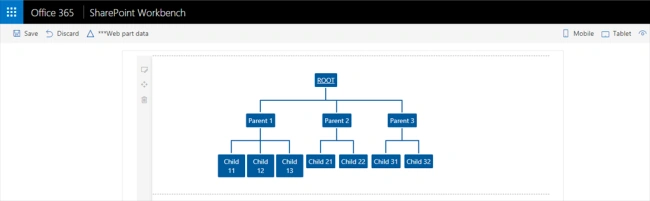
When the web part is running on local SharePoint workbench, the mock data service can provide the mock data to the web part.
Add MockDataService.ts file under “\src\services” folder
- import { ServiceScope, ServiceKey } from "@microsoft/sp-core-library";
- import { IDataService } from './IDataService';
- export class MockDataService implements IDataService {
- public static readonly serviceKey: ServiceKey<IDataService> = ServiceKey.create<IDataService>('orgChart:mock-service', MockDataService);
- constructor(serviceScope: ServiceScope) {
- }
- public getOrgChartInfo(): Promise<any> {
- const initechOrg: any =
- {
- id: 1,
- title: "ROOT",
- url: {Description: "Microsoft", Url: "http://www.microsoft.com"},
- children:[
- {
- id: 2,
- title: "Parent 1",
- url: null,
- parent_id: 1,
- children:[
- { id: 3, title: "Child 11", parent_id: 2, url: null },
- { id: 5, title: "Child 12", parent_id: 2, url: null },
- { id: 6, title: "Child 13", parent_id: 2, url: null }
- ]
- },
- {
- id: 7,
- title: "Parent 2",
- url: null,
- parent_id: 1,
- children:[
- { id: 8, title: "Child 21", parent_id: 7, url: null },
- { id: 9, title: "Child 22", parent_id: 7, url: null }
- ]
- },
- {
- id: 10,
- title: "Parent 3",
- url: null,
- parent_id: 1,
- children:[
- { id: 11, title: "Child 31", parent_id: 10, url: null },
- { id: 12, title: "Child 32", parent_id: 10, url: null }
- ]
- }
- ]
- };
- return new Promise<any>((resolve, reject) => {
- resolve(JSON.parse(JSON.stringify(initechOrg)));
- });
- }
- }
- Open web part class OrgChartViewer.tsx under “\src\webparts\orgChartViewer\components\”.
- Update the class to consume the implemented service.
- import * as React from 'react';
- import styles from './OrgChartViewer.module.scss';
- import { IOrgChartViewerProps } from './IOrgChartViewerProps';
- import { IOrgChartViewerState } from './IOrgChartViewerState';
- import { IOrgChartItem, ChartItem } from '../../../services/IOrgChartItem';
- import { IDataNode, OrgChartNode } from './OrgChartNode';
- import { SPHttpClient, SPHttpClientResponse } from '@microsoft/sp-http';
- import { escape } from '@microsoft/sp-lodash-subset';
- import { ServiceScope, Environment, EnvironmentType } from '@microsoft/sp-core-library';
- import { OrgChartService } from '../../../services/OrgChartService';
- import { MockDataService } from '../../../services/MockDataService';
- import { IDataService } from '../../../services/IDataService';
- import OrgChart from 'react-orgchart';
- export default class OrgChartViewer extends React.Component<IOrgChartViewerProps, IOrgChartViewerState> {
- private dataCenterServiceInstance: IDataService;
- constructor(props: IOrgChartViewerProps, state: IOrgChartViewerState) {
- super(props);
- this.state = {
- orgChartItems: []
- };
- let serviceScope: ServiceScope = this.props.serviceScope;
- switch (Environment.type) {
- case EnvironmentType.SharePoint:
- case EnvironmentType.ClassicSharePoint:
- // Based on the type of environment, return the correct instance of the IDataCenterService interface
- // Mapping to be used when webpart runs in SharePoint.
- this.dataCenterServiceInstance = serviceScope.consume(OrgChartService.serviceKey);
- this.dataCenterServiceInstance.getOrgChartInfo(this.props.listName).then((orgChartItems: any) => {
- this.setState({
- orgChartItems: orgChartItems
- });
- });
- break;
- // case EnvironmentType.Local:
- // case EnvironmentType.Test:
- default:
- // Webpart is running in the local workbench or from a unit test.
- this.dataCenterServiceInstance = serviceScope.consume(MockDataService.serviceKey);
- this.dataCenterServiceInstance.getOrgChartInfo().then((orgChartItems: any) => {
- this.setState({
- orgChartItems: orgChartItems
- });
- });
- }
- }
- public render(): React.ReactElement<IOrgChartViewerProps> {
- return (
- <div className={ styles.orgChartViewer }>
- <div className={ styles.container }>
- <div className={ styles.row }>
- <div className={ styles.column }>
- <OrgChart tree={this.state.orgChartItems} NodeComponent={this.MyNodeComponent} />
- </div>
- </div>
- </div>
- </div>
- );
- }
- private MyNodeComponent = ({ node }) => {
- if (node.url) {
- return (
- <div className="initechNode">
- <a href={ node.url.Url } className={styles.link} >{ node.title }</a>
- </div>
- );
- }
- else {
- return (
- <div className="initechNode">{ node.title }</div>
- );
- }
- }
- }
Test the WebPart
- On the command prompt, type “gulp serve”.
- Open SharePoint site.
- Navigate to /_layouts/15/workbench.aspx.
- Add the webpart to page.
- Edit the web part and add the list name (i.e. OrgChart) to web part property.

- The web part should display the data from a SharePoint list in an organization chart.
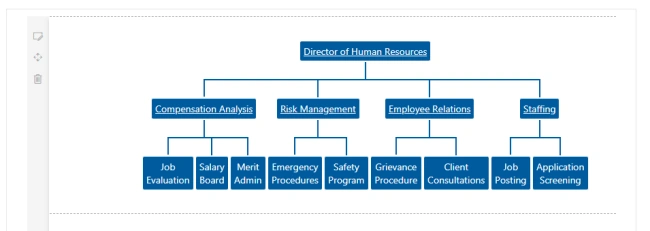
- Click on the nodes with URL to see test the page navigation.
- Open Local SharePoint workbench (https://localhost:4321/temp/workbench.html)
- Add the web part to the page.
Summary
With the implementation of Separation of concerns (SoC), all sections are separated. The code is easier to maintain and upgrade without touching other sections. ServiceScope helps to build SoC in SharePoint Framework solutions.
Vivek MetePosted Oct 29, 2018, 10:16 AM
Very nice and informative article.
Vivek MetePosted Oct 29, 2018, 10:16 AM
Very nice and informative article.