

Introduction
Depending on business requirements sometimes we tend to implement the best of all
technologies and end up aligning many heterogeneous technologies. If they need these systems to communicate among themselves then we need to contrive a
platform independent protocol so that it can be easily decoded into their
respective dialects. Web services equipped with SOAP protocol are one of those
solutions.
In these days SharePoint is used extensively by organizations as a collaborative platform. Sometimes other systems need to integrate with SharePoint for their array of actions and in terms of business continuity. SharePoint is equipped with many Web Services (you will find them under one roof
i.e. _vti_vin) which can be accessed and consumed by other applications for the sake of collaboration and communication.
Though there are many web services (packed with many web methods) exposed by a SharePoint server, none of them are covered extensively. Here is my effort to
cover some of the these Web methods available in a web service(List web service)
illustrating how these can be used in tandem to accomplish a technical
requirement.
Overview
Unless a SharePoint site is anonymously accessible we have to pass a valid user
credential that has access to the web service (otherwise we can access it with the Default credential). To store a user credential, a resource file (Resource1.resx)
is added to the project( because it is very easy to read an embedded resource
file, of course).
Besides that, a user input form is there (see figure-1) which accepts a Site URL
and a list name as user input. Then using the below web methods, it reads the list and
displays data in a GridView control.
[Definition and description of parameters of the web method GetListItems is
interpreted in the below table.]
|
GetListItems(string listName, string viewName, XmlNode query, XmlNode viewFields, string rowLimit, XmlNode queryOptions, string webSiteId ) |
|
|
String listName (Mandatory) |
Accepts GUID of List only. If you are aware about the GUID then fine. Otherwise you can get it by calling web method "GetListCollection()" of List web service. See code for illustration. |
|
String viewName (optional) |
Accepts GUID of View only. If passed empty or null, default view is queried. |
|
XmlNode query (optional) |
In case there is no condition, pass XmlNode object with "Query" as tagname. For detail refer code. |
|
XmlNode viewFields (optional) |
In case you want to see all columns then build an XmlNode object with "ViewFields" as tagname and pass it as parameter. We are using web method "GetListAndView" to get all user defined columns. |
|
String rowLimit(optional) |
To view all rows set "rowLimit" to string.Empty. Otherwise pass the number of rows you want see. In case no. of rows available in list is lesser than the rowLimit defined by you, all records are fetched. |
|
XmlNode queryOptions(optional) |
In case there is no condition simple pass XmlNode object with "QueryOptions" as tag name. For detail refer code where it is defined. |
|
String webSiteId(optional) |
If string.Empty is passed, then default site is queried. Otherwise site with given GUID is searched for. |
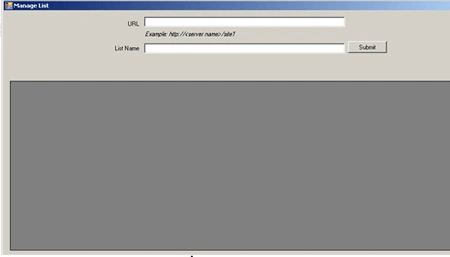
Figure 1
Description
As a prerequisite, you need to have VS2010 or VS Framework 3.5 or more to run
this project. The project is developed and tested with SharePoint 2007.
After giving the SharePoint site URL and a list name in user interface and when the user clicks the "submit" button (refer Figure-1), the SharePoint Server is queried by its web service
and results are returned back to the windows application. After that a dataset is
generated out of the XML returned by the web service and bound to a GridView
control. It is described comprehensively below.
- All actions occur in response to the button click. Associated event is "buttonSubmit_Click".
- First it accepts the User given SiteUrl and List name.
- Call the function "LoadAppResource()" to load the user credential from resource file. If the site is anonymously accessible then pass the default credential (System.Net.CredentialCache.DefaultCredentials).
- Call the web method "GetListCollection()" of List webservice to get the GUID of the list. The user only needs to provide the List Name, however, the GetListItems() web method needs a GUID as the parameter.
- Call the web method "GetListAndView()" to get a list of columns marked as viewable in the default view. This column list will be passed as a parameter to the web method GetListItems().
- Call the web method GetListItems() with all required parameters and generate a dataset with the XML returned by the web method.
- Bind that dataset to a GridView control to display the final results.
Mahesh ChandPosted Sep 30, 2011, 8:49 AM
Manoj, Welcome to C# Corner.
Dinesh BeniwalPosted Sep 30, 2011, 1:28 AM
Good work Manoj, Welcome to the Mindcracker Community.