

Introduction
Today we will learn how to show/hide columns in JQWidgets JQX Grid. I hope you like it.
Please see this article Show/Hide Columns in JQWidgets JQX Grid in my blog.
Background
If you are new to JQWidget JQX Grid, Please learn more here.
Using the code
Here I am using Visual Studio 2012. We will have a text file with the JSON data, you can use this file or you can explicitly load JSON data from the server side.
So let us start
First of all we must include the necessary files for the grid as in the following:
- <script src="jquery-1.9.1.js"></script>
- <script type="text/javascript" src="JQXItems/jqwidgets/jqxcore.js"></script>
- <script type="text/javascript" src="JQXItems/jqwidgets/jqxdata.js"></script>
- <script type="text/javascript" src="JQXItems/jqwidgets/jqxbuttons.js"></script>
- <script type="text/javascript" src="JQXItems/jqwidgets/jqxscrollbar.js"></script>
- <script type="text/javascript" src="JQXItems/jqwidgets/jqxlistbox.js"></script>
- <script type="text/javascript" src="JQXItems/jqwidgets/jqxdropdownlist.js"></script>
- <script type="text/javascript" src="JQXItems/jqwidgets/jqxmenu.js"></script>
- <script type="text/javascript" src="JQXItems/jqwidgets/jqxgrid.js"></script>
- <script type="text/javascript" src="JQXItems/jqwidgets/jqxgrid.filter.js"></script>
- <script type="text/javascript" src="JQXItems/jqwidgets/jqxgrid.sort.js"></script>
- <script type="text/javascript" src="JQXItems/jqwidgets/jqxgrid.selection.js"></script>
- <script type="text/javascript" src="JQXItems/jqwidgets/jqxgrid.pager.js"></script>
- <script type="text/javascript" src="JQXItems/jqwidgets/jqxgrid.columnsresize.js"></script>
- <script type="text/javascript" src="JQXItems/jqwidgets/jqxgrid.columnsreorder.js"></script>
- <script type="text/javascript" src="JQXItems/jqwidgets/jqxgrid.export.js"></script>
- <script type="text/javascript" src="JQXItems/jqwidgets/jqxdata.export.js"></script>
- <script type="text/javascript" src="JQXItems/jqwidgets/jqxdatatable.js"></script>
- <link href="JQXItems/jqwidgets/styles/jqx.base.css" rel="stylesheet" />
No we can start the grid implementation. For that create a ready function and add the code as follows.
- < script type = "text/javascript" > $(document).ready(function() {
- var source = {
- datatype: "json",
- datafields: [{
- "name": "AreaCode",
- "type": "string"
- }, {
- "name": "Revenue",
- "type": "number"
- }],
- url: "jsonData.txt"
- };
- var dataAdapter = new $.jqx.dataAdapter(source);
- $("#jqxgrid").jqxGrid({
- width: 600,
- source: dataAdapter,
- ready: function() {
- // callback function which is called by jqxGrid when the widget is initialized and the binding is completed.
- $('#readymessage').show();
- },
- columnsresize: true,
- columns: [{
- "text": "Area Code",
- "dataField": "AreaCode",
- "cellsalign": "left",
- "cellsformat": "d",
- hidden: true
- }, {
- "text": "Revenue",
- "dataField": "Revenue",
- "cellsalign": "right",
- "cellsformat": "c2"
- }],
- pageable: true,
- filterable: true,
- sortable: true
- });
- }); < /script>
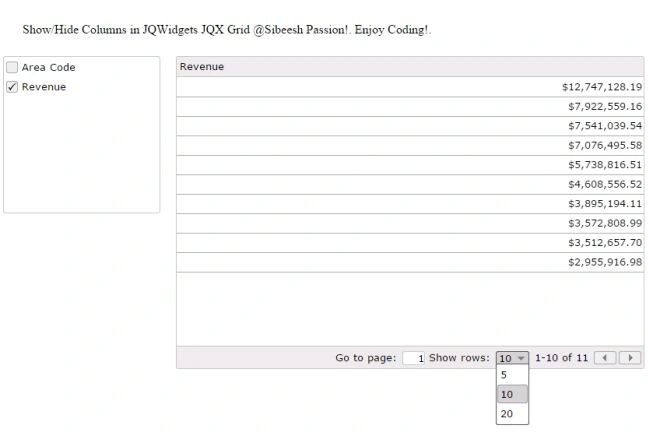
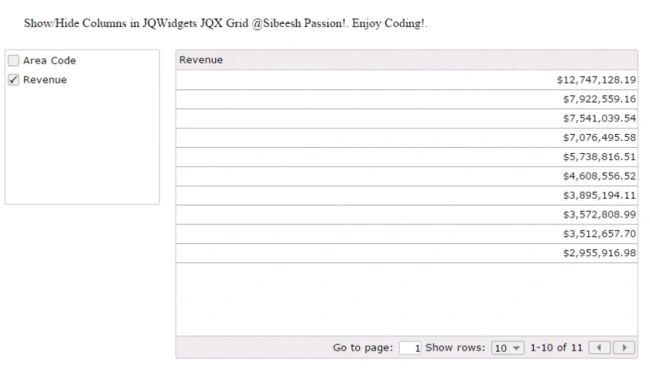
Now if you note, you can determine I have provided hidden:true for the grid column implementation. So we have made that column hidden.
- columns: [{ "text": "Area Code", "dataField": "AreaCode", "cellsalign": "left", "cellsformat": "d", hidden:true }, { "text": "Revenue", "dataField": "Revenue", "cellsalign": "right", "cellsformat": "c2" }],
Now what else do we need? Yes, we need to create a div where we can render our grid.
- <body class='default'>
- <div id='jqxWidget'>
- <div id="readymessage" style="display:none;padding:25px;">Show/Hide Columns in JQWidgets JQX Grid @Sibeesh Passion!. Enjoy Coding!.</div>
- <div style="float: left;" id="jqxlistbox"></div>
- <div style="margin-left: 20px; float: left;" id="jqxgrid"></div>
- </div>
- </body>
Here I am creating a new div that is not used for grid rendering.
- <div id="readymessage" style="display:none;padding:25px;">Show/Hide Columns in JQWidgets JQX Grid @Sibeesh Passion!. Enjoy Coding!.</div>
I will introduce a function called ready here. What this function does is, it will be fired once the grid is loaded fully. So we can use this function for the operations that must be executed after the grid rendering.
- ready: function () {
- // callback function which is called by jqxGrid when the widget is initialized and the binding is completed.
- $('#readymessage').show();
- },
The data
What about our data? We have not seen our data, right?
- [{"AreaCode":"B697-31","Revenue":12747128.190000001},{"AreaCode":"B697-92","Revenue":7922559.1600000048},{"AreaCode":"B697-76","Revenue":7541039.540000001},{"AreaCode":"B697-46","Revenue":7076495.5800000066},{"AreaCode":"B553-131","Revenue":5738816.5099999979},{"AreaCode":"B553-193","Revenue":4608556.52},{"AreaCode":"B697-74","Revenue":3895194.1099999994},{"AreaCode":"D158-233","Revenue":3572808.989999996},{"AreaCode":"B697-78","Revenue":3512657.6999999937},{"AreaCode":"B672-31","Revenue":2955916.9800000032},{"AreaCode":"B553-46","Revenue":2806813.7100000042}]
Sibeesh VenuPosted Jun 23, 2015, 9:58 PM
Santhakumar Munuswamy Thank you
Santhakumar MunuswamyPosted Jun 23, 2015, 3:02 PM
Thanks for nice article:)
Sibeesh VenuPosted Jun 23, 2015, 2:48 AM
Debasis Saha Thank you :)
Debasis SahaPosted Jun 23, 2015, 12:57 AM
Thanks for sharing..