

Introduction
In this article, I will explain how to connect to a SQL database with JavaScript and how to show data from a database as a TextBox value.
Note: This program will only work with Internet Explorer.
First I created a database EmpDetail. Then I created a table in this database.
Query Code
- CREATE TABLE [dbo].[emp](
- [id] [int] NULL,
- [name] [varchar](50) NULL,
- [salary] [int] NULL
- ) ON [PRIMARY]
Now insert some data in the emp table.
Complete Program
Show_Record_With_TextBox_Value.htm
- <!DOCTYPE html PUBLIC "-//W3C//DTD XHTML 1.0 Transitional//EN" "http://www.w3.org/TR/xhtml1/DTD/xhtml1-transitional.dtd">
- <html xmlns="http://www.w3.org/1999/xhtml">
- <head>
- <title></title>
- <script type="text/javascript" >
- function loadDB()
- {
- var txtid = document.getElementById('txtid').value;
- if (txtid.length != 0) {
- var connection = new ActiveXObject("ADODB.Connection");
- var connectionstring = "Data Source=.;Initial Catalog=EmpDetail;Persist Security Info=True;User ID=sa;Password=****;Provider=SQLOLEDB";
- connection.Open(connectionstring);
- var rs = new ActiveXObject("ADODB.Recordset");
- rs.Open("select * from emp where id=" + txtid, connection);
- rs.MoveFirst();
- var span = document.createElement("span");
- span.style.color = "Blue";
- span.innerText = " ID " + " Name " + " Salary";
- document.body.appendChild(span);
- while (!rs.eof)
- {
- var span = document.createElement("span");
- span.style.color = "green";
- span.innerText = "\n " + rs.fields(0) + " | " + rs.fields(1) + " | " + rs.fields(2);
- document.body.appendChild(span);
- rs.MoveNext();
- }
- rs.close();
- connection.close();
- }
- else
- {
- alert("Please Enter Employee Id In TextBox");
- }
- }
- </script>
- <style type="text/css">
- #main
- {
- height: 264px;
- }
- </style>
- </head>
- <body>
- <div id="show" style="font-size: x-large; font-weight: bold; height: 142px; color: #009999;">
- Employee Details<p style="font-size: medium; color: #000000;">
- Enter Employee Id
- <input id="txtid" type="text" /></p>
- <p>
- <input id="ShowRecord" type="button" value="Show" onclick="loadDB()" /> </p>
- </div>
- </body>
- </html>
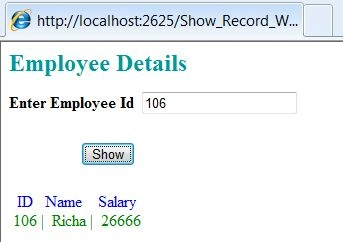
Output 1
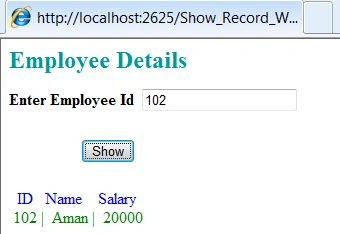
Output 2
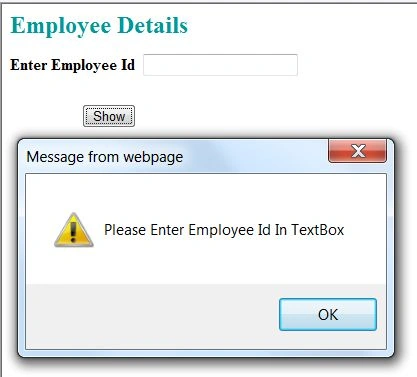
Output 3
If the TextBox value is null then:
For more information, download the attached sample application.
Join the conversation! Your thoughts help the community grow.