

The following is my Data Table structure from which I am fetching data: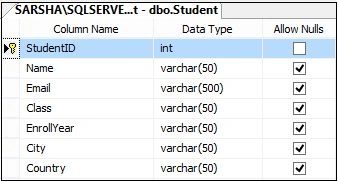
Image 1.
Data in my table: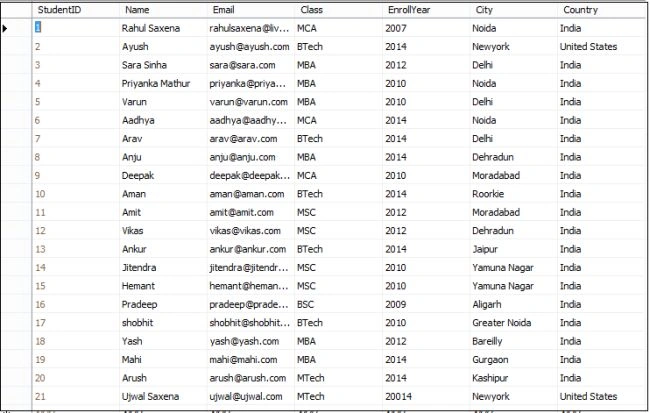
Image 2.
To do this I created the following Stored Procedure: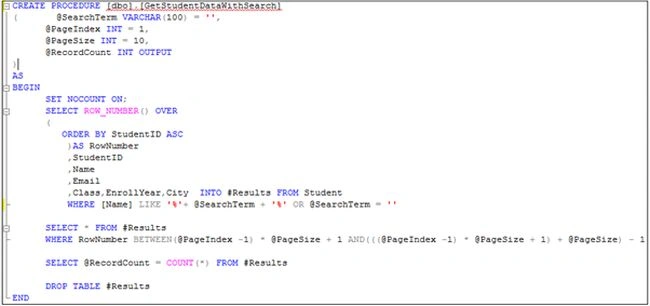
Image 3.
My Stored Procedure is:
- CREATEPROCEDURE [dbo].[GetStudentDataWithSearch]
- ( @SearchTerm VARCHAR(100)='',
- @PageIndex INT= 1,
- @PageSize INT= 10,
- @RecordCount INTOUTPUT
- )
- AS
- BEGIN
- SETNOCOUNTON;
- SELECTROW_NUMBER()OVER
- (
- ORDERBY StudentID ASC
- )AS RowNumber
- ,StudentID
- ,Name
- ,Class,EnrollYear,City INTO #Results FROM Student
- WHERE [Name] LIKE'%'+ @SearchTerm +'%'OR @SearchTerm =''
- SELECT*FROM #Results
- WHERE RowNumber BETWEEN(@PageIndex -1)* @PageSize + 1 AND(((@PageIndex -1)* @PageSize + 1)+ @PageSize)- 1
- SELECT @RecordCount =COUNT(*)FROM #Results
- DROPTABLE #Results
- END
- <%@PageLanguage="C#"AutoEventWireup="true"CodeBehind="ShowSearchPaging.aspx.cs"Inherits="ShowSearchAndPagingUsing_jQuery.ShowSearchPaging"%>
- <!DOCTYPEhtml>
- <htmlxmlns="http://www.w3.org/1999/xhtml">
- <headrunat="server">
- <title>jQuery: Show Data and Paging in ASP.NET Grid View using jQuery</title>
- <scripttype="text/javascript"src="http://ajax.googleapis.com/ajax/libs/jquery/1.8.3/jquery.min.js"></script>
- <scriptsrc="jquery.pagination.min.js"type="text/javascript"></script>
- <scripttype="text/javascript">
- $(function () {
- GetStudents(1);
- });
- $("[id*=txtSearch]").live("keyup", function () {
- GetStudents(parseInt(1));
- });
- $(".Pagination .page").live("click", function () {
- GetStudents(parseInt($(this).attr('page')));
- });
- function SearchTerm() {
- return jQuery.trim($("[id*=txtSearch]").val());
- };
- function GetStudents(pageIndex) {
- $.ajax({
- type: "POST",
- url: "ShowSearchPaging.aspx/GetStudents",
- data: '{searchTerm: "' + SearchTerm() + '", pageIndex: ' + pageIndex + '}',
- contentType: "application/json; charset=utf-8",
- dataType: "json",
- success: OnSuccess,
- failure: function (response) {
- alert(response.d);
- },
- error: function (response) {
- alert(response.d);
- }
- });
- }
- var row;
- function OnSuccess(response) {
- var xmlDoc = $.parseXML(response.d);
- var xml = $(xmlDoc);
- var customers = xml.find("Student");
- if (row == null) {
- row = $("[id*=GridViewStudent] tr:last-child").clone(true);
- }
- $("[id*=GridViewStudent] tr").not($("[id*=GridViewStudent] tr:first-child")).remove();
- if (customers.length > 0) {
- $.each(customers, function () {
- var customer = $(this);
- $("td", row).eq(0).html($(this).find("Name").text());
- $("td", row).eq(1).html($(this).find("Email").text());
- $("td", row).eq(2).html($(this).find("Class").text());
- $("td", row).eq(3).html($(this).find("EnrollYear").text());
- $("td", row).eq(4).html($(this).find("City").text());
- $("td", row).eq(5).html($(this).find("Country").text());
- $("[id*=GridViewStudent]").append(row);
- row = $("[id*=GridViewStudent] tr:last-child").clone(true);
- });
- var pager = xml.find("dtForPaging");
- $(".Pagination").jQ_Pager({
- ActiveCssClass: "current",
- PagerCssClass: "pager",
- PageIndex: parseInt(pager.find("PageIndex").text()),
- PageSize: parseInt(pager.find("PageSize").text()),
- RecordCount: parseInt(pager.find("RecordCount").text())
- });
- $(".Name").each(function () {
- var searchPattern = new RegExp('(' + SearchTerm() + ')', 'ig');
- $(this).html($(this).text().replace(searchPattern, "<span style='background-color:red;color:white;'>" + SearchTerm() + "</span>"));
- });
- } else {
- var empty_row = row.clone(true);
- $("td:first-child", empty_row).attr("colspan", $("td", row).length);
- $("td:first-child", empty_row).attr("align", "center");
- $("td:first-child", empty_row).html("No records found for the search criteria.");
- $("td", empty_row).not($("td:first-child", empty_row)).remove();
- $("[id*=GridViewStudent]").append(empty_row);
- }
- };
- </script>
- </head>
- <body>
- <formid="form1"runat="server">
- <div>
- <tablestyle="border: solid15pxblue; width: 100%; vertical-align: central;">
- <tr>
- <tdstyle="padding-left: 20px; padding-top: 20px; padding-bottom: 20px; background-color: skyblue; text-align: center; font-family: Verdana; font-size: 20pt; color: red;">jQuery: Show Data and Paging in ASP.NET Grid View using jQuery</td>
- </tr>
- <tr>
- <tdstyle="padding-left: 100px; padding-top: 20px; padding-bottom: 20px; background-color: #EE9A4D; font-family: Arial; font-size: 15pt; color: #E41B17">Enter Name To Search #:
- <asp:TextBoxID="txtSearch"runat="server"/>
- </td>
- </tr>
- <tr>
- <td>
- <tablestyle="width: 80%; text-align: center; vertical-align: central;">
- <tr>
- <tdstyle="text-align: left;">
- <asp:GridViewID="GridViewStudent"runat="server"AutoGenerateColumns="False"Width="100%"
- BackColor="White"BorderColor="#3366CC"BorderStyle="None"BorderWidth="1px"CellPadding="4"GridLines="Both">
- <Columns>
- <asp:BoundFieldDataField="Name"HeaderText="Student Name"HeaderStyle-HorizontalAlign="Left"ItemStyle-CssClass="Name"></asp:BoundField>
- <asp:BoundFieldDataField="Email"HeaderText="Email"HeaderStyle-HorizontalAlign="Left"/>
- <asp:BoundFieldDataField="Class"HeaderText="Class"HeaderStyle-HorizontalAlign="Left"/>
- <asp:BoundFieldDataField="EnrollYear"HeaderText="Enroll Year"HeaderStyle-HorizontalAlign="Left"/>
- <asp:BoundFieldDataField="City"HeaderText="City"HeaderStyle-HorizontalAlign="Left"/>
- <asp:BoundFieldDataField="Country"HeaderText="Country"HeaderStyle-HorizontalAlign="Left"/>
- </Columns>
- <FooterStyleBackColor="#99CCCC"ForeColor="#003399"/>
- <HeaderStyleBackColor="#003399"Font-Bold="True"ForeColor="#CCCCFF"/>
- <PagerStyleBackColor="#99CCCC"ForeColor="#003399"HorizontalAlign="Left"/>
- <RowStyleBackColor="White"ForeColor="#003399"/>
- <SelectedRowStyleBackColor="#009999"Font-Bold="True"ForeColor="#CCFF99"/>
- <SortedAscendingCellStyleBackColor="#EDF6F6"/>
- <SortedAscendingHeaderStyleBackColor="#0D4AC4"/>
- <SortedDescendingCellStyleBackColor="#D6DFDF"/>
- <SortedDescendingHeaderStyleBackColor="#002876"/>
- </asp:GridView>
- </td>
- </tr>
- <tr>
- <td>
- <divclass="Pagination"style="background-color: orange; font-family: Verdana; font-size: 10pt; height: 30px; text-align: center; vertical-align: central; padding-top: 20px; padding-bottom: 10px;">
- </div>
- </td>
- </tr>
- </table>
- </td>
- </tr>
- </table>
- </div>
- </form>
- </body>
- </html>
- using System;
- using System.Collections.Generic;
- using System.Configuration;
- using System.Data;
- using System.Data.SqlClient;
- using System.Linq;
- using System.Web;
- using System.Web.Services;
- using System.Web.UI;
- using System.Web.UI.WebControls;
- namespace ShowSearchAndPagingUsing_jQuery
- {
- publicpartialclassShowSearchPaging : System.Web.UI.Page
- {
- privatestaticint PageSize = 5;
- protectedvoid Page_Load(object sender, EventArgs e)
- {
- if (!IsPostBack)
- {
- BindGridViewHeader();
- }
- }
- privatevoid BindGridViewHeader()
- {
- DataTable dtHeader = newDataTable();
- dtHeader.Columns.Add("Name");
- dtHeader.Columns.Add("Email");
- dtHeader.Columns.Add("Class");
- dtHeader.Columns.Add("EnrollYear");
- dtHeader.Columns.Add("City");
- dtHeader.Columns.Add("Country");
- dtHeader.Rows.Add();
- GridViewStudent.DataSource = dtHeader;
- GridViewStudent.DataBind();
- }
- [WebMethod]
- publicstaticstring GetStudents(string searchTerm, int pageIndex)
- {
- string query = "[GetStudentDataWithSearch]";
- SqlCommand cmd = newSqlCommand(query);
- cmd.CommandType = CommandType.StoredProcedure;
- cmd.Parameters.AddWithValue("@SearchTerm", searchTerm);
- cmd.Parameters.AddWithValue("@PageIndex", pageIndex);
- cmd.Parameters.AddWithValue("@PageSize", PageSize);
- cmd.Parameters.Add("@RecordCount", SqlDbType.Int, 4).Direction = ParameterDirection.Output;
- return GetData(cmd, pageIndex).GetXml();
- }
- privatestaticDataSet GetData(SqlCommand cmd, int pageIndex)
- {
- SqlDataAdapter da;
- DataSet ds = newDataSet();
- SqlConnection con = newSqlConnection();
- ds = newDataSet();
- con.ConnectionString = @"Data Source=MYPC\SqlServer2k8; Initial Catalog=SchoolManagement; Integrated Security=true;";
- cmd.Connection = con;
- da = newSqlDataAdapter(cmd);
- da.Fill(ds, "Student");
- con.Open();
- cmd.ExecuteNonQuery();
- con.Close();
- DataTable dt = newDataTable("dtForPaging");
- dt.Columns.Add("PageIndex");
- dt.Columns.Add("PageSize");
- dt.Columns.Add("RecordCount");
- dt.Rows.Add();
- dt.Rows[0]["PageIndex"] = pageIndex;
- dt.Rows[0]["PageSize"] = PageSize;
- dt.Rows[0]["RecordCount"] = cmd.Parameters["@RecordCount"].Value;
- ds.Tables.Add(dt);
- return ds;
- }
- }
- }

Image 4.

Image 5.

Image 6.

Image 7.
Aroggo niketonPosted Apr 1, 2019, 12:53 AM
How can I add here delete option in every row?
Mohd ArifPosted May 23, 2017, 12:44 AM
How to download this file <script src="jquery.pagination.min.js" type="text/javascript"></script>
Tarun sharmaPosted Jan 19, 2017, 2:44 AM
This code pasted here from aspsnnipet :)
kalu singh raoPosted Jul 8, 2016, 3:00 AM
NIce...
Ajeet MishraPosted Oct 30, 2015, 9:15 AM
the code is not working properly in vs2015 can you please provide the proper code
Rahul Kumar SaxenaPosted Feb 26, 2015, 5:18 AM
Thanks...
Rahul Kumar SaxenaPosted Feb 24, 2015, 8:07 AM
Thanks Manish Kumar Choudhary...
Manish Kumar ChoudharyPosted Feb 6, 2015, 1:07 PM
Nice explanation. Thanks for sharing. .