
Ok, first off this is not actually VB.NET. My computer died in 2011 and I was forced to use my ancient 900Mhz P3 computer and wrote things in Java and VB6 for a while, since Visual Studio 2008 said it wouldn't run on it. This program is one of them. It's a simulated 3D maze game with an editor to make new levels. I tortured myself for days plotting on graph paper the points for the walls. I had to use rectangles and triangles to make the walls look angled. Filling the rectangles was easy using bf (box fill) instead of just f (fill). Filing the triangles was trickier, having to draw a series of lines to fill them. The result came out well though.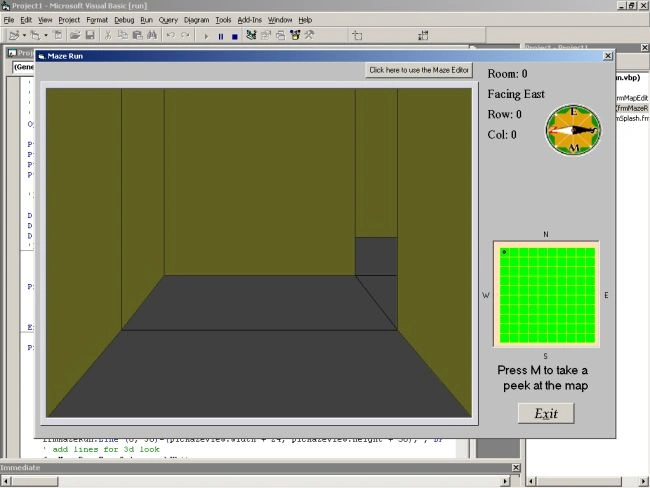
Above is a screenshot of the beginning using a pre-made maze level. The com changes direction and there is an unfilled map with a dot to show your location. If you press M you get a 3 second view of the entire maze map as shown below.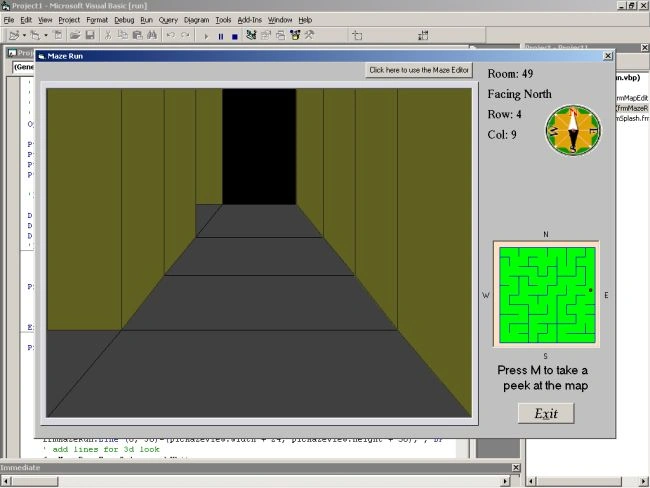
I included a level editor so people can make their own levels. It is a simple point and click interface using some very skinny command buttons. When you click they change from white to black, or back again, to indicate the walls you want. The screenshot below shows the editor with a few walls clicked.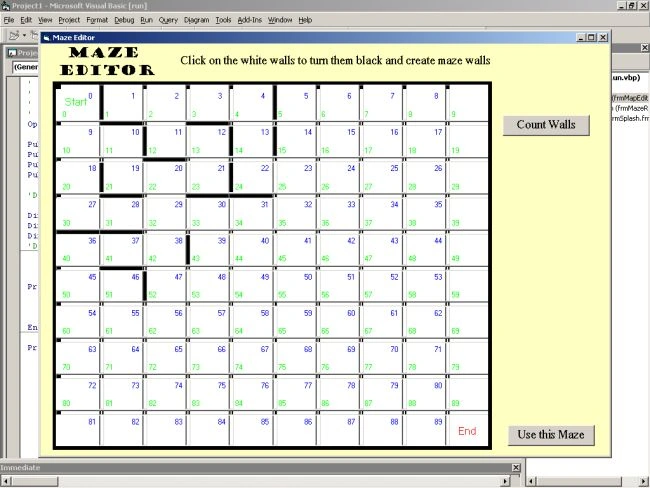
The zip file has the executable and the complete source code for the program. Please feel free to adapt the code to VB.NET, if you dare. The simulated 3D is pretty tough. I had the concept of numbering the "rooms" you can see from your vantage point as 1, 2, 3 & 4 with 1 being the closest. The room walls are encoded as binary to take less space and also make navigating easier. I just use an AND operation to determine if you can go in the direction you want to.
Have fun with this and I hope it's inspirational. If you comment that you want them, I will go back and add more comments to the code files to make them more understandable.
I hope this holds you over until I finish and upload a GENUINE 3D maze game using XAML/C# that is almost done.
Garry

Simulated 3D Maze Game in VB
Join the conversation! Your thoughts help the community grow.
Sign in to leave a comment
It is the same account you read, post and publish with — and you will come straight back to this page.
Calgreghard CalgreghardPosted Jun 3, 2017, 3:12 PM
Terrific work I really like the game, I came here looking for a way to make a maze myself. I made a maze game before just using an int variable and as my skills are improving I wanted to improve the game so I moved to classes which would allow me to add a level editor. I was wondering if you didn't mind me using your code for some inspiration?
anton madtoPosted Dec 24, 2014, 9:09 AM
Dear Garry Adams, I would like to use this mazerun for my research purpose. and I will modify it little to fit my purpose. Would you mind if I do this? However, I cannot edit in Visual Studio 10. I am sorry I am new in VB coding. What version of VB could open this file .vbp? Thanks
Garry AdamsPosted May 29, 2014, 5:54 PM
I have one in the works... again. I have been killing computers - 2 in the last 3 weeks now. The first one had only onboard video with 8Mb of video memory and I was making it do 40 fps with 10 moving sprites. The video burned up. Then I built another computer from some used parts and pushing it too hard killed the power supply and toasted the DIMMs. I just built another one last week and it should be pretty durable. It's good to be able to know how to build your own computer and even better to have a friend with a computer business who can give you parts. :-) I lost the code to the 3D maze game I was making in XAML/WPF/C# but I started it over again and it is more efficient, using less lines of code to do the same thing. It should be done this weekend and I will post it next week sometime.
Mahesh ChandPosted May 23, 2014, 11:45 AM
Nice effort bringing the old cat back to life. Yes from the Form (screen), I can say it is VB. I worked in VB 3 and then migrated to C /VC , then MFC, ATL, COM and eventually moved to C#. Definitely would love to see a XAML/WPF version of this game.