

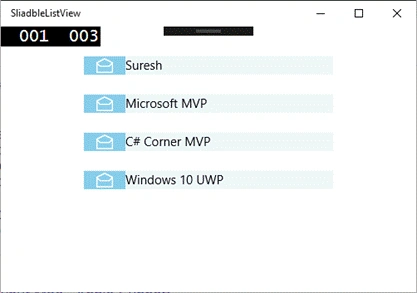
Windows 10 UWP Community toolkit is a collection of a helper class, custom controls and Application services. The SlideableListItem Control enables the actions to be triggered by sliding the content left or right.
Create a new Windows 10 UWP project or open your existing project. Right click on your project and select Manage NuGet Packages. Search for Microsoft.Toolkit.UWP.UI.Controls and install it, as shown below-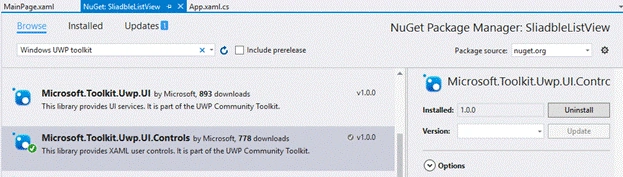
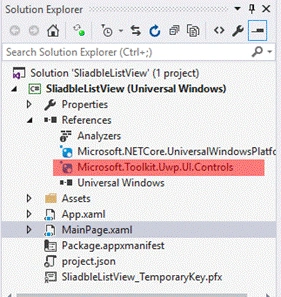
This will add Microsoft.Toolkit.Uwp.UI.Controls.dll in 'References' of your project, as shown below-
Add the toolkit reference in your XAML pages, using the code, given below-
XAML
xmlns:UWPToolkit="using:Microsoft.Toolkit.Uwp.UI.Controls"
Now, open your XAML page and write the code, given below-
- Page.Resources>
- <DataTemplate x:Key="EmailsItemTemplate" >
- <UWPToolkit:SlidableListItem LeftIcon="Add"
- RightIcon="Delete"
- HorizontalAlignment="Stretch"
- RightCommandRequested="SlidableListItem_RightCommandActivated"
- MinWidth="300"
- MaxWidth="800"
- >
- <Grid Background="AliceBlue">
- <Grid.ColumnDefinitions>
- <ColumnDefinition Width="50"/>
- <ColumnDefinition Width="*" />
- </Grid.ColumnDefinitions>
- <Grid Grid.Column="0" Background="SkyBlue" x:Name="Checkmark" >
- <SymbolIcon Symbol="Read" Foreground="White" />
- </Grid>
- <TextBlock Grid.Column="1" Text="{Binding Title}" ></TextBlock>
- </Grid>
- </UWPToolkit:SlidableListItem>
- </DataTemplate>
- </Page.Resources>
- <Grid x:Name="Root" Padding="24">
- <ListView x:Name="listView" SelectionMode="None" IsItemClickEnabled="False" HorizontalAlignment="Center" ItemsSource="{x:Bind _items, Mode=OneWay}" ItemTemplate="{StaticResource EmailsItemTemplate}">
- <ListView.ItemContainerStyle>
- <Style TargetType="ListViewItem">
- <Setter Property="HorizontalContentAlignment" Value="Stretch"/>
- <Setter Property="Margin" Value="0,1"/>
- </Style>
- </ListView.ItemContainerStyle>
- </ListView>
- </Grid>
Thimotey TsanPosted Sep 12, 2016, 11:27 AM
Hi, nice post. I would like to know if we can lock one of the two slide?
Prasanna MuraliPosted Sep 5, 2016, 11:08 AM
Nice post......